
SEO: A web phenomenon whose only constant is change.
Those three letters refer to the practice of tweaking your site so as to make it more visible and have it rank well for certain keywords. They also refer to a steady cause of anxiety and hair-tearing-out: just as you’ve figured it out, or thought you have, it changes, leaving everything you once knew turned on its head. Then, like a wisp of smoke, your SEO mastery dissipates and you’re left looking at your computer screen and shaking both fists at the internet deities.
Do you know what you’re doing? I mean, do you … really?
True SEO has a million components, from the giant (“let’s buy an established domain and use its credibility to boost our relevance”, which Google now treats as expired domain abuse when the domain is repurposed to rank low-value content) to the tiny (“write better alt text for your images”). You could write a book on it. But that’s not what this post is. This is a quick and dirty guide to getting your SEO ducks in a row. This isn’t meant to be a comprehensive guide (if that’s what you’re looking for, two great ones are this one from Moz and this one from Google itself). Rather, this is meant as a Sparknotes version of the “Complete SEO Guide.” Yes, SEO is complicated, but it’s not so difficult that you need to read a textbook to get its gist. This guide cuts out the fluff, and every tip below was checked against Google Search Central documentation on October 19, 2026.
Here’s what you need to know.
What changed since this guide was first written
- Google+ is gone. Google shut down consumer Google+ in April 2019 (Google), so the old “Google+ likes” tip no longer applies.
- Spam policies got stricter. In March 2024 Google added scaled content abuse (mass-producing pages, with AI or by hand, to rank), expired domain abuse and site reputation abuse to its spam policies (announcement).
- Speed is measured differently. Interaction to Next Paint (INP) replaced First Input Delay as a Core Web Vital on March 12, 2024 (Google Search Central).
- Google indexes the mobile version. With mobile-first indexing, Google uses the mobile version of your content for indexing and ranking (Google).
- AI answers use the same basics. Google says there are no additional requirements to appear in AI Overviews or AI Mode, and that SEO best practices remain relevant (Google).
Knowing the game

When you’re trying to understand something, the best way to start is to learn about its evolution. SEO is no different: to truly understand it, you’ve got to know how search developed. Luckily search engines aren’t that old, so you don’t have to go back too far to get a feel for the field.
The beginning was the early ’90s. There were many search engines, all trying to organize the internet’s information and help the neon-windbreaker-wearing population find what they were looking for. And not unlike neon windbreakers, it was a mess. The mid- to late ’90s saw some strong search engines emerge, among them Yahoo!, Ask Jeeves and Google (officially born in 1998). Since then, the number of search engines we use has dwindled, and today we’re pretty much all about a couple, with Google leading the pack.
It’s simple enough: as the internet blew up, search engines sought to make sense of it. They did this with simple algorithms that counted keywords and links. It follows then that SEO, in its infancy, was not much more than keyword stuffing: the practice of cramming a keyword into a page as much as possible so as to appear relevant and come up high in search results. Today that is a violation of Google’s spam policies.
As the years went by and the web got more sophisticated, so did the algorithms. Each search engine evolved differently, but the gist is about the same: they work today as a result of changes that began with ensuring relevant and satisfactory searches for users, and more recently has turned into more policing those who try to fool the system (Google publishes the rules in its Search Essentials).
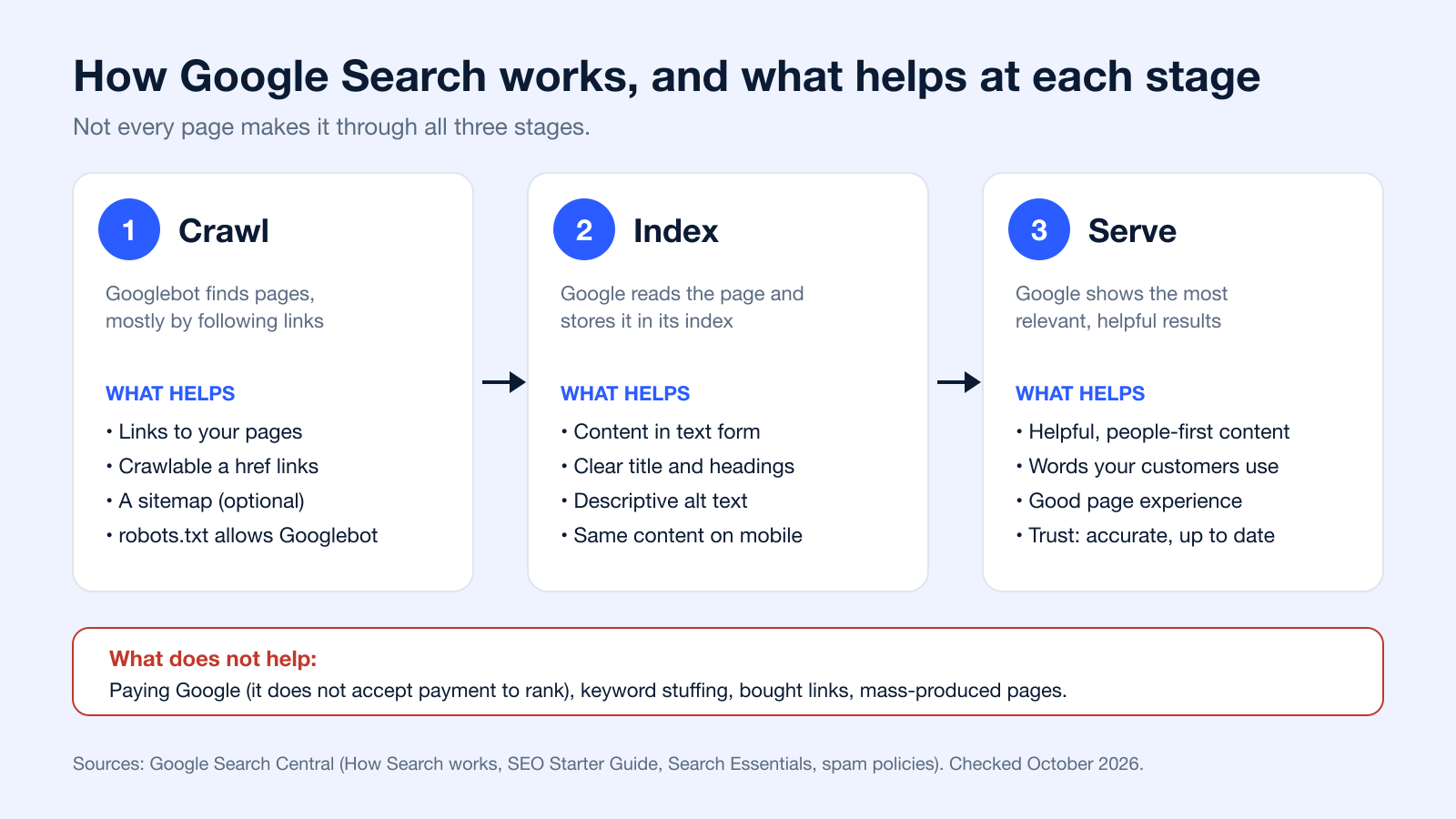
Google handles an enormous number of questions every day, and its systems are designed, first and foremost, to find what people are looking for. Google Search works in three stages: crawling (automated programs called crawlers find pages), indexing (Google analyzes each page and stores it in its index) and serving results (How Google Search works). Not every page makes it through all three. And no, you can’t pay your way in: Google says it “doesn’t accept payment to crawl a site more frequently, or rank it higher.” If you want to truly shine at SEO, keep this one rule in mind: help people find what they are looking for.
Making your website look good (to everyone)
The internet is, above all, a way for people to connect.
It may be “curated” by web crawlers, but they only serve the purpose of making sense of data for us humans. When you type a question into the search bar, you’re expecting content to appear in a fraction of a second, solving all your woes. You as a content creator write for your audience, but how do you make sure that your words get in front of them? How do you design for people in a way that will also make the bots happy?
Google’s answer is the same as this post’s: create helpful, reliable, people-first content, not content made mainly to manipulate rankings. The sections below cover how to do that and how to make it easy for the bots to read.
Solid content and good headlines.
This is an obvious one, but one that should be mentioned regardless. If you’re trying to optimize your website, you must put out solid content. Doing so will make your job a hundred times easier, because the people you reach and interest will help you do your job.
This is most helpful on the social side. Social media is one of the ways Google suggests promoting your website, along with community engagement, advertising and word of mouth: it gets your pages in front of people, and some of them will link to you or search for you later. Any solid SEO strategy should have a prong for social media, too, and any respectable digital marketing plan must have a strong focus on compelling content and social media.
Social traffic helps indirectly. Google’s documentation describes social media as a way to promote your site, not as a ranking signal on its own; what crawlers rely on are links, since “the vast majority of the new pages Google finds every day are through links” (SEO Starter Guide).
So think of social sharing as a way to earn backlinks rather than as backlinks themselves: the more people see your content, the more chances someone writes about it and links to your site.
Take advantage of this by adding social sharing buttons to your site if you don’t have any. This makes sharing a one-click job. If you use WordPress, pick a sharing plugin that is actively maintained.
Before moving on from social, here’s a quick history note: earlier versions of this post said Google+ likes gave a small ranking boost. Google shut down consumer Google+ in April 2019 (Google), and its SEO Starter Guide treats social media as promotion, not as a ranking shortcut.
What Google means by helpful content
Google’s helpful content guidance gives a self-check. Your content is probably made for search engines first if the answer is yes to questions like these:
- Is it made primarily to attract visits from search engines?
- Are you using extensive automation to produce content on many topics?
- Are you mainly summarizing what others say without adding much value?
- Are you writing about things simply because they seem to be trending, not because your existing audience would want them?
- Are you writing to a particular word count because you heard Google prefers one?
On that last one, Google answers it directly: “No, we don’t” have a preferred word count. And of experience, expertise, authoritativeness and trust, Google says “trust is most important.” For headlines, the same rule applies: Google asks for page titles that are descriptive, concise and unique to each page, without repeated keywords.
Keywords, keywords, keywords.
Keywords!
I’m sure you know what these are and how they work, so I won’t go into too much detail. They are, however, so important that I feel I must emphasize their relevance (briefly).
Your keyword strategy is your playbook: it’ll make or break you. You’ve got to know what your target audience is looking for. Use keyword tools, like Google’s Keyword Planner (part of Google Ads; it needs a Google Ads account), to pick your target keywords. It is very basic SEO, but don’t overlook it. Keywords are not the super hacks they once were, but without them you might as well not be doing SEO at all.
Google’s own advice: think about the different words people might use to find your content (experts and beginners search differently), then use them naturally in prominent places such as the page title, main heading, image alt text and link text (Search Essentials). Repeating the same words over and over is keyword stuffing, which is against Google’s spam policies.
Backlinks.
Backlinks are other websites linking to your content. They boost you up and give your site credibility. Backlink creation and management (or link building) is another elementary SEO tip, because algorithms give authority to sites that other sites link to. And of course, the higher authority of the linking sites, the better for your site’s SEO.
Because it’s so basic, link stuffing is one of the most common black hat SEO practices. Google’s spam policies name buying or selling links for ranking purposes, excessive link exchanges (“link to me and I’ll link to you”) and automated link-building programs as link spam. However, Google says it “uses links as a signal when determining the relevancy of pages and to find new pages to crawl” (Google), so they are quite beneficial when earned the right way.
The easiest and safest way to earn organic backlinks is by being social and useful. Yes, again, back to social media. But aside from the above-mentioned ways to get organic links and clicks to your content, don’t forget about forums and blogs. Your customers are out there, talking about problems you can solve. Communicating with them is good for both your business and your online presence. Just don’t treat it as a link shortcut: Google recommends that sites add a nofollow or similar annotation to links their users post (SEO Starter Guide).
Cater to the crawlers
You can’t win a game without knowing how your opponents work and how to use this against them. The SEO game is similar: crawlers are what you’re up against, and what you must understand to come out on top.
For a website, this is simple. It comprises good, clean, on-site SEO. Having an optimized site will strengthen your site in and of itself, making it look legitimate to web crawlers. Akin to something like “internet etiquette,” on-site SEO is what makes a truly great user experience and is rewarded by web crawlers.
Keyword-rich URLs.
Let crawlers easily find your site and deliver it quickly to searchers by integrating what they speak (URL address) and what you speak (English). As a part of your marketing strategy, you should have a few keywords you’re always targeting: putting them in your page titles is a good way to make your keyword-relevant content easily findable. In URLs, keep it simple and readable: Google recommends readable words rather than long ID numbers, and hyphens instead of underscores (Google URL structure). Just don’t expect the URL to do the ranking: Google says keywords in the domain name or URL path “have hardly any effect beyond appearing in breadcrumbs” (SEO Starter Guide).
Easy navigation.
Be straight and to the point in site design, so users can spend less time clicking around and more time taking in your content. A common usability rule of thumb is three clicks: it shouldn’t take more than three clicks to get anywhere on a site (it’s a guideline for people, not a Google requirement). No matter how big your site is, the quicker it is to navigate, the more likely users are to come back to it. The same works inversely: if your website is like a maze, people will leave. Quick navigation is also good for SEO: plain, crawlable links between related pages help crawlers (and people!) get through your content, and Google uses those links to find new pages (Google link best practices).
Play by code’s rules.
Remember: even though Google wants to create a strong experience for people, their crawlers and algorithms are not people. To this end, you as a web marketer must play by the crawlers’ rules. When approaching SEO from the back end, the important thing to keep in mind is that everything should be fast and efficient. Do things like use Google Tag Manager to manage your marketing and analytics tags in one place instead of pasting snippets into every page, and remove tags you no longer use. Similarly, using a clear title tag and headings on your pages organizes the content for the crawlers and for readers (Google notes that the number and order of headings does not matter for ranking).
Page experience and Core Web Vitals
“Fast and efficient” now has numbers. Google measures real-user experience with three Core Web Vitals (Google Search Central, checked October 19, 2026):
| Metric | What it measures | Good | Source |
|---|---|---|---|
| Largest Contentful Paint (LCP) | Loading: when the main content appears | Within 2.5 seconds | |
| Interaction to Next Paint (INP) | Responsiveness to taps, clicks and typing; replaced First Input Delay on March 12, 2024 | Under 200 milliseconds | Google, INP update |
| Cumulative Layout Shift (CLS) | Visual stability: how much the page jumps while loading | Under 0.1 |
Keep this in proportion. Google says there is no single page experience signal, and that Search “always seeks to show the most relevant content, even if the page experience is sub-par” (page experience). Its page experience checklist also covers HTTPS, mobile-friendliness, and avoiding intrusive ads and pop-ups. Since Google indexes the mobile version of your pages, make sure your mobile site has the same content as your desktop site (mobile-first indexing).
One more back-end tool worth knowing: structured data (Google recommends the JSON-LD format) describes your page in a standard way and can make it eligible for rich results, such as review stars or FAQs, though eligibility is not a guarantee.
Make SEO work for you
SEO is a long game, and quick fixes are often tricks that Google is quick to find out and punish (its spam policies list what gets sites demoted or removed). These are ways to have your site run clean, quick and smart so you can run your site like an SEO boss.
SEO is always changing because search engines are constantly evolving, and winning at SEO is a marathon, not a race. However, keep these tips in mind and you’ll know how to manage SEO and plan an effective strategy. Know the field, the rules and what you’re up against, and there’s nothing you can’t handle, you SEO whiz!
Did these make any sense to you? Have you tried any of these, did they work? Did we miss anything? Were the nineties references too much? To see whether your changes work, use Google Search Console: it shows how your pages perform on Google Search. Give it time: Google says some changes take effect in a few hours, others take several months (SEO Starter Guide). To judge what search brings in next to your other channels, see measuring marketing campaign effectiveness.
What have you found is the most critical factor in SEO? Keep it in mind as you plan your next page.
SEO myths Google says to ignore
Half of beginner SEO is knowing what not to worry about. Google’s own documentation addresses these directly (checked October 19, 2026):
| Myth | What Google says | Source |
|---|---|---|
| The meta keywords tag helps you rank | “Google Search doesn’t use the keywords meta tag.” | SEO Starter Guide |
| Keywords in your domain or URL boost rankings | They have “hardly any effect beyond appearing in breadcrumbs.” | SEO Starter Guide |
| Google prefers a minimum word count | Google says it does not have a preferred word count. | Helpful content |
| Headings must be in perfect H1, H2, H3 order | The number and order of headings is not something to focus on for ranking. | SEO Starter Guide |
| Duplicate content gets a penalty | Listed by Google among the things you shouldn’t focus on (the “penalty” is a myth); pick one preferred URL when you can. | SEO Starter Guide |
| E-E-A-T is a ranking factor you can add | Listed as a misconception: it describes what Google’s systems look for, with trust the most important. | SEO Starter Guide, Helpful content |
| You can pay Google to rank higher | “Google doesn’t accept payment to crawl a site more frequently, or rank it higher.” | How Search works |
| Someone can guarantee you the #1 spot | “No one can guarantee a #1 ranking on Google.” | Do you need an SEO? |
| You need special tricks for AI Overviews | “There are no additional requirements to appear in AI Overviews or AI Mode.” | AI features |
SEO for local businesses
If your customers are nearby, local results matter as much as your website. Google says local results are mainly based on relevance (how well your Business Profile matches the search), distance, and prominence (how well-known the business is, including links to it and its reviews), and that “there’s no way to request or pay for a better local ranking on Google” (Google Business Profile Help). Keep your Business Profile complete and accurate, and ask happy customers for reviews.
For a small local business, Google also says “you can probably do much of the work yourself,” starting with its SEO Starter Guide (Google).
SEO brings new people to you; it does less for keeping in touch with the ones who already bought. That’s where many local businesses pair search with channels customers opt into, like text messaging. See SMS marketing best practices, SMS marketing for small business and these multi-channel campaign examples, or how SMS marketing works on Broadcast.
SEO for beginners: FAQ
How do I learn SEO as a beginner?
Start with Google’s free SEO Starter Guide and its Search Essentials, then set up Search Console for your own site and watch which searches bring people in. Practice on real pages: improve a title, add a missing answer, fix a slow page, and check the results over the following weeks.
Is SEO dead now with AI?
Not according to Google. Its guidance for AI Overviews and AI Mode says “the best practices for SEO remain relevant for AI features in Google Search” and that there are no additional requirements or special optimizations needed to appear in them (Google). Traffic from AI features is included in Search Console’s Performance report. Mass-producing AI pages to rank, on the other hand, is scaled content abuse under Google’s spam policies.
What is the 80/20 rule in SEO?
It’s the Pareto principle applied to SEO: the idea that a small share of your pages, keywords or fixes drives most of your results. It’s a rule of thumb, not a Google guideline. In practice, it means finding the pages that already get impressions in Search Console and improving those first.
How long does SEO take to work?
Google says some changes take effect in a few hours and others could take several months (SEO Starter Guide). Be wary of anyone who promises fast, guaranteed rankings: “No one can guarantee a #1 ranking on Google” (Google).
Can you pay Google to rank higher?
No. Google says it “doesn’t accept payment to crawl a site more frequently, or rank it higher” (How Google Search works). Ads are a separate, paid product; organic rankings can’t be bought.


