
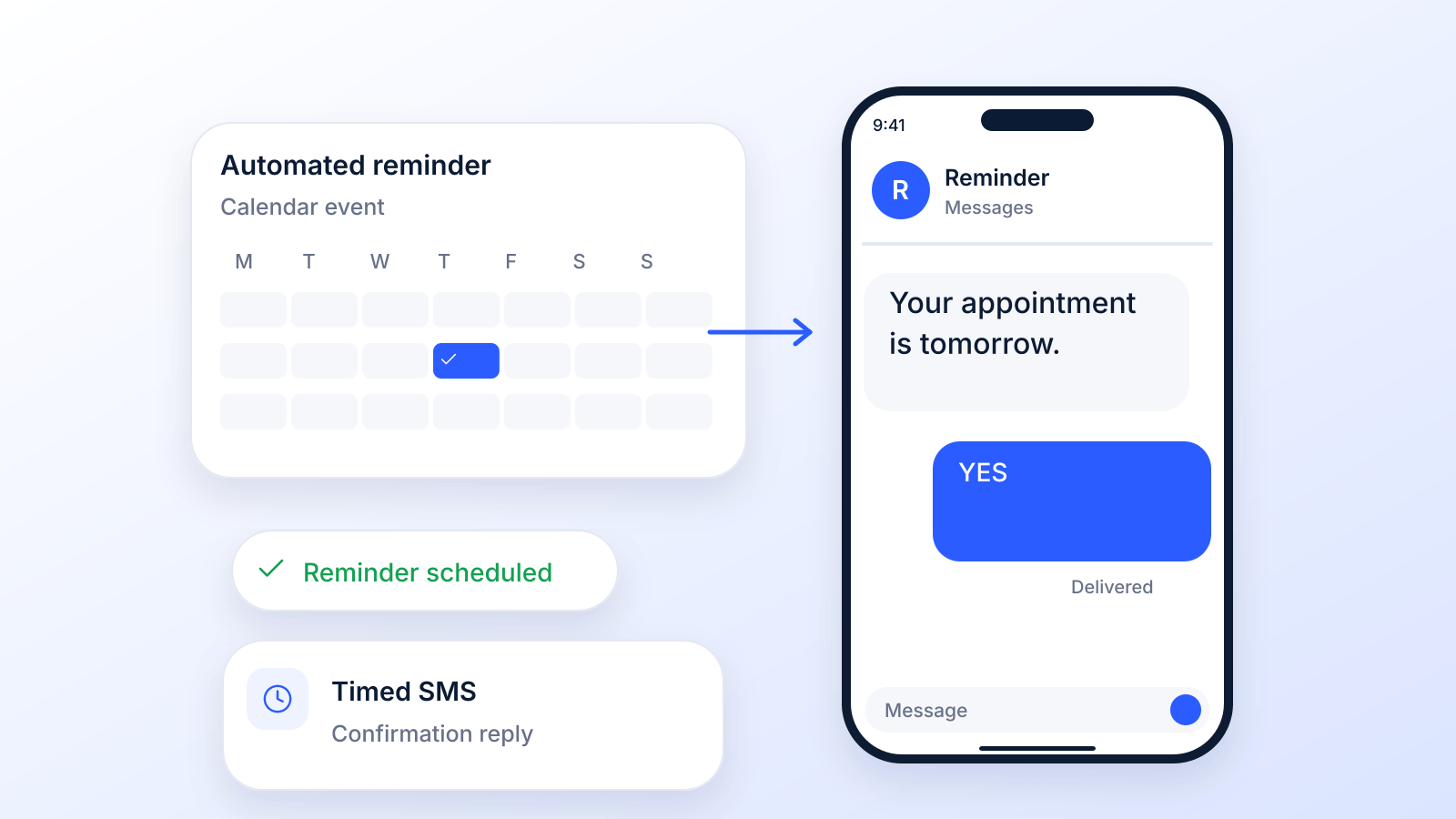
At its core, an automated text message reminder is a simple, yet incredibly powerful, tool that sends out pre-written SMS notifications for you. Think of it as a way to let your customers know about appointments, events, or important updates without lifting a finger.
The magic happens when this technology connects to your existing business systems, like your calendar or customer database, and automatically triggers messages. The whole idea is to put your most repetitive, time-consuming communication tasks on autopilot so that everyone gets the right message at exactly the right time.
How Automated Text Reminders Work for Your Business
Imagine having a personal assistant who never sleeps, never forgets an appointment, and communicates perfectly every single time. That's what you get with automated text reminders. This isn't complicated tech; it hooks right into the tools you already use, like calendars and customer lists, to send out timely notifications without any manual effort.
It all boils down to a simple concept: a "trigger" and an "action." The trigger could be anything: an appointment that's 24 hours away, a pending payment, or even a customer's birthday. Once that trigger event happens, the system automatically performs the action: sending a text message you’ve already written. This completely eliminates the need for your staff to manually dial numbers or type out individual texts, freeing them up to focus on what really matters.
The Core Mechanics of Automation
Under the hood, the system is built on a straightforward principle of integration and scheduling. Your customer data (names, phone numbers, appointment details) is securely synced with an SMS reminder platform. From there, you get to build out a communication workflow. And this isn't just about sending one message; it's about creating a smart, strategic sequence.
For example, a typical appointment workflow might look like this:
- Initial Confirmation: A text zips out the moment an appointment is booked.
- Advance Reminder: Another message is sent 24-48 hours before the scheduled time.
- Final Nudge: A last reminder goes out just a few hours before the appointment.
This multi-step approach is brilliant because it cuts through the noise and drastically reduces the chances of a customer forgetting. It’s a proactive strategy that keeps your business top-of-mind and your schedule full.
More Than Just a Reminder
But it's not just about sending out alerts. This technology opens up a direct and incredibly convenient communication channel. Customers can often reply to the text to confirm, cancel, or even reschedule, which simplifies your entire scheduling process. The benefits of SMS reminders are clear: fewer no-shows, more customer engagement, and a smoother operation.
By putting your most tedious communication on autopilot, you ensure every client gets the right information at precisely the right moment. This leads to fewer missed appointments and a more professional customer experience.
Texting is already part of daily life. Americans exchanged nearly 2.2 trillion SMS and MMS messages in 2024, according to the CTIA 2025 Annual Survey. That reach is why reminders by text work, and it sets the stage for the benefits below.
3 Ways to Automate Text Message Reminders
"Automated" can mean three different things, and the right one depends on how many people you need to remind. Your phone can schedule a single text. Booking software can text every client who books. An SMS reminder platform can run a full sequence for a whole list.
| Option | What it automates | Limits | Best for | Source |
|---|---|---|---|---|
| Schedule a text on your iPhone (Send Later) | One message, scheduled up to 14 days ahead | iMessage only; one conversation at a time; no personalization or replies handling | Personal reminders, a few clients | Apple Support |
| Schedule a text in Google Messages (Android) | One message at a set date and time (touch and hold Send) | Android 7.0 and up; if the phone is offline, it sends when it reconnects; one conversation at a time | Personal reminders, a few clients | Google Messages Help |
| Calendar app (for example Google Calendar) | Reminds you, the calendar owner (desktop, email or browser alerts); guests get email updates | Does not text your customers | Your own schedule | Google Calendar Help |
| Booking software with text reminders | Texts every booked client automatically before the appointment | Often paid plans only (Calendly Workflows: paid plans, 180 characters, invitees opt in); Square Appointments lists text and email reminders on its Free plan | Businesses that take bookings online | Calendly Help; Square pricing |
| SMS reminder platform | Sequences to whole lists: confirmation, reminder, day-of nudge, follow-up, with merge tags and replies | One more tool to connect to your calendar or CRM; consent and opt-out handling are on you | Teams sending reminders at volume, several channels | SMS reminders |
Schedule a text on your phone
- iPhone: in Messages, tap the plus button, choose Send Later, pick a date and time up to 14 days ahead, then send. Apple notes you must be using iMessage (Apple Support).
- Android (Google Messages): type the message, touch and hold Send, choose a suggested time or pick a date and time, then tap Send (Google Messages Help).
This works for a handful of reminders. It stops scaling once you have more than a few appointments a day, because every message is typed and scheduled by hand. Our guide to the best scheduled text message apps covers more options.
Use booking or reminder software
If customers book online, turn on text reminders in your booking tool first; many include them, sometimes only on paid plans. If your scheduler works but reminders are too basic, add a dedicated reminder platform that reads appointments from your calendar or CRM and sends the full sequence. We compare both kinds, with prices checked on each vendor page, in our list of the best appointment reminder software.
The Real-World Benefits of Automated SMS Reminders
Let's move past the technical stuff. The real magic of automated text reminders is what they actually do for your business. When you put this simple tech to work, you see real, measurable returns across your entire operation: a healthier bottom line, happier customers, and an easier day for your team.
The first and most obvious win? Fewer no-shows. Missed appointments aren't just a headache; they're lost revenue and wasted time you can never get back. Every empty slot on your calendar is a direct hit to revenue.
Think of an automated reminder as your frontline defense against that financial leak. A simple, well-timed text cuts through the daily noise and gives your customer a helpful nudge, making it far less likely they'll forget.
Drastically Reduce Missed Appointments
By getting in front of your customers, you close the gap where forgetfulness creeps in. The best evidence comes from healthcare: a Cochrane review of 8 randomized trials (6,615 participants) found that text message reminders raised attendance from 67.8% with no reminder to 78.6%, about as well as phone call reminders. That’s a big help for keeping schedules full and operations running smoothly.
And it's not just about one single ping. A smart sequence (maybe a confirmation right after booking, another reminder 24 hours out, and one last heads-up on the day of) creates multiple touchpoints that keep the appointment top of mind.
Enhance Customer Loyalty and Experience
Beyond protecting your revenue, automated reminders just make for a better customer experience. When you send a helpful, personalized text, you're telling your customers you value their time. It’s a small, proactive gesture that makes people feel seen and appreciated.
That kind of thoughtful communication builds trust and loyalty. Customers will always come back to a business that makes their life easier. You stop being just another transaction and start building a real connection, turning one-time clients into long-term fans.
An automated reminder is more than just a notification; it's a signal to your customer that you are organized, professional, and dedicated to providing them with a seamless experience from start to finish.
This simple touchpoint reduces their anxiety and ensures they show up prepared, whether it’s for a doctor's visit or a salon appointment.
Free Up Your Team for Higher-Value Work
Finally, think about the huge operational lift you get from automation. Manually calling every single customer to confirm appointments is a soul-crushing task for your staff. It’s repetitive, time-consuming, and pulls them away from what they should be doing: helping the customers right in front of them.
Automating this process frees up hours every week. Your team can stop playing phone tag and start focusing on the exceptional service that actually grows your business. Not only does this boost morale, but it makes your whole operation more productive. To pick a tool, compare the options in our guide to the best appointment reminder software. It's the classic case of working smarter, not harder.
See How Different Industries Use Text Reminders
The real magic of automated text reminders isn't that they work for one type of business; it's that they work for all types. It’s a super versatile tool that fits the unique needs of a busy dental clinic just as well as a growing online store.
No matter the industry, the goal is pretty much the same: get the right info to the right person at exactly the right time. This simple action smooths things over for the customer, makes them feel taken care of, and delivers real, measurable results for the business.
Think of it like a universal key for communication. Whether you're reminding a patient about a crucial check-up or letting a shopper know their favorite jeans are back in stock, SMS is direct, immediate, and incredibly effective. Let's dig into how a few key industries are putting it to work.
Healthcare Providers
For any medical, dental, or wellness practice, a no-show is a killer. It's not just an empty slot on the calendar; it disrupts patient care schedules and hits the bottom line. Reminders are one of the best-studied fixes: in the Cochrane review above, text reminders raised attendance by about 11 percentage points compared with no reminder.
By setting up a simple sequence of messages, clinics can slash their no-show rates. These texts aren't just about confirming a date and time; they're about providing helpful pre-visit instructions, offering an easy way to reschedule, and generally making patients feel less anxious and more prepared.
- Appointment Confirmation: Fire this off right after they book to lock it in.
- Pre-Visit Instructions: Send a reminder 48 hours out with key info, like "remember to fast before your blood test."
- Final Nudge: A quick text on the morning of the appointment keeps it top-of-mind.
Here’s a template that just works:
"Hi [PatientFirstName], this is a reminder of your appointment with Dr. Smith tomorrow at 10:30 AM. Please reply YES to confirm or call us at 555-123-4567 to reschedule. Thank you!"
This kind of proactive communication doesn't just fill your schedule; it shows patients you're on top of your game and that you value their time.
E-commerce Stores
In the cutthroat world of online retail, timing is everything. Automated texts are an absolute powerhouse for driving sales and keeping customers hooked from their first click to checkout. When you consider that the average documented cart abandonment rate is about 70% (Baymard Institute, 50 studies), a well-timed nudge can be the difference between a lost sale and a cha-ching.
Smart e-commerce brands use SMS for those high-impact moments that feel both personal and urgent.
- Abandoned Cart Recovery: A friendly ping sent about an hour after a shopper leaves items in their cart.
- Shipping & Delivery Updates: Proactive texts that keep customers in the loop and cut down on those "where's my order?" support tickets.
- Flash Sale & Restock Alerts: Exclusive, time-sensitive deals sent to your VIPs who've opted in for texts.
Try this template:
"Hey [CustomerName]! You left some great items in your cart at [StoreName]. Don't miss out! Complete your order here: [ShortLink]. Reply STOP to opt out."
These messages slice right through a noisy email inbox and get people to act now, giving a direct boost to your revenue.
Cart and restock texts are marketing messages, so they need a stronger kind of consent than appointment reminders. See the consent section below.
Service-Based Businesses
If you run a salon, an auto repair shop, or a home services company, your schedule is your lifeblood. Automated reminders are mission-critical for confirming bookings, cutting down on last-minute cancellations, and making sure the day runs smoothly for your techs and stylists.
Just like in healthcare, a simple text confirmation sequence can work wonders for attendance. But it doesn't stop there. These businesses can also use automated follow-ups to get valuable feedback and reel in repeat customers. A text sent the day after a service asking for a quick review is way more likely to get a response than an email that gets buried.
By automating the confirmation and follow-up process, service businesses can free up hours of admin time every week. That lets the staff focus on what they do best: giving clients an amazing in-person experience.
This creates a powerful cycle: better service leads to glowing reviews, which attracts new customers. A smart text reminder strategy is the engine that keeps that whole cycle running.
How to Set Up Your First Reminder Campaign
Getting your first automated text message reminder campaign off the ground is a lot simpler than it sounds. Forget about mastering some complex new technology; this is all about building a straightforward, reliable communication bridge between you and your customers.
Let's walk through the essential steps to get you launched with confidence.
First up, you need to pick the right platform. Think of this as your command center: the tool that will handle everything from scheduling messages to personalizing them. From there, it's all about building your contact list the right way, which means getting clear, explicit permission from every single person you plan to text. Compliance isn't just a legal hurdle; it's the bedrock of a trusting relationship with your audience.
Choosing the Right Software
Your choice of software pretty much defines what’s possible with your reminder campaigns. You'll want a platform that’s not just a breeze to use but is also loaded with features designed to make your life easier and your messages more effective.
Here are the non-negotiables to look for:
- Merge Tags: The ability to automatically pop in personal details like
[FirstName]or[AppointmentTime]is a must. This tiny touch turns a generic broadcast into something that feels like a one-on-one conversation. - Advanced Scheduling: You need total flexibility to send messages at the perfect moment, whether that's immediately after someone books, 24 hours in advance, or at a custom date. Timeliness is everything.
- Drip Sequences: This is a powerhouse feature that lets you create a whole series of reminders. For instance, you could set up a sequence that automatically sends an initial confirmation, a 24-hour reminder, and a final nudge on the day of the appointment.
A solid platform like Broadcast gives you the tools to build a smart strategy that basically runs on autopilot. You save time while looking like a pro.
Building a Compliant Contact List
Before you hit "send" on a single message, you need consent. In the world of SMS, permission is king. Under the Telephone Consumer Protection Act (TCPA) rules, automated texts to cell phones need the person's prior express consent, and marketing texts need prior express written consent. Appointment reminders are usually informational, but many businesses collect written consent for every text to stay on the safe side.
This means you can't just grab a list of phone numbers you’ve collected over the years and start blasting. People have to actively opt-in to hear from you.
An opt-in isn't just a legal checkbox; it's a signal that your customer wants to hear from you. Respecting that is the first step toward building a loyal audience that actually values your communication.
You can collect consent in a few different ways:
- Add a simple checkbox to your online booking or checkout forms.
- Ask customers to text a keyword (e.g., "Text JOIN to 555-123-4567").
- Get verbal permission and make sure you document it carefully.
And always make it clear what they’re signing up for and provide an easy way to opt out, like including "Reply STOP to cancel" in your messages. Carrier guidance (the CTIA Messaging Principles) asks senders to explain how to opt out, and FCC rules require you to honor a STOP reply within 10 business days.
This infographic breaks down the typical flow for automated SMS reminders, showing how it works across different industries.
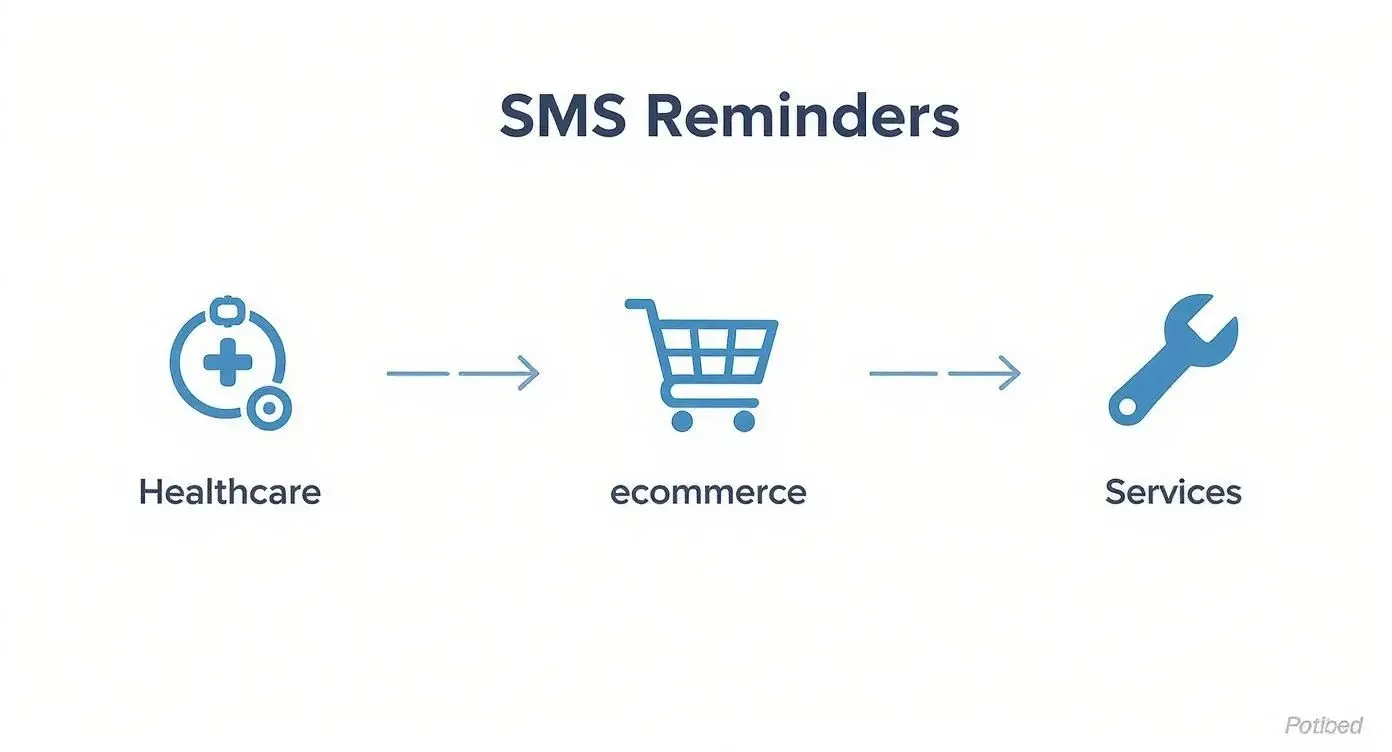
As you can see, whether you're in healthcare, e-commerce, or another service field, the core steps (triggering, personalizing, and sending a reminder) are pretty much the same. And they work.
Crafting the Perfect Reminder Message
Okay, software is picked and your list is ready. Now for the fun part: writing your messages. The best reminders are clear, short, and immediately useful. Every character counts.
A great reminder has a few key ingredients that work together to inform and get a response. Nailing this formula is crucial.
Let's break down what every effective reminder needs.
Essential Components of an Effective Reminder Message
To make sure your reminders are clear, professional, and get the job done, they should contain a few standard parts. Think of it as a simple recipe for success.
| Component | Purpose | Example |
|---|---|---|
| Recipient Name | Personalizes the message and grabs attention. | Hi [FirstName], |
| Reason for Message | Clearly states why you are texting them. | This is a reminder for your appointment... |
| Key Details | Includes the essential information (date, time, location). | ...tomorrow at 2:00 PM. |
| Business Name | Identifies who the message is from. | From [Your Business Name]. |
| Call to Action | Tells the recipient what to do next. | Reply C to confirm. |
| Opt-Out Instructions | Provides a compliant way to unsubscribe. | Reply STOP to end. |
For the email side of the same sequence, borrow from these sample reminder emails, and for the first message, these appointment confirmation text templates.
By putting these elements in every message, you create something that’s not just helpful but also professional and fully compliant. This structure cuts out any confusion and encourages the response you're looking for, whether that's a quick confirmation or a click to reschedule. Your goal is to make it dead simple for the customer to understand and act.
Ready-to-Use Templates for Any Scenario
Generic messages get generic results. If you seriously want to cut down on no-shows, you need to tailor your reminders to different points in their journey with you. Here are a few battle-tested templates you can swipe and adapt for your own business.
Initial Booking Confirmation (Sent Immediately)
This one is all about locking in the appointment and setting expectations right from the get-go.
Template: Hi [FirstName], this is [Your Business Name]. You're all set for your appointment on [Date] at [Time]. We look forward to seeing you! Reply HELP for questions.
Why it works: It's immediate, it's reassuring, and it gives them a simple channel to ask questions if something comes up.
The 24-Hour Reminder (The Real Workhorse)
This is your most critical message for stopping no-shows in their tracks. Think of it as the final, friendly nudge.
Template: Hi [FirstName], a friendly reminder from [Your Business Name] about your appointment tomorrow, [Date], at [Time]. Please reply C to confirm or call us at [Phone Number] to reschedule.
Why it works: The call-to-action is direct and dead simple. Offering an effortless confirmation path (Reply C) gets clients to mentally and physically commit to showing up.
Post-Appointment Follow-Up (Building Loyalty)
The conversation shouldn't stop just because the appointment is over. A quick follow-up shows you value their business and opens the door for reviews and future bookings.
Template: Hi [FirstName], thanks for visiting [Your Business Name] today! We hope you had a great experience. We'd love it if you could share your feedback here: [Link]
Why it works: It’s a polite, no-pressure way to gather valuable reviews while making the client feel appreciated. The short link makes it easy to click.
Reminder Texts vs Marketing Texts: What Consent You Need
Not every automated text follows the same rules. A reminder about an appointment the customer booked is informational. A text that sells something is marketing. US rules and carrier guidance treat them differently, so keep them in separate lists or sequences.
| Type of text | Examples | Federal rule (TCPA) | Carrier guidance (CTIA) |
|---|---|---|---|
| Informational | Appointment reminders, confirmations, order and shipping updates | Prior express consent for automated texts to cell phones (47 CFR 64.1200(a)(1)) | Express consent |
| Marketing | Cart reminders, sales, restock alerts, review requests with an offer | Prior express written consent (47 CFR 64.1200(a)(2)) | Express written consent |
| Opt-out | STOP, END, CANCEL, UNSUBSCRIBE, QUIT replies | Honor any reasonable opt-out within 10 business days; one confirmation text allowed (47 CFR 64.1200(a)(10), (a)(12)) | State how to opt out; send one confirmation and nothing after it |
Sources: 47 CFR 64.1200 and the CTIA Messaging Principles and Best Practices. Marketing texts also fall under the federal quiet hours for telephone solicitations: not before 8 a.m. or after 9 p.m. in the recipient's local time (47 CFR 64.1200(c)(1)), and some states set stricter hours.
Healthcare reminders and HIPAA
HHS treats appointment reminders as part of treatment, so a provider can send them without a separate patient authorization, but it advises keeping the details in a message to a minimum (HHS HIPAA FAQ 198). Patients can ask to be contacted another way, and providers must accommodate reasonable requests (45 CFR 164.522(b)). If a texting vendor will create, receive, store or send protected health information for you, it is a business associate, and HIPAA requires a written business associate agreement (BAA) first (45 CFR 164.502(e)). Under the TCPA, health care messages from HIPAA covered entities are exempt from the written consent rule for telemarketing calls, but they still need prior express consent.
Keep reminders short and generic: "your appointment tomorrow at 10:30" rather than the reason for the visit. Our guide to HIPAA-compliant texting platforms goes deeper.
Patient Reminder Texts: Telehealth Appointments
Telehealth no-shows often aren't true no-shows. They're access failures. The patient intended to attend but couldn't find the link, forgot to download the app, or hit an audio issue five minutes before the visit. A strong telehealth reminder prevents that friction before it starts.
Examples:
- “[Patient Name], your video visit with [Provider] is tomorrow at [Time]. Join here: [Link]. Need tech help? Call [Number].”
- “[Patient Name], your first video appointment is tomorrow. Ensure good lighting, quiet space, and stable internet. Download app: [Link]. Questions: [Number]”
- “Virtual visit with [Specialist] is in 1 hour. Have your insurance card and symptoms list ready. Access: [Link]”
Remove the predictable failure points
First-time telehealth patients need more detail than returning patients. Give them the join link, device requirements, and a backup phone number. Returning patients usually need less explanation and a faster reminder closer to the visit.
For higher-stakes visits, a two-step sequence often works well. Send one reminder with setup instructions, then another closer to the appointment with the join link front and center. If your scheduling team is working to reduce attendance gaps broadly, these patient no-show reduction strategies are worth aligning with your telehealth workflow.
In mental health visits with a high predicted no-show risk, an extra text sent 3 business days before the visit (on top of the usual reminder 2 business days before) reduced no-shows by 11% in a randomized study at Kaiser Permanente Washington (The Permanente Journal, 2022). That's especially relevant for telehealth because patients may need both behavioral prompting and technical support. The strongest reminder won't help if the patient can't get into the session.
Where ringless voicemail fits
Ringless voicemail is useful when the appointment requires prep that doesn't fit gracefully into SMS. A brief recorded message can remind patients to test audio, choose a private setting, and keep medication lists nearby. For older adults or patients who struggle with links, that voice layer often lowers stress before the session begins. Like texts, ringless voicemail needs the patient's consent: the FCC treats it as a call under the TCPA (FCC 22-85).
A/B test setup-heavy language against minimalist copy. Some practices assume more instruction is better. Often it isn't. Experienced telehealth users usually respond better to one clean link and one support number.
Patient Reminder Texts: Preventive Care and Screenings
Preventive reminders are where strategy beats volume. If you text everyone the same annual wellness pitch, such messages can be disregarded. If you send a reminder tied to what they are due for, the message feels relevant instead of promotional.
Examples:
- “[Patient Name], time for your annual wellness visit. Schedule today: [Link]. Appointments available next week.”
- “[Patient Name], you're due for your [Screening Type] screening. Early detection saves lives. Book now: [Link]”
- “Hi [Patient Name], your flu shot is available now. Protect yourself this season. Schedule: [Link]. Walk-ins welcome!”
Relevance matters more than clever wording
Segment these messages by age, condition, care gap, and prior response pattern. A patient due for a routine physical doesn't need the same tone or urgency as someone due for a repeat screening after a prior recommendation. The more precisely your EHR or CRM can trigger the reminder, the less copy has to do the heavy lifting.
This is also a good place to use multi-touch communication. Start with SMS. If the patient doesn't respond and the preventive service matters clinically, follow with ringless voicemail or a live outreach step. Voice can help when the message needs more explanation, such as why a screening matters or how to prepare.
A preventive reminder should answer the silent question in the patient's mind: “Why should I book this now?”
Pragmatic research at Kaiser Permanente Washington found that, for visits with a high predicted no-show risk, adding an extra text 3 business days before the visit to the standard reminder 2 business days before reduced no-shows by 7% and same-day cancellations by 6% in primary care, in this randomized study of more than 125,000 primary care visits. The broader lesson for preventive outreach is straightforward. A single message often isn't enough for patients who are busy, hesitant, or juggling logistics.
In testing, compare convenience-led language against benefit-led language. “Appointments available next week” may outperform a generic wellness appeal because it reduces perceived effort. If self-scheduling is available, put the booking link in the first text, not the second.
Patient Reminder Texts: Prescription Refills
Refill reminders work best when they remove friction. Patients don't need a lecture about adherence in the text itself. They need a nudge before they run out, plus the fastest path to request, pick up, or arrange delivery.
Common formats include:
- “[Patient Name], your prescription for [Medication] is ready for pickup at [Pharmacy Name]. Expires [Date]. Come by today!”
- “Hi [Patient Name], your refill for [Medication] is available. Reply REFILL or call [Number]. We can deliver it free!”
- “[Patient Name], time to refill [Medication]. Low supply detected. One click to request: [Link]”
Build around the action, not the alert
Refill messaging often fails because the text says the medication is due but doesn't resolve the next obstacle. Patients then have to call, log in, or wait until office hours. Better systems include a reply keyword, a direct portal route, or a pharmacy support number in the first message.
In a before-and-after study at a Ryan White-funded HIV clinic in El Paso, Texas, an inexpensive text reminder system cut the no-show rate from 24.8% to 17.7% (about 7 percentage points), supporting the value of SMS for diverse populations including low-income and uninsured patients in this clinic study. That result doesn't mean every refill workflow should look identical, but it does reinforce a broader operational truth: simple reminders can move behavior when access is already in place.
A few practical distinctions matter:
- Chronic meds: Keep timing consistent and predictable.
- As-needed meds: Avoid over-messaging. Trigger based on refill status, not a fixed cadence.
- Specialty meds: Add a human support path quickly if prior auth or shipping delays are common.
For A/B testing, compare a convenience-first message against a clinical-first one. “Reply REFILL” usually feels lighter than “Your medication adherence matters.” It also gives the patient a one-step action instead of a vague instruction. If you support voice channels, ringless voicemail can work for patients who repeatedly miss refill texts or prefer spoken reminders, especially in older populations or caregiver-managed households.
Finding the Right Timing and Frequency for Your Messages
The real magic behind automated text message reminders isn't just the tech; it’s the strategy. Anyone can send a text. But sending the right text at the right time? That’s what turns a potentially annoying ping into a genuinely helpful nudge. Your goal is to find that sweet spot where your reminders feel supportive, not spammy.
Think about it like reminding a friend about lunch plans. You wouldn't text them five times in one day. That'd be weird. The same goes for your customers. Text too often, and you’ll see your unsubscribe rate climb. Don't text enough, and you're right back to dealing with the no-shows you wanted to avoid in the first place.
The Psychology of a Multi-Step Sequence
So, why does sending a few reminders work so much better than just one? It’s all about working with, not against, how people actually think and plan. Life is busy. A single reminder is incredibly easy to see, acknowledge, and then completely forget a few hours later. But a well-timed sequence? That builds reinforcement.
An instant confirmation text locks in the appointment right away. A reminder sent a day or two ahead gives them a chance to shuffle their schedule if something came up. And that final text on the day of the appointment is the perfect last-minute jog to their memory. This layered approach plugs all the little holes where forgetfulness tends to sneak in.
The best reminder schedule is one that respects your customer's attention while making sure your appointment stays top-of-mind. It’s a simple, proactive process that can slash your no-show rates.
Building Your Ideal Reminder Cadence
While there's no magic, one-size-fits-all schedule, there's a common framework that works for most businesses. You can start here and then tweak it based on what you learn about your own customers. Most reminder sequences use a simple, three-step cadence.
If you're just getting started, learning how to send a scheduled text is the perfect first step and the foundation of this entire process.
Here’s a classic, highly effective schedule to get you going:
- The Immediate Confirmation: Send this the second someone books with you or places an order. It’s instant peace of mind, confirming everything went through. Make sure it includes the key details, like the date and time.
- The 24-Hour Heads-Up: This might be the most important message in the whole sequence. Sent a day before, it gives your customer a clear prompt to confirm they're still coming or to reschedule if they need to. It's close enough to be relevant but gives them enough time to make changes without chaos.
- The Day-Of Nudge: This is your final safety net. A quick, friendly reminder sent 1-3 hours before the appointment is perfect for preventing last-minute forgetfulness. It’s also a great spot to include helpful info like a link to your office on Google Maps, parking tips, or the Zoom link for a virtual meeting.
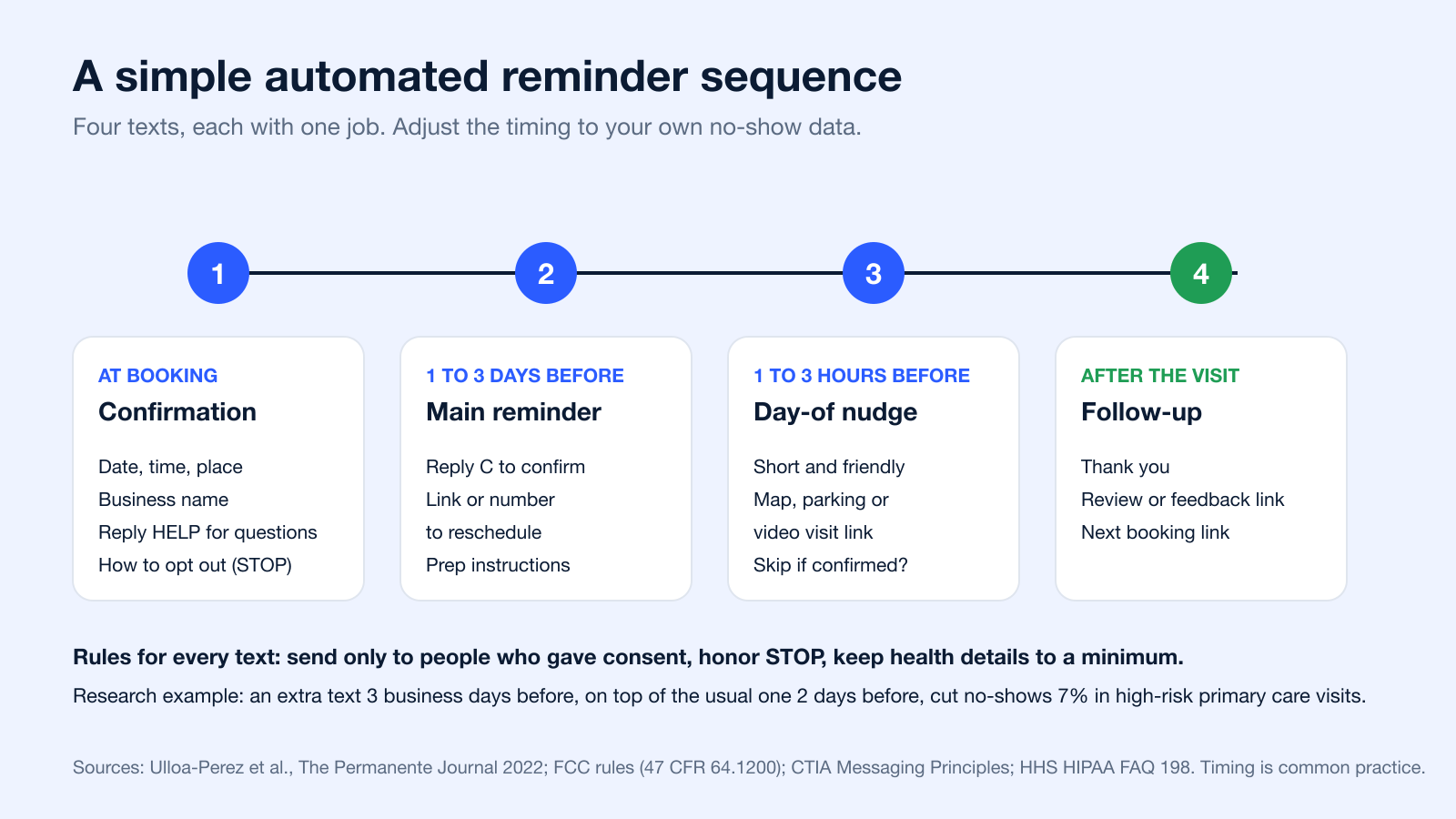
Reminder timing at a glance
| Message | When | What the evidence says |
|---|---|---|
| Confirmation | Right after booking | Common practice; confirms the details while the customer is still engaged |
| Main reminder | 1 to 3 days before | In a randomized study, adding a text 3 business days before to the usual one 2 business days before cut no-shows 7% (primary care) and 11% (mental health) for high-risk visits (Permanente Journal) |
| Day-of nudge | 1 to 3 hours before | Common practice; useful for links, directions and parking |
| Follow-up | Same day or next day | Common practice; ask for feedback or the next booking |
Send reminders during normal waking hours in the customer's time zone. The federal 8 a.m. to 9 p.m. window applies to marketing texts, but it is a sensible default for reminders too, and some states set stricter hours.
When you structure your reminders this way, you're providing a service, not a nuisance. By thoughtfully timing your automated text message reminders, you turn a simple notification into a killer tool for keeping customers happy and engaged.
How to Measure and Optimize Your Campaign Success
Launching your first campaign is a huge step, but the real growth happens when you start listening to the data. A great reminder strategy isn't something you just set and forget; it evolves. By tracking performance and making data-driven decisions, you can turn a good campaign into an unstoppable one.
The goal is to move beyond simply sending messages and start understanding their real-world impact. Are your reminders actually reducing no-shows? Are they driving customers to take action? The answers are in the numbers.
Key Metrics You Need to Monitor
To get a clear picture of how your automated text message reminders are performing, you need to zero in on a few core metrics. These are the vital signs of your campaign, telling you what’s working and where you have room to improve. Think of your analytics dashboard as the control panel for your entire strategy.
Here are the essentials to keep an eye on:
- Delivery Rate: This is the percentage of messages that successfully reached your recipients' phones. A high, steady delivery rate tells you that you have a healthy, clean contact list; a sudden drop usually points to bad numbers or carrier filtering.
- Response Rate: This tracks how many people replied to your message. It’s a powerful sign of engagement, especially if you're asking for a simple confirmation like "Reply YES."
- Click-Through Rate (CTR): If your reminders include links (like a link to reschedule or view instructions), this metric shows how many people actually clicked. It’s a direct measure of how compelling your call to action is.
Monitoring these numbers is simple with the right tools. Platforms with robust reporting features give you a clear, at-a-glance view of your campaign's health, making it easy to spot trends.
Connecting Metrics to Business Outcomes
Tracking metrics is only half the battle. The true measure of success is seeing how those numbers translate into tangible business results. For instance, a high response rate is great, but it’s even better when you can directly link it to a measurable drop in your no-show rate.
The most successful campaigns are built on a continuous cycle of testing, learning, and refining. Don’t just set it and forget it; treat your reminder strategy as a living part of your business that can always be improved.
This is where you connect the dots between your SMS analytics and your bottom line. Are you seeing fewer empty appointment slots? Is your revenue from confirmed bookings on the rise? These are the outcomes that truly define your return on investment (ROI).
A/B Testing Your Way to Better Results
Once you have a baseline for your performance, it's time to start optimizing. The best way to do this is through A/B testing, where you compare two versions of a message to see which one performs better. You can test almost anything to see what clicks with your audience.
Consider experimenting with these elements:
- Message Copy: Try a friendly, casual tone versus a more formal, direct one.
- Send Times: Does a reminder sent at 6 PM get more confirmations than one sent at noon?
- Calls to Action (CTAs): Compare "Reply YES to confirm" against "Click here to confirm your slot."
By making small, incremental changes and measuring the results, you can systematically improve the effectiveness of your automated text message reminders over time. This data-driven approach removes the guesswork and ensures your strategy is always getting sharper.
Got Questions About Automated Text Reminders? We've Got Answers.
Jumping into automated text reminders can bring up a few questions, even when you have a solid plan. It's totally normal. Let's walk through some of the most common ones so you can move forward feeling confident.
Getting these details right from the start is the key to building an SMS program your customers will actually thank you for. It helps you avoid any nasty surprises down the road and sets you up for some serious wins.
Are Automated Text Message Reminders Legal?
Yes, as long as you play by the rules. The big one in the US is the Telephone Consumer Protection Act (TCPA). Automated texts to cell phones need the person's prior express consent, and marketing texts need prior express written consent (47 CFR 64.1200). Many businesses collect written consent for every text, reminders included.
This means people have to clearly opt in. You can't just add them to a list. You also have to honor opt-outs: a reply such as STOP must be honored within 10 business days under FCC rules, so include "Reply STOP to unsubscribe" in your messages. This is general information, not legal advice.
How Much Do Automated SMS Reminder Services Cost?
Pricing can feel a bit all over the place, but most services use a tiered subscription model based on how many messages you send each month. You'll also see some pay-as-you-go options, which are perfect if your sending volume goes up and down.
But here’s a pro tip: don't just shop on price per text. The real value is often hiding in the features. Things like great analytics, easy integrations with software you already use, and customer support that actually helps can save you a ton of time and make your campaigns way more effective.
One of the most powerful features to look for is personalization. Using 'merge tags,' you can instantly pop in a customer's details like
[FirstName]or[AppointmentTime]. This small touch makes each reminder feel personal and significantly boosts the customer experience.
When you focus on the overall value instead of just the cost, you’ll land a solution that genuinely helps you grow.
Ready to slash no-shows and free up your team? Broadcast provides powerful, compliant, and easy-to-use tools for automating your SMS reminders, voice broadcasts, and ringless voicemails. Start your free trial today and see the difference it makes.
Can I Automate Actions Based on Customer Replies?
Absolutely. This is where modern SMS platforms really shine. You can build simple, two-way automated conversations that save you a ton of time and give your customers a slick experience. It all works by setting up workflows that trigger actions based on keywords in their replies.
For example, you could set it up so that:
- A client replies 'CONFIRM', and their appointment is automatically marked as confirmed in your calendar.
- Someone texts back 'RESCHEDULE', and they instantly get a link to your booking page to pick a new time.
- A reply of 'QUESTION' could ping your team to follow up with a personal call.
This kind of automation frees up your staff from tedious manual work and gives clients the convenient, on-demand service they expect.
How Does Ringless Voicemail Fit into This Strategy?
Ringless voicemail is a clever tool that drops a pre-recorded audio message directly into someone's voicemail box without making their phone ring. It’s a fantastic way to add a human touch to your follow-up without interrupting their day. Since November 2022 the FCC treats ringless voicemail as a call under the TCPA, so it needs the same consent as an automated call (FCC 22-85).
You can pair it with your text reminders for a more personal, multi-channel approach. This voicemail drop technique reinforces the message and helps build a stronger connection with your clients.
Imagine an automated workflow like this:
- 48 Hours Before: An automated SMS reminder goes out with the appointment details.
- 24 Hours Before: A friendly, pre-recorded ringless voicemail from the person they're meeting with follows up, adding a warm, personal touch.
Combining a quick text with a friendly voice makes your communication stand out. It shows a level of care that people notice, turning your reminder system into a tool for building relationships, not just managing logistics.
Can you set a reminder in text messages?
For yourself, partly. Google Messages has Nudges, on by default, which remind you to reply to messages you have not answered and alert you on saved contacts' birthdays (Google Messages Help). To remind someone else, schedule the text: Send Later on iPhone (iMessage, up to 14 days ahead) or touch and hold Send in Google Messages. For customer reminders, use booking or reminder software instead.
Can you schedule a text message to send automatically?
Yes. On iPhone, tap the plus button in Messages, choose Send Later and pick a time up to 14 days ahead; it only works over iMessage (Apple Support). On Android, type the message in Google Messages, touch and hold Send and pick a date and time; it needs Android 7.0 or later (Google Messages Help).
Can text messages be automated?
Yes. A phone can schedule single messages, booking software can text every client who books, and an SMS platform can send whole sequences triggered by a booking, a date or a reply. See the three options above.
Is there an app that will automatically send texts?
Your phone's own Messages app can schedule texts (Send Later on iPhone, scheduled send in Google Messages). For reminders to many customers, booking tools such as Calendly (paid plans) and Square Appointments send text reminders, and dedicated SMS reminder platforms run reminder sequences for whole lists (see SMS reminders).
Do text message reminders really reduce no-shows?
In healthcare, yes. A Cochrane review of 8 randomized trials found that text reminders raised attendance from 67.8% to 78.6% compared with no reminder (Gurol-Urganci et al., 2013). Outside healthcare there is less research, so measure your own no-show rate before and after you start.


