
Most healthcare teams don't struggle with patient communication because they don't care. They struggle because the day gets crowded fast. Front desk staff are confirming appointments, nurses are returning calls, billing is following up, providers are trying to close charts, and someone is always asking whether a text, email, voicemail, or portal message is safe to send.
That’s where hipaa compliant patient communication becomes operational, not theoretical. The issue isn’t just whether your messages are encrypted. It’s whether your team knows which channel fits which message, whether your vendor will sign a BAA, whether consent is documented, and whether you can prove what happened if a complaint or audit lands on your desk.
Most guides stop at secure texting. That’s too narrow for real practices. A workable communication strategy usually needs multiple channels: SMS for reminders, email for secure follow-up, voice for urgent outreach, and ringless voicemail for low-friction administrative messages when patients won’t answer the phone. The challenge is using each one without exposing more PHI than necessary.
This guide is general information, not legal advice. Rules are cited with links and were checked on October 19, 2026.
The High Cost of Patient Communication Errors
A familiar scene plays out in medical offices every day. A patient misses an appointment because the reminder never reached them. Another leaves a voicemail after hours with a medication question. A staff member replies from the wrong device, or sends too much detail in a standard text because they’re trying to be helpful. No one intended to create risk, but the process was weak from the start.
The damage from poor communication isn’t limited to scheduling friction. It affects safety, liability, and trust. In healthcare, communication failures often show up as delayed follow-up, unclear handoffs, incomplete documentation, and patients who don’t know what to do next.
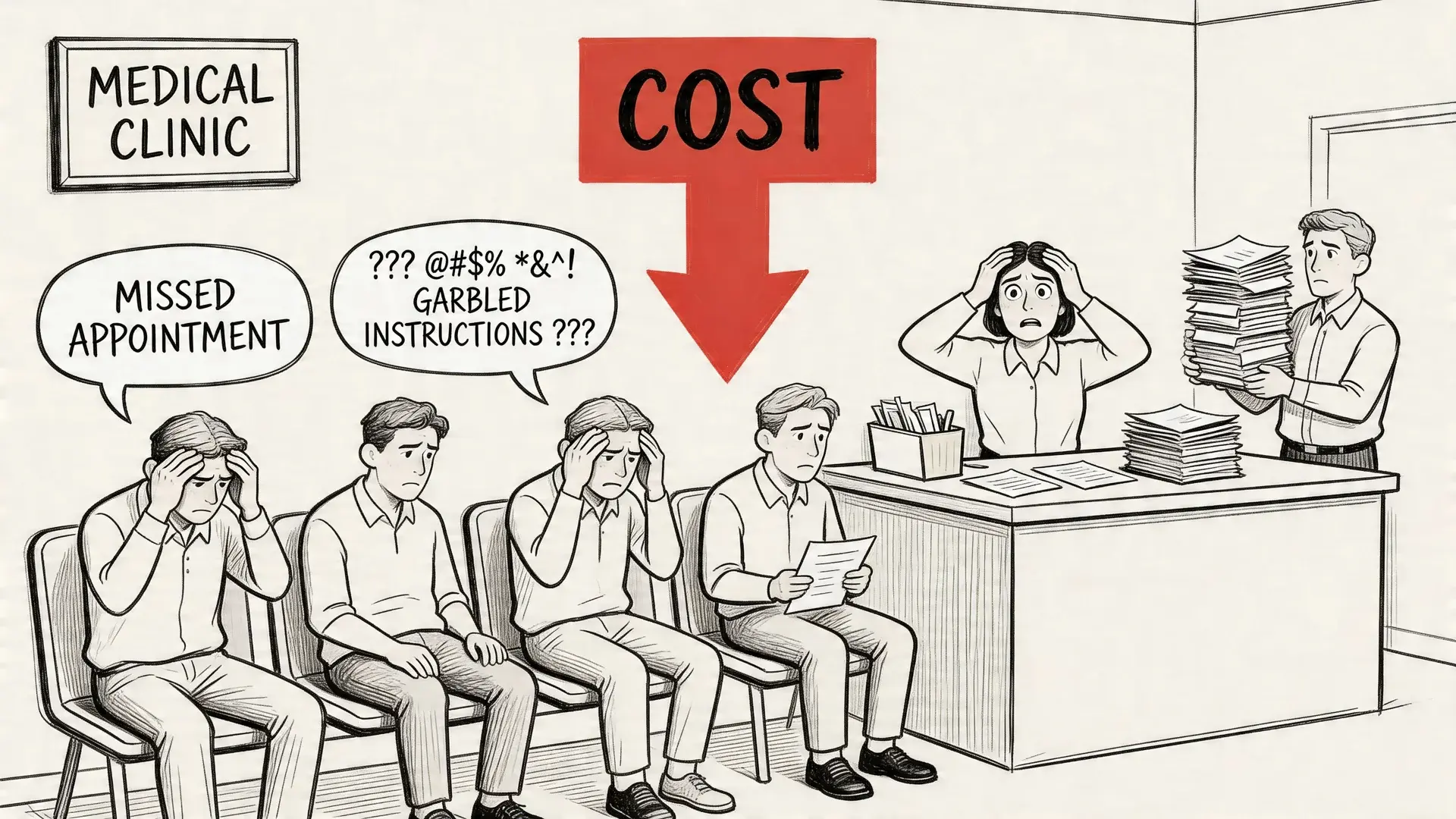
One statistic should reset how seriously teams treat this problem. HIPAA Journal cites a Joint Commission study that found 80% of serious medical errors involved miscommunication between caregivers during patient handovers. The same article cites CRICO Strategies, which reviewed 23,000 malpractice claims and tied communication failures to $1.7 billion in malpractice costs and almost 2,000 preventable deaths. CRICO's own summary of its report says 30 percent of all malpractice claims involve a communication failure.
What outdated communication usually looks like
Practices usually know they have a problem before they know how to describe it:
- Phone tag all day: Staff call, leave a voicemail, wait, and repeat.
- Unsecure workarounds: Someone uses personal texting because it’s faster.
- Scattered records: Communication lives across inboxes, sticky notes, and voicemail boxes.
- No proof of delivery: The team can’t tell whether a patient saw the message.
Practical rule: If your workflow depends on memory, verbal relay, or personal devices, it isn't reliable enough for patient communication.
A compliant communication strategy solves more than one problem at once. It reduces ambiguity, creates a record, limits unnecessary PHI exposure, and gives staff a repeatable process they can follow on a busy day.
Understanding HIPAA and Protected Health Information
HIPAA is often treated like a list of restrictions. In practice, it’s a handling standard for patient information. If your team communicates with patients by text, email, phone, voicemail, portal, or a mix of channels, HIPAA sets the conditions for how that information should be protected.
The central concept is Protected Health Information, or PHI. Think of PHI as a package that needs controlled handling. The contents matter, but so does the label on the outside. Information becomes sensitive when it connects a person to their health care, payment, or condition. In the rule's words, PHI is individually identifiable health information that is transmitted or maintained in any form or medium (45 CFR 160.103).
What counts as PHI
PHI includes health information linked to an identifiable person. In day-to-day operations, that can include:
- Patient names tied to care details
- Appointment details connected to a specific provider or condition
- Billing information linked to treatment
- Test results, diagnoses, prescriptions, and follow-up instructions
- Contact details when paired with health-related context
That’s why a message like “Please confirm your appointment tomorrow at 2 PM” may be manageable in one workflow, while “Your cardiology follow-up for arrhythmia is tomorrow at 2 PM” creates a very different privacy exposure.
The ways PHI can be communicated
Because the definition covers "any form or medium," PHI can be communicated in three broad ways, and each one shows up in a practice's daily outreach:
- Oral: in person, on a live call, or in a voicemail or answering machine message.
- Written on paper: letters, printed forms, postcards and faxed pages.
- Electronic: text messages, email, patient portal messages, apps and recorded audio files.
The Privacy Rule covers all three. The Security Rule adds its technical requirements for electronic PHI, the information transmitted or maintained in electronic media (45 CFR 160.103). That is why the same reminder can raise different questions when it is spoken, mailed or texted.
The three HIPAA rules that affect communication
Most communication decisions map back to three HIPAA areas.
Privacy Rule
The Privacy Rule governs when and how PHI can be used or disclosed. For communication teams, the practical takeaway is simple: limit each message to what its purpose needs. Strictly speaking, the "minimum necessary" standard does not apply to disclosures to the patient or to other providers for treatment (45 CFR 164.502(b)), but the rule still requires reasonable safeguards (45 CFR 164.530(c)), and HHS tells providers to limit what they leave in messages for patients (HHS FAQ 198). If the patient only needs a reminder, don’t include diagnosis details just because the template has space.
Security Rule
The Security Rule focuses on electronic PHI. In this context, encryption, access control, authentication, and audit logging are key. Its technical safeguards require access control, audit controls, integrity protections, person or entity authentication and transmission security; encryption is an "addressable" specification, which means you implement it when it is reasonable and appropriate, or document why not and use an equivalent measure (45 CFR 164.312). If your messaging tool can’t restrict who sees a message, can’t secure stored data, or can’t show a record of access, it creates a compliance problem.
Breach Notification Rule
This rule matters when something goes wrong. If unsecured PHI is breached, the covered entity must notify affected individuals without unreasonable delay and in no case later than 60 calendar days after discovering the breach (45 CFR 164.404). The organization needs a clear way to detect it, investigate it, document it, and respond. That’s one reason audit trails matter so much in communications.
HIPAA doesn't require magic language. It requires controlled processes, documented decisions, and tools that match the sensitivity of the message.
Why plain-English understanding matters
Many teams overcorrect in one of two ways. They either become so cautious that communication slows down, or they assume everyday reminders are harmless and send too much through the wrong channel.
A better approach is to ask three questions before sending anything:
- Does this message contain PHI or create a strong inference about care?
- Is this channel appropriate for the level of sensitivity involved?
- Can we document consent, access, and delivery if needed?
That’s the working mindset behind hipaa compliant patient communication. It’s less about memorizing regulations and more about making disciplined choices every time a message leaves your office.
HIPAA rule changes to watch in 2025 and 2026
A few rule changes affect patient communication programs. Status as published by HHS and the Federal Register (checked October 19, 2026):
- January 6, 2025: Security Rule proposal. HHS proposed updates to the Security Rule to strengthen cybersecurity for electronic PHI, including written policies that are reviewed, tested and updated regularly (Federal Register). Comments closed March 7, 2025. It is still a proposal: HHS says the current Security Rule remains in effect while it works on the rulemaking (HHS), and no final rule appears in the Federal Register as of this check.
- June 18, 2025: reproductive health privacy rule vacated. A federal court in Texas vacated most of the 2024 HIPAA Privacy Rule to Support Reproductive Health Care Privacy (HHS).
- February 16, 2026: notice of privacy practices updates. HHS says the remaining changes to the notice of privacy practices requirements (45 CFR 164.520) were not disturbed by that ruling, and compliance was required by February 16, 2026 (HHS).
Check HHS's HIPAA for Professionals pages before you update policies; proposals can change before they become final.
The Three Pillars of HIPAA Communication Safeguards
A compliant communication program works like a three-legged stool. Remove one leg and the whole thing gets unstable. In healthcare messaging, those legs are technical safeguards, administrative safeguards, and physical safeguards.
Too many organizations focus on the software alone. The platform matters, but software can’t compensate for weak policies or careless device handling. Real compliance sits at the intersection of system design, staff behavior, and physical control of access.
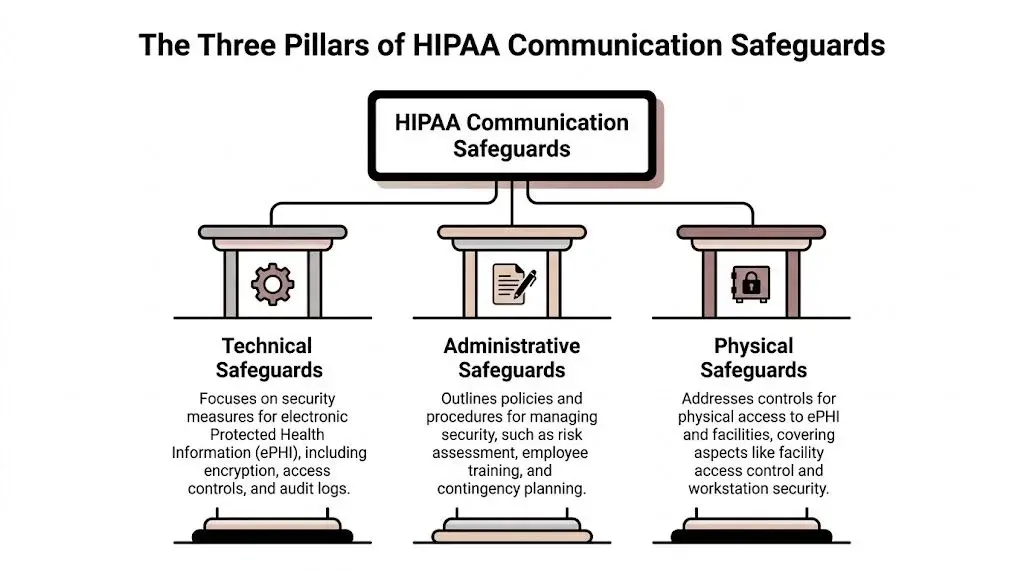
Technical safeguards
This is the layer that often comes to mind first. It covers the controls inside the platform and the transmission path for messages.
The Security Rule spells out the technical safeguards: access control (with unique user IDs and, as addressable items, automatic logoff and encryption), audit controls that record activity in systems holding electronic PHI, integrity protections, person or entity authentication, and transmission security (45 CFR 164.312). Audit trails that log access events are what let you investigate an incident and show what happened.
For messaging tools, technical safeguards usually mean:
- Encryption: Messages and stored data need protection in transit and at rest.
- Access controls: Staff should only see what they need for their role.
- Authentication: Multi-factor authentication and secure logins matter.
- Audit logs: Every access, change, and send event should be traceable.
- Session controls: Automatic timeouts reduce the risk of abandoned sessions.
If a vendor says they are “HIPAA-friendly” but can’t show how access is restricted or how logs are retained, that’s not enough.
Administrative safeguards
Administrative safeguards are the operating rules behind the technology. Failures often arise in this area. The tool may be secure, but the process around it is sloppy.
This category includes vendor review, training, risk assessment, incident response, and written policies for what can be sent through each channel.
These map to the rule text: administrative safeguards such as risk analysis and workforce training are in 45 CFR 164.308, and the Privacy Rule requires training all workforce members on PHI policies as needed for their jobs (45 CFR 164.530(b)).
A strong administrative setup usually includes:
- Channel rules by message type: Reminders, billing, results, and care instructions shouldn’t all be handled the same way.
- Staff training: Front desk, nursing, billing, and management roles need different examples and expectations.
- Vendor oversight: If a provider handles PHI, the relationship needs a BAA and a review of controls.
- Escalation paths: Staff should know when to stop texting and move the conversation into a more secure workflow.
A secure platform with an untrained team is still a compliance risk.
Physical safeguards
Physical safeguards sound old-school until a laptop disappears, a shared workstation stays unsecured, or voicemail access sits on a sticky note near the phone.
These controls include office access, workstation placement, screen privacy, device management, and secure storage for any hardware or records tied to patient communication. For small practices, physical safeguards often break down at the front desk, in call areas, and on mobile devices used by staff moving between locations.
The rule text for this pillar is 45 CFR 164.310: facility access controls, workstation use and security, and device and media controls.
What works together and what fails together
The three pillars reinforce each other.
| Safeguard type | What it controls | What often goes wrong |
|---|---|---|
| Technical | Systems, encryption, access, logging | Teams buy tools without configuring them properly |
| Administrative | Policies, training, vendor management | Staff improvise when the workflow is unclear |
| Physical | Devices, spaces, physical access | Shared devices and unlocked stations expose PHI |
A stable hipaa compliant patient communication process needs all three. Teams get into trouble when they buy one secure app and assume the job is done.
Mapping Communication Channels to HIPAA Rules
A practical communication plan starts with channel discipline. Not every message belongs in every medium. Teams get exposed when they use one channel for everything because it’s convenient.
The right question isn’t “Can we text patients?” It’s “What kind of message can we send through this channel, under what controls, and with what documentation?” That’s especially important if your practice uses more than one outreach method, including SMS, email, phone calls, and ringless voicemail.
What HHS and the FCC say about each channel
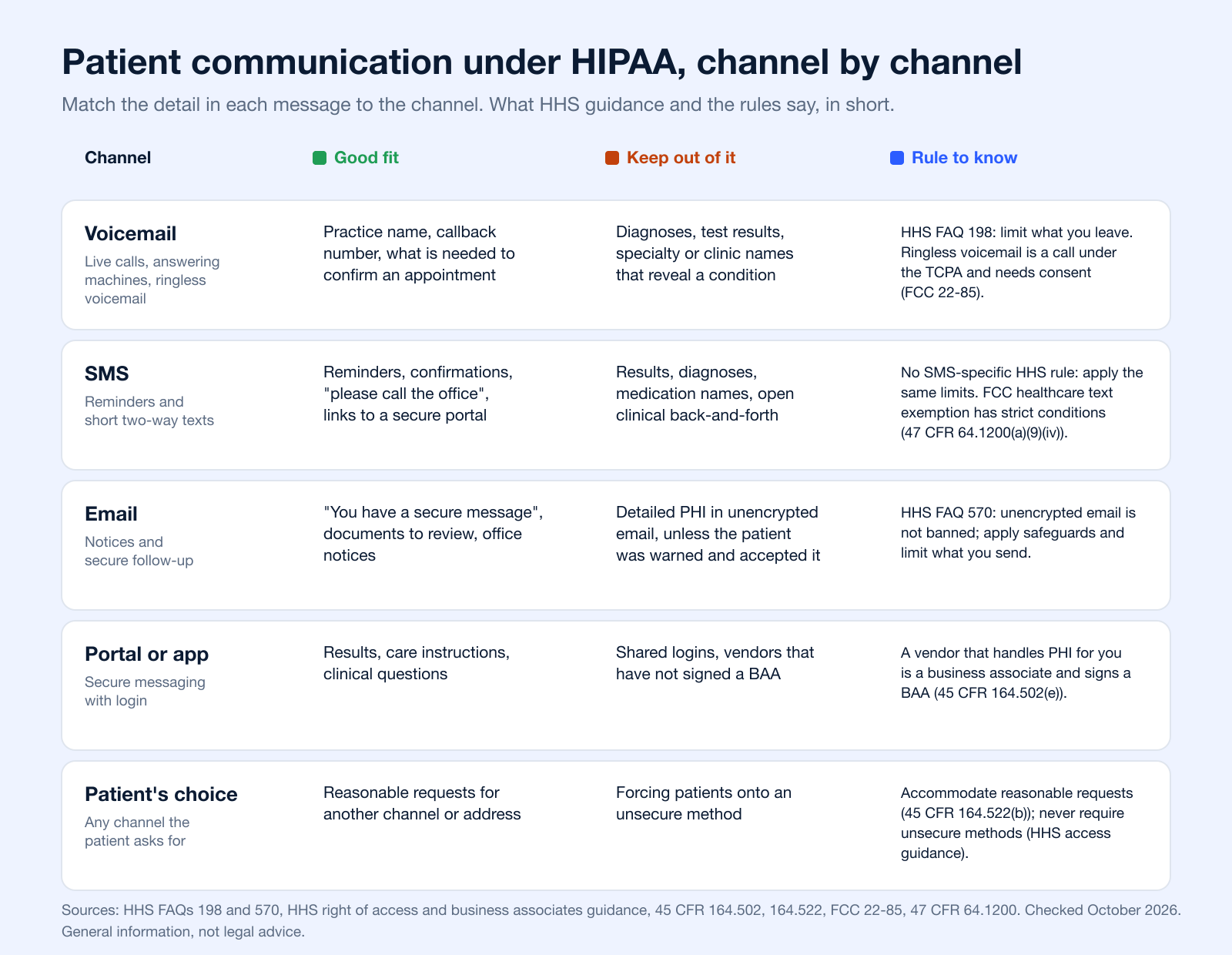
HHS has no rule written specifically for texting. Its guidance on phone messages and email sets the principles practices apply to every channel, and the FCC adds consent rules for automated calls, texts and ringless voicemail (checked October 19, 2026):
| Channel | What the rule or guidance says | Source |
|---|---|---|
| Phone and voicemail | Providers may call patients and leave messages, but should limit the information, for example to the practice name, number and what is needed to confirm an appointment, or ask the patient to call back. | HHS FAQ 198 |
| Allowed with reasonable safeguards. Unencrypted email is not prohibited for treatment-related messages, but limit the amount or type of information; if a patient finds it unacceptable, offer another way. | HHS FAQ 570 | |
| SMS | No SMS-specific HHS guidance; the same limits and safeguards apply. For the TCPA, certain healthcare texts are exempt from consent when every condition is met (free to the patient, 160 characters or less, at most 1 a day and 3 a week, STOP opt-out, no marketing or billing). | 47 CFR 64.1200(a)(9)(iv) |
| Ringless voicemail | The FCC treats it as a call under the TCPA, so it needs the same consent as other automated calls. Content follows the voicemail guidance above. | FCC 22-85 |
| Portal or messaging app | A vendor that creates, receives, maintains or transmits PHI on your behalf is a business associate and must give satisfactory assurances in a BAA. | 45 CFR 164.502(e), HHS guidance |
| Any channel the patient requests | Providers must accommodate reasonable requests to receive communications by alternative means or at alternative locations. A patient warned of the risk may still choose an unsecure method; a provider may not require one. | 45 CFR 164.522(b), HHS access guidance |
SMS and secure texting
SMS is useful because patients read it quickly and respond quickly. It’s often the best fit for confirmations, reminders, and simple back-and-forth scheduling. But standard SMS becomes risky fast when staff include clinical detail that doesn’t belong there.
A safer approach is to separate administrative communication from sensitive communication. Appointment reminders and “please contact the office” notices are very different from lab results or treatment details. If you want a broader framework for how healthcare teams structure secure texting workflows, this guide to secure messaging for healthcare is a useful reference point.
Standard SMS is not end-to-end encrypted; for how SMS, RCS and iMessage differ, see Is SMS encrypted?. For reminder wording that stays administrative, see these appointment confirmation text examples.
What works:
- Appointment reminders
- Confirmation requests
- Check-in instructions
- Simple follow-up prompts with minimal detail
What doesn’t:
- Detailed diagnoses
- Test results in plain text
- Medication specifics when the message can be seen by others
- Open-ended clinical discussions in a non-secure thread
Email can be appropriate, but only when the setup matches the sensitivity of the content. HHS says providers may email patients if they apply reasonable safeguards, and that the Privacy Rule does not prohibit unencrypted email for treatment-related communications as long as the amount or type of information is limited (HHS FAQ 570). The practical issue with email isn’t the concept of email itself. It’s forwarding, mailbox access, shared devices, and the tendency to include too much information because the format encourages long messages.
For sensitive communication, use encrypted email or push the patient to a secure portal or protected message flow. Email is usually a stronger fit for notifications that tell the patient to log in, review a document securely, or contact the office.
Voice calls and voicemail
Voice still matters, especially for urgent outreach, older patient populations, and situations where texting isn’t appropriate. A live call allows clarification and confirmation in real time. It also introduces risk if staff leave overly detailed voicemails or discuss PHI before verifying who is on the line.
A compliant voice workflow usually includes identity verification before discussing specifics, call documentation in the record, and policies for what can be left on voicemail. HHS says leaving messages on answering machines is permitted, but providers should limit the information, for example leaving only the practice name and number and what is needed to confirm an appointment, or asking the patient to call back (HHS FAQ 198). If a patient’s voicemail greeting doesn’t confirm identity, staff should default to a generic callback request.
Ringless voicemail
Ringless voicemail is useful for administrative outreach that doesn’t require immediate conversation. It can reduce missed connections without forcing staff into repeated outbound calls. In healthcare, that makes it a practical option for appointment reminders, office closure notices, recall campaigns, billing prompts, and general callback requests.
One rule to know first: since November 2022 the FCC treats ringless voicemail as a call under the TCPA, so it needs the same consent as other automated calls (FCC 22-85). See our guide to ringless voicemail compliance for the details.
Its value is also where teams get careless. Because the message feels less intrusive, some staff start treating it like a place to summarize care details. That’s a mistake. Ringless voicemail should stay tightly scoped. Think logistics, not diagnosis.
Ringless voicemail works best when the message would still be appropriate if a family member heard it by accident.
HIPAA Compliance by Communication Channel
| Channel | Common Use Case | Inherent Risk | Required Safeguards |
|---|---|---|---|
| SMS | Reminders, confirmations, simple two-way scheduling | Message visibility on devices, over-sharing by staff | Minimize PHI, document consent where needed, use secure workflows and logging |
| Secure follow-up, notices to review information, administrative communication | Forwarding, mailbox compromise, excessive detail | Encryption for sensitive content, access control, documented policy on content | |
| Voice calls | Urgent outreach, care coordination, clarification | Misidentification, informal disclosure, weak documentation | Verify identity, document calls, define voicemail rules |
| Ringless voicemail | Appointment reminders, callback requests, billing prompts, office updates | Heard by unintended listeners, temptation to include too much detail | Keep content administrative, avoid specific PHI, log delivery and campaign use |
The channel map most teams need
A practical rule set looks like this:
- Use SMS for speed
- Use encrypted email or protected messaging for detail
- Use voice for urgency and clarification
- Use ringless voicemail for low-detail administrative outreach
That mix is what makes hipaa compliant patient communication workable in practice. One channel rarely solves everything well.
Choosing a Compliant Vendor and Getting Patient Consent
Vendors don’t just provide software. In healthcare, they become part of your compliance posture. If a platform handles PHI, stores messages, routes calls, or logs patient interactions, your practice is accountable for how that vendor performs.
That’s why vendor selection and patient consent belong in the same conversation. One controls the system. The other controls permission.
The BAA is not optional
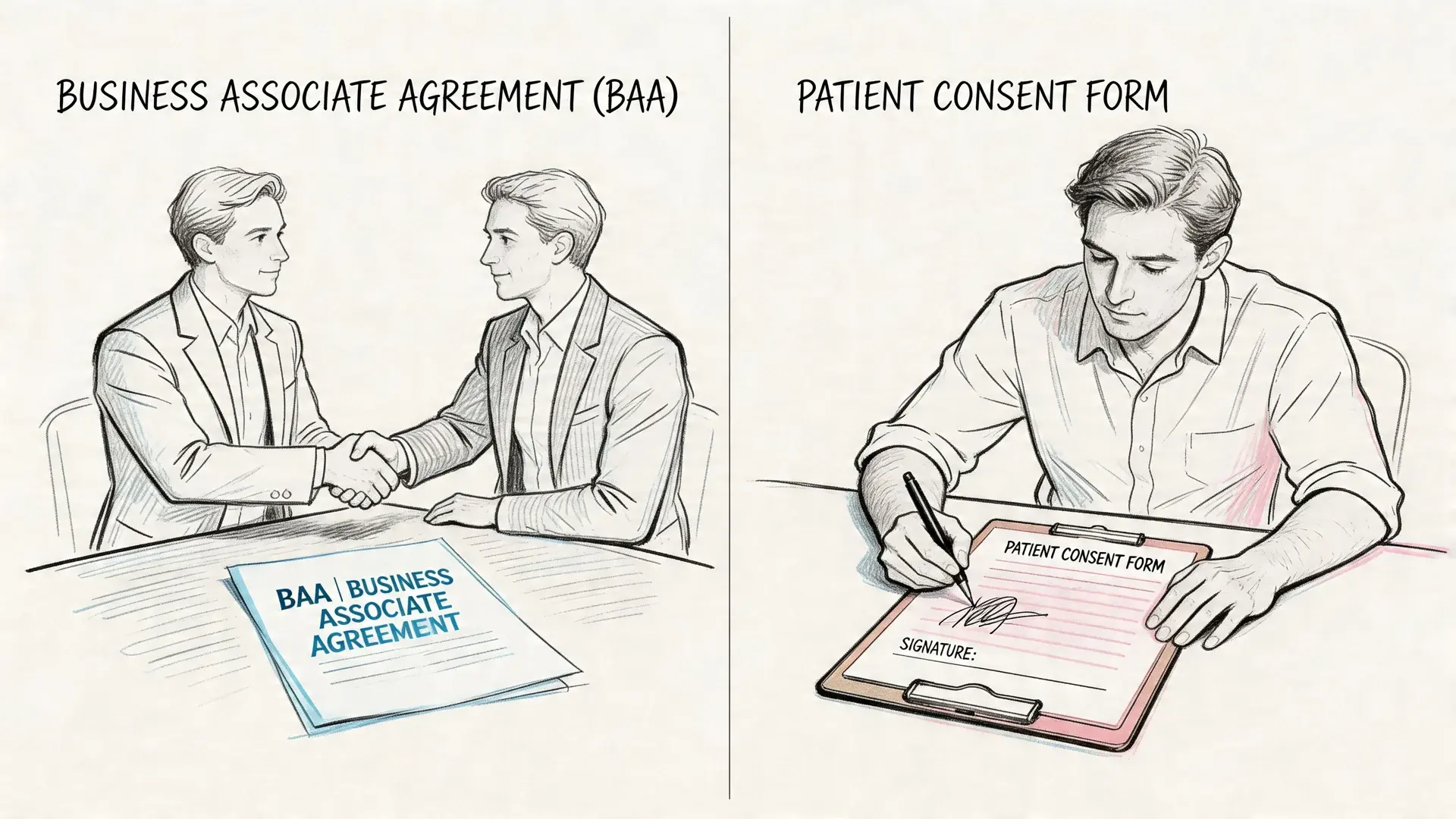
If a vendor handles PHI on your behalf, you need a Business Associate Agreement, or BAA. A covered entity may let a business associate create, receive, maintain or transmit PHI on its behalf only after obtaining satisfactory assurance that it will safeguard the information (45 CFR 164.502(e)). HHS lists a health care app developer that provides patient messaging for a covered entity as an example of a business associate (HHS business associates guidance). Without it, the relationship is incomplete from a compliance standpoint.
A BAA should clarify responsibilities around safeguarding PHI, breach handling, data access, and subcontractor obligations. If a vendor refuses to sign one, that’s usually the end of the evaluation. It doesn’t matter how polished the interface looks.
Be careful with "HIPAA certified" labels. HHS says no standard requires a covered entity to certify compliance and that it does not endorse or recognize private "certifications" (HHS FAQ). What you can verify is the BAA, the controls and how the vendor documents them.
For teams comparing platforms, this overview of a HIPAA compliant communication platform outlines the kind of capabilities buyers typically review, such as secure messaging workflows, documentation, and support for healthcare use cases.
Consent is where many practices get sloppy
Patient preference matters, but preference alone isn't enough if your documentation is weak. HIPAA does not ask for a signed consent before you send routine treatment messages; it asks you to honor reasonable requests for alternative channels (45 CFR 164.522(b)) and, when a patient wants information by an unsecure method such as unencrypted email, to give a brief warning about the risk and confirm the preference (HHS right of access guidance). Separately, the FCC treats a phone number given to a provider as consent for healthcare calls and texts within the scope of that consent (FCC 15-72). Recording the preference where staff can see it is what makes all of this provable. HIPAA penalties are set per violation by tier of culpability (45 CFR 160.404); the inflation-adjusted amounts in 45 CFR 102.3 range from $145 per violation in the lowest tier to $2,190,294 in the highest, with a calendar-year cap of $2,190,294 for identical violations.
That should change how teams collect consent. A verbal “text me if needed” at the front desk is not a strong process. A documented form tied to channel preferences is.
What good consent documentation includes
Your consent workflow should capture:
- Preferred channels: SMS, email, voice, portal, or combinations
- Scope of messages: Administrative reminders only, billing notices, or broader communication
- Risk acknowledgment: The patient understands the limits of less secure channels
- Revocation process: The patient knows how to opt out or change preferences
- EHR storage: Staff can see the preference at the moment of communication
Vendor review questions that actually matter
When practices evaluate communication platforms, focus less on feature lists and more on operational proof.
Ask questions like these:
- Will you sign a BAA?
- How is data encrypted in transit and at rest?
- Can we control user roles and permissions by job function?
- Do you provide audit trails for sent, received, and accessed messages?
- How are voicemail, voice broadcasts, and ringless voicemail logged?
- Can we separate administrative campaigns from more sensitive patient communication?
- How do you handle opt-outs, consent updates, and retention?
One practical way to judge a platform
A useful test is to walk one real workflow through the system. For example: annual recall reminder by SMS, non-responder follow-up by ringless voicemail, and a staff callback for anyone who asks a clinical question. If the vendor can’t show how that workflow is secured, documented, and permissioned, the platform probably isn’t mature enough for healthcare use.
Some organizations use multi-channel systems like Broadcast when they need outbound SMS, voice broadcasting, and ringless voicemail under one operational workflow with HIPAA support and a BAA. The key point isn’t the brand. It’s whether the platform can enforce the communication rules your staff need to follow.
Compliant Message Templates and Best Practices
Templates reduce risk because they remove improvisation. Staff usually make mistakes when they type fast, include context that feels helpful, or reply from habit instead of from policy. Good templates keep messages clear without leaking detail.
There’s also a patient experience reason to do this well. In a Sinch Engage survey of 1,000 US patients (December 2025), 90% said they prefer to receive healthcare communication by text, and 68% said they want two-way texting to ask simple questions or confirm and reschedule appointments (Sinch Engage survey). It is a vendor survey of stated preferences, so treat it as direction, not a benchmark.
Safe templates for common patient messages
Use these as operational examples, not legal boilerplate.
If you send texts under the FCC healthcare exemption, keep them to about 160 characters, include the provider's name and contact information, and tell patients they can reply STOP (47 CFR 64.1200(a)(9)(iv)). For more on cutting missed visits with reminders, see how to reduce patient no-shows, and for scheduled reminder campaigns, SMS reminders.
Appointment reminder by SMS
Template
“Hello [First Name], this is [Practice Name]. You have an appointment on [Day] at [Time]. Reply C to confirm or call [Phone Number] to reschedule. Reply STOP to opt out.”
Why it works:
- Identifies the sender
- Gives a simple action
- Avoids diagnosis or specialty detail
- Includes opt-out language
Follow-up prompt by SMS
Template
“Hello [First Name], this is [Practice Name]. Please call our office at [Phone Number] regarding your recent visit. We’re available [Hours]. Reply STOP to opt out.”
Why it works:
- Moves the conversation to a safer channel
- Doesn’t describe the reason for follow-up
- Gives the patient a clear next step
Secure email notification
Template
“Subject: Message from [Practice Name]
Hello [First Name], we’ve sent you a secure message from [Practice Name]. Please log in to review it or call [Phone Number] if you need help accessing your account.”
Why it works:
- Uses email as a prompt, not as the container for sensitive content
- Limits PHI exposure
- Gives support instructions
Ringless voicemail reminder
Template
“Hello, this is [Practice Name] calling with a reminder to contact our office regarding your upcoming appointment. Please call us at [Phone Number]. Thank you.”
Why it works:
- Appropriate if heard by someone else
- Keeps the message administrative
- Works well for patients who don’t answer live calls
Billing notice by voice or SMS
Template
“Hello [First Name], this is [Practice Name]. We need to speak with you about your account. Please call [Phone Number] during business hours.”
Why it works:
- Avoids discussing balance details in the message
- Directs the patient to a verified contact point
Note that billing texts fall outside the FCC healthcare exemption, which excludes "accounting, billing, debt-collection, or other financial content" (47 CFR 64.1200(a)(9)(iv)(D)). Send them only to patients who agreed to receive them.
Keep the message useful, but stop short of including information that would feel uncomfortable on a speakerphone.
Best practices that improve both safety and response
- Use the minimum necessary detail: Don’t include diagnosis, results, or medication names unless the workflow is built for that level of sensitivity.
- Match the channel to the purpose: SMS and ringless voicemail are strong for reminders. Sensitive follow-up belongs in a secure message or live conversation.
- Standardize staff responses: Don’t let every employee invent their own wording.
- Include opt-out language in SMS: That supports patient preference management and keeps outreach cleaner.
- Design for two-way escalation: If a patient replies with a clinical question, move it out of the basic text thread and into a protected workflow.
For practices building reminder and follow-up flows, these examples around SMS for healthcare can help teams think through how templates, automation, and patient replies should work together.
Common Pitfalls and How to Avoid Them
The biggest communication mistakes in healthcare usually don’t come from obvious negligence. They come from everyday shortcuts that slowly become normal. A team sends one detailed text because the patient asked for it. Someone leaves a specific voicemail because they’re trying to save time. An after-hours answering service relays messages without proper logging, and nobody notices the gap until there’s a complaint.
That after-hours gap is one of the most overlooked risks in the whole workflow. Many practices rely on traditional answering services that work outside the record and lack secure channels and audit trails. An answering service that creates, receives, maintains or transmits PHI on your behalf fits the HIPAA definition of a business associate (45 CFR 160.103), so it needs a BAA and the same documentation standards as your daytime workflow.
Mistakes that show up repeatedly
- Using one channel for everything: Not every message belongs in SMS or voicemail.
- Treating patient preference as blanket permission: Consent has to be documented and scoped.
- Leaving detailed voicemails: If someone else hears it, the disclosure is already out.
- Choosing vendors that won’t sign a BAA: That’s a procurement failure, not a legal technicality.
- Ignoring after-hours workflows: Daytime compliance doesn’t protect nighttime operations.
- Letting staff use personal devices informally: Convenience creates inconsistent records and weak control.
How to tighten the process
The strongest fix is usually simple. Build a communication matrix by message type and channel, then train staff to follow it without improvising.
For example:
| Pitfall | Better practice |
|---|---|
| Detailed reminder text | Send a simple reminder with no sensitive detail |
| Unlogged answering service relay | Use a documented workflow with secure handling |
| Generic vendor security claims | Require a BAA and proof of controls |
| Clinical back-and-forth over SMS | Shift the exchange to a secure or live channel |
The safest practices aren't the ones with the longest policies. They're the ones your staff can follow consistently at 4:55 PM and after hours.
Frequently Asked Questions
| Question | Answer |
|---|---|
| Can we text appointment reminders to patients? | Yes, if the content is limited and your process matches patient preferences and your internal policies. Keep reminders administrative and avoid unnecessary PHI. |
| Can staff send lab results by regular SMS? | That’s usually where teams get into trouble. Sensitive results should move to a more secure channel or a protected message workflow instead of plain texting. |
| Is ringless voicemail allowed for healthcare communication? | It can be useful for administrative outreach such as reminders, callback requests, and office notices. The message should stay general and avoid exposing clinical details. The FCC treats ringless voicemail as a call, so it needs consent (FCC 22-85). |
| What if a patient texts us first? | Patient-initiated communication doesn’t mean every reply is appropriate in the same channel. Staff still need rules for what can be sent back and when to move the conversation elsewhere. |
| Do we need a BAA for a messaging vendor? | If the vendor creates, receives, maintains or transmits PHI on your behalf, yes (45 CFR 164.502(e)). A vendor that won’t sign a BAA creates unnecessary risk. |
| Can we use email for patient communication? | Yes, but the workflow matters. Email works better for secure notifications and administrative communication than for sending detailed PHI in the message body. |
| What should we leave on voicemail? | Keep it minimal. HHS suggests leaving the practice name and number and what is needed to confirm an appointment, or asking the patient to call back (HHS FAQ 198). |
| How should we handle after-hours messages? | Treat after-hours communication as part of your main compliance program, not as a separate informal process. The same standards for documentation, security, and escalation should apply. |
What are the 5 basic rules of HIPAA?
HHS does not publish an official list of five. The rules practices usually mean are the Privacy Rule (how PHI may be used and disclosed), the Security Rule (safeguards for electronic PHI), the Breach Notification Rule (notice after a breach of unsecured PHI), the Enforcement Rule (investigations and penalties) and the Omnibus Rule of 2013, which implemented HITECH Act provisions and finalized the Breach Notification Rule (HHS HIPAA for Professionals). Separate administrative simplification standards cover transactions, code sets and identifiers.
What is the new HIPAA rule in 2026?
As of October 19, 2026, the main pending change is the Security Rule proposal HHS published on January 6, 2025; it is not final, and the current Security Rule remains in effect (HHS). The 2024 reproductive health privacy rule was largely vacated by a court in June 2025, while the updated notice of privacy practices requirements applied from February 16, 2026 (HHS). Check HHS for updates before changing your policies.
Is there a HIPAA compliant ChatGPT?
No AI tool is HIPAA compliant on its own; what matters is whether the vendor signs a BAA and how you use it. OpenAI says it offers BAAs for its API services on request, and for ChatGPT only to sales-managed ChatGPT Enterprise or Edu customers, plus a separate flow for eligible clinicians using ChatGPT for Clinicians; it does not offer a BAA for ChatGPT Business (OpenAI Help Center). Without a BAA, keep PHI out of the tool.
Is WhatsApp HIPAA compliant?
No messaging app is HIPAA compliant by itself, and HHS does not certify apps. WhatsApp's own Business Messaging Policy says not to use WhatsApp to send or request health related information where regulations prohibit sending it to systems that do not meet heightened requirements for health information (WhatsApp Business Messaging Policy). For PHI, use a vendor that signs one; our review of HIPAA compliant texting platforms compares options.
What is a HIPAA compliant voicemail message?
One that would be fine if someone else heard it. Following HHS FAQ 198, leave the practice name, a callback number and, if needed, the appointment date and time, with no diagnosis, results or specialty. Example: "Hello, this is [Practice Name] calling about an upcoming appointment. Please call us at [Phone Number]. Thank you." For texting rules, see our guide to health care SMS.
If your team needs a practical way to manage hipaa compliant patient communication across SMS, voice, and ringless voicemail without relying on scattered tools, Broadcast offers a multi-channel outbound messaging platform with HIPAA support and BAA availability for healthcare workflows. It’s built for reminders, follow-ups, and coordinated patient outreach that needs to stay documented, controlled, and easy for staff to use.


