
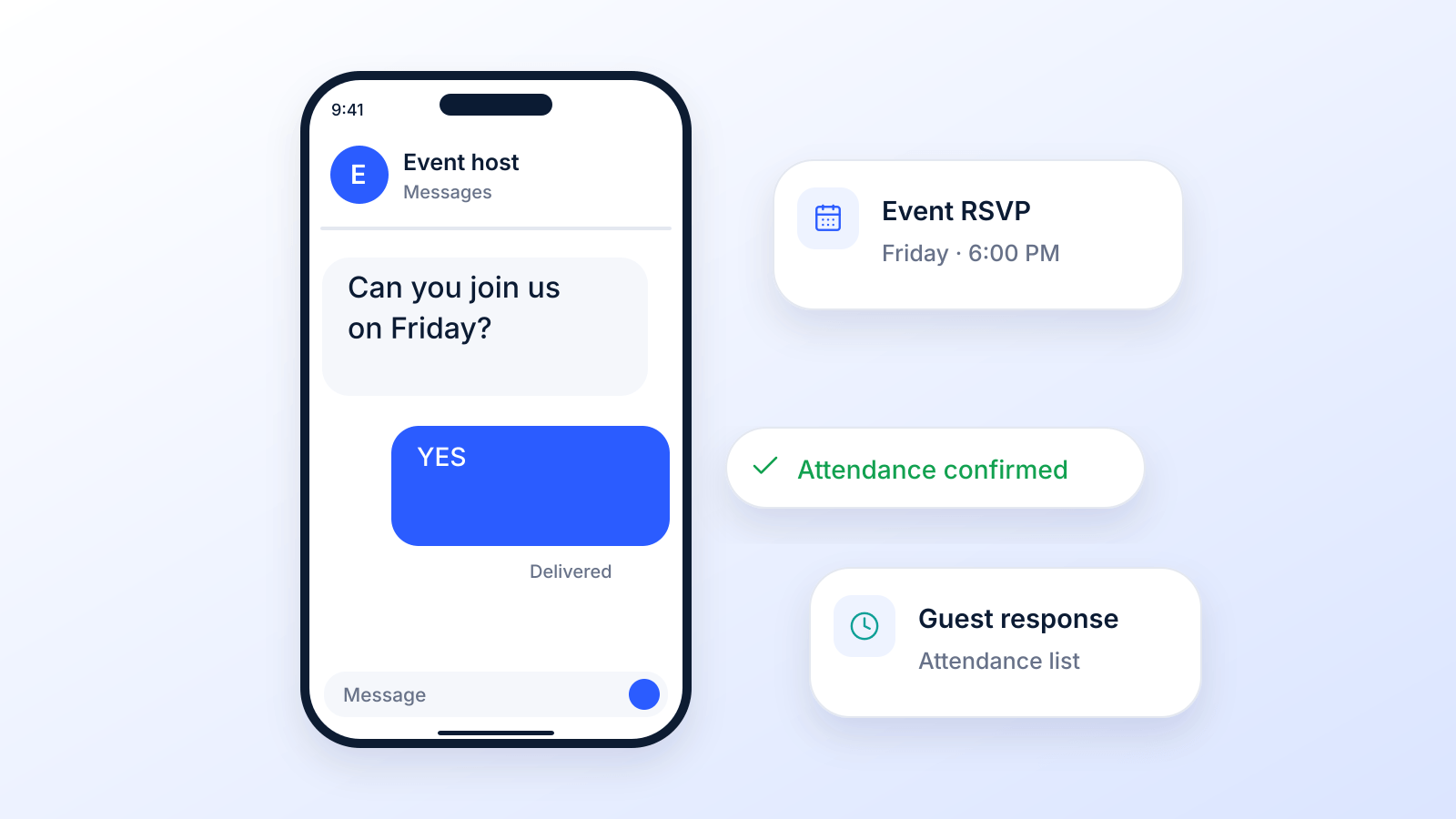
You sent the invite. Replies start coming in from everywhere. A few guests text “yes,” one sends a thumbs-up emoji, someone emails their meal choice, and another leaves a voicemail without saying whether they’re attending.
That’s where event planning gets messy fast.
If you want a clean headcount, fewer follow-ups, and a process that doesn’t eat your afternoon, you need a structured way to handle how to RSVP by text message. For guests, that means replying in a format the host can use. For organizers, it means building a system that captures replies, sorts them, and triggers the right follow-up without manual work.
Text works because people see it quickly and respond with less friction than email or phone. The best setups keep the guest experience simple and keep the organizer out of spreadsheet chaos.
Jump to RSVP replies to copy if you are a guest, or to how to collect RSVPs by text and confirmation texts if you are the host.
Why Text Message RSVPs Are a Game Changer
Text RSVPs shorten the gap between invitation and answer. A guest gets the message, taps a reply, and you have a usable response instead of a loose promise buried in email, DMs, or voicemail.

That speed matters on both sides. Guests get a low-effort way to respond from the device they already use all day. Organizers get replies in a format that can be tracked, sorted, and followed up automatically.
Why organizers use text
SMS works best when the goal is fast confirmation and less manual cleanup. Instead of reading through varied replies and updating a spreadsheet by hand, you can ask for a simple keyword such as YES, NO, or MAYBE and let your system do the sorting.
The operational benefit is straightforward:
- Cleaner data: Standard replies make attendance status easier to capture correctly.
- Less manual work: Automation can tag responses, update counts, and trigger reminders.
- Faster follow-up: Non-responders can get a reminder by text, and higher-touch campaigns can add ringless voicemail or another channel for key segments.
- Better planning: Early response patterns show whether you need to adjust outreach, venue counts, or reminder timing.
The difference is biggest on mid-size and large guest lists. Once replies start coming in from multiple places, the admin work grows fast. Text keeps the intake process tighter.
Why guests respond faster
Guests usually do not want extra steps. They do not want to open a form, remember a password, or guess what details the host needs. A short text reply removes that friction.
That is the advantage.
A well-written RSVP text tells the guest exactly what to do and gives them the easiest possible action. Reply YES. Reply NO. Reply with your total count. Clear instructions raise response quality, not just response speed.
The channel only works if the setup does
Sending RSVP texts from a personal phone can work for a small dinner. It breaks down quickly for business events, fundraisers, school functions, and any event with follow-ups, reminders, or segmented messaging. A proper two-way SMS setup gives organizers message history, keyword handling, contact organization, and automation rules. If you need a quick primer, this overview of how SMS messaging works covers the basics.
There is also a compliance side that gets ignored too often. If you are collecting RSVPs by text for organized outreach, especially at scale, consent and TCPA rules need to be part of the setup from day one. The fastest RSVP system is not very useful if it creates legal risk.
Replying to an RSVP Text the Right Way
If you’re the guest, the job is easy. Reply clearly enough that the host or their system can record your answer without guessing.
The safest format is: your name, your answer, and your guest count.
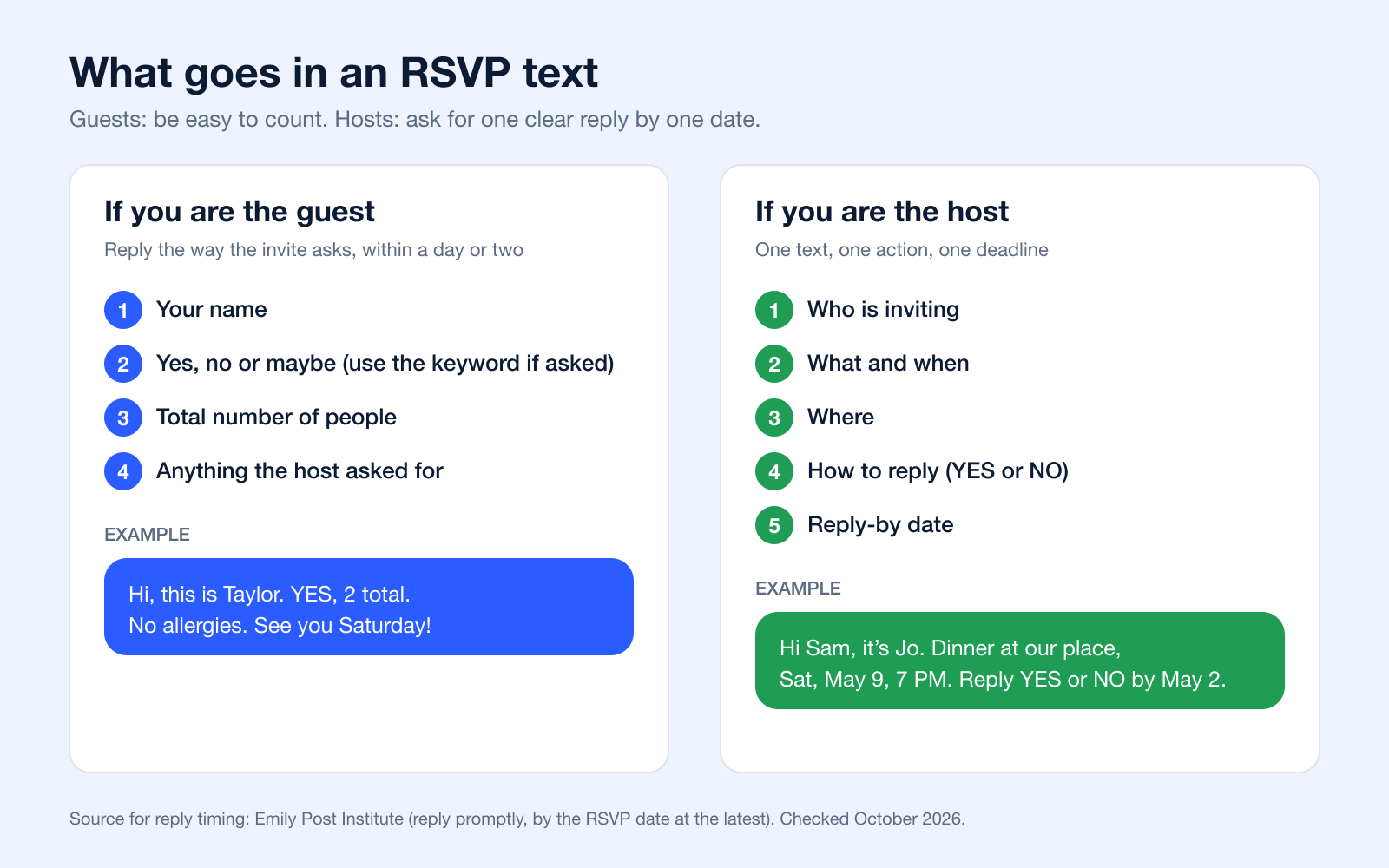
Timing matters as much as wording: etiquette guidance from the Emily Post Institute is to reply within a day or two of getting an invitation, and by the RSVP date at the latest.
What to look for in the invitation
Before replying, check whether the text asks for:
- A keyword: YES, NO, MAYBE, or a custom word
- A guest count: just you, or total attendees
- A deadline: reply by a certain day
- Any special info: meal choice, child count, or a question link
If the text says “Reply YES,” send exactly that unless it also asks for more detail. Automated systems often look for a specific keyword first.
Use simple replies that match the instructions
If the invitation is casual and not automated, a little extra context helps. If it’s automated, keep your first response clean and direct.
Here’s a practical cheat sheet:
| Scenario | Example Reply | Why It Works |
|---|---|---|
| Attending solo | Hi, this is Alex. YES. Just me. | Includes identity, answer, and headcount |
| Attending with guest | Hi, this is Alex. YES, 2 total. | Gives the full total, not just “+1” |
| Declining | Hi, this is Alex. NO, but thanks for inviting me. | Clear answer, still polite |
| Maybe | Hi, this is Alex. MAYBE. I’ll confirm tomorrow. | Gives the host a timeline |
| Needs detail first | Hi, this is Alex. Is there parking on-site? I can confirm after that. | Keeps the question specific |
| Late response | Hi, this is Alex. Sorry for the delay. YES if there’s still room, just me. | Acknowledges timing and avoids assumptions |
What guests should avoid
Some replies create work for the organizer:
- “Sure” or “probably” without a firm answer
- Emoji-only replies that an automated system may not sort correctly
- “I’m coming with my wife” without the total number
- Questions mixed into the keyword reply when the invite asked for one exact response first
If the invite gives you a keyword, send the keyword first. Ask your follow-up question after the system records your RSVP.
Copy-and-paste guest templates
You can use these as-is:
- Yes: Hi, this is Taylor. YES. One person.
- Yes with guest: Hi, this is Taylor. YES. Two people total.
- No: Hi, this is Taylor. NO. Thank you for the invitation.
- Maybe: Hi, this is Taylor. MAYBE. I’ll confirm by Friday.
- Question first: Hi, this is Taylor. Are guests included? I can confirm once I know.
For guests, good RSVP etiquette isn’t about sounding formal. It’s about being easy to count.
Need more wording? The next section has replies for every situation, including declining politely and changing your answer.
RSVP Text Replies to Copy for Every Situation
The cheat sheet above covers the basics. These are fuller replies for the situations people search for most: saying yes with details, declining kindly, buying a little time, and changing your answer. Swap in your own names and details. If the invitation asks for a keyword (YES, NO, MAYBE), put the keyword first so an automated system can count it.
Saying yes
Declining politely
When you are not sure yet
Late replies and changed plans
Replying to a birthday invite? See the guest replies in our guide to birthday invitation text messages.
How to Collect and Automate SMS RSVPs
Manual RSVP tracking breaks down quickly. Once replies start landing, you need structure. The strongest setup uses a dedicated text-enabled number, a simple keyword, and automations that sort contacts the moment they reply.
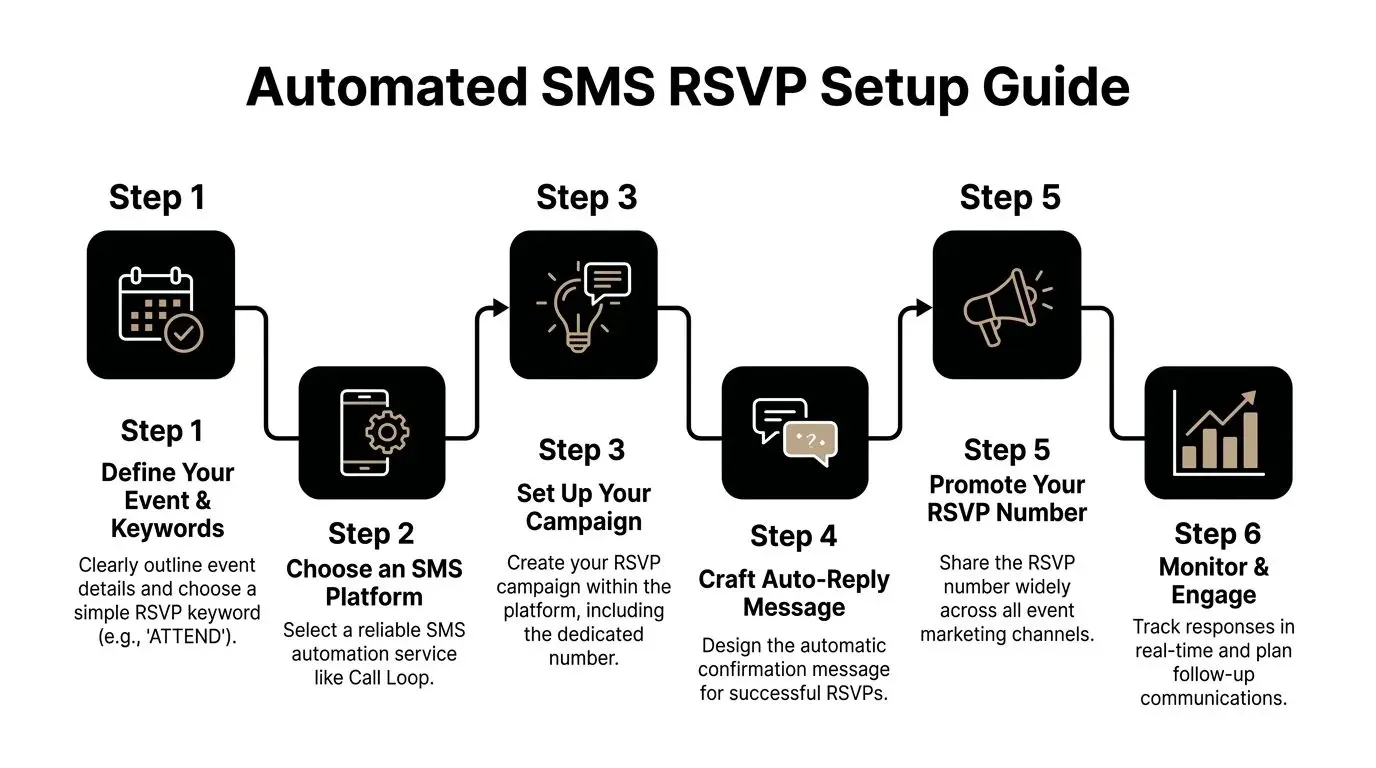
Texting is where most guests already are: Americans exchanged nearly 2.2 trillion SMS and MMS messages in 2024, according to the CTIA 2025 Annual Survey. To keep up with replies at scale, teams connect their texting tool to their CRM or spreadsheet through integrations such as Zapier or HubSpot, and clean their number lists before sending.
Start with the response path
Before you write a single invite, decide what you need the guest to do.
For most events, the cleanest workflow is:
- Guest receives a text invite.
- Guest replies with YES, NO, or MAYBE.
- The system adds them to the matching segment.
- Each segment gets its own follow-up.
That sounds basic, but it solves the biggest operational problem. You’re not reading and interpreting free-form replies one by one.
Choose the keyword carefully
Custom keywords work best when they’re short, memorable, and tied to the event. A wedding might use a branded phrase, while a nonprofit dinner might use the event name.
A few practical rules help:
- Keep it obvious: Guests shouldn’t have to guess spelling.
- Avoid overlap: Don’t use a keyword that could appear in unrelated conversations.
- Match the event: “GALA24” is easier to manage than a vague word like “JOIN.”
If you're planning a wedding or another guest-heavy event, a dedicated planning tool can help keep household details, meal choices, and attendance notes organized. A wedding guest list or RSVP tool is useful when your RSVP workflow needs more than a plain spreadsheet.
Group text or individual texts?
For a small party among friends, a group text is quick. It also shows every member to the rest of the group, and replies can turn into a long thread. What guests see depends on the type of group:
- In group iMessage and group MMS, members see all responses from the group (Apple).
- In group SMS, replies come back as individual texts and recipients can't see the other responses (Apple).
- Google Messages has a "Mass text" setting that sends an SMS to everyone and brings replies back to you individually (Google Messages Help).
If guests don't know each other (school parents, clients, coworkers and family together), send individual texts or use a tool that keeps replies private. More options are in our guide to blind copy (BCC) for text messages.
Build your automation around decisions
The best automation doesn’t stop at “attending” and “not attending.” It routes people based on what happens next.
For YES replies
Send a confirmation immediately. Include the event name, date, time, and any next step. If you need meal choices or plus-one details, ask after the initial confirmation so you don’t clog the first reply.
For NO replies
Acknowledge the decline politely. If appropriate, move that contact into a future-invites segment so you don’t keep texting them about the same event.
For MAYBE replies
Here, automation earns its keep. Schedule a reminder closer to the RSVP deadline. MAYBE contacts are often recoverable if the follow-up is timely and specific.
A maybe list should never sit untouched. It’s the segment most likely to convert with a well-timed reminder.
Personalization matters, but only when it stays clean
Use merge tags for the guest’s first name, event date, or location. Keep the personalized fields limited to details you know are accurate. Broken personalization damages trust fast.
A practical invite might include:
- First name
- Event title
- RSVP deadline
- One response instruction
If you’re also sending digital invites, this guide on how to send an evite via text message is a useful companion to your RSVP workflow.
Keep the dashboard usable
A strong organizer view should show:
| Need | What to track |
|---|---|
| Attendance status | YES, NO, MAYBE |
| Party size | Total guests attending |
| Follow-up status | Confirmed, reminded, unresolved |
| Special notes | Dietary needs, accessibility, questions |
| Message history | Invite sent, reply received, reminder sent |
If your system can’t quickly show those fields, you’ll end up rebuilding the data manually.
What works and what doesn’t
What works
- Single-keyword replies: Easy for guests and easy for automation
- Immediate confirmations: Guests know their response was received
- Segment-based reminders: Only text the people who need the next message
- Validated numbers: Cleaner delivery and fewer dead records
What doesn’t
- Open-ended first replies: They create messy inboxes
- Mixing every question into the invite: Too much friction up front
- Using a personal phone: No audit trail, no segmentation, no consistency
- Waiting until the last minute: You lose time to correct weak response pockets
The cleanest RSVP systems feel simple to the guest because the organizer did the setup work early.
Writing RSVP Texts That Get Instant Replies
The effectiveness of your RSVP system depends heavily on the clarity of your message. A solid workflow still stalls if the first text makes people stop and think about how to respond.
Fast replies usually come from copy that does three things well. It identifies the event, gives one clear action, and removes small points of friction that cause delay. That matters for both sides. Guests want a low-effort reply. Organizers need responses that map cleanly into automation, reminders, and follow-up.
Start with one job for the message
The first RSVP text should collect the RSVP. Save parking instructions, meal choices, guest count, and schedule details for the confirmation flow or the next message.
That trade-off matters. A fuller message can reduce follow-up questions, but it also lowers the odds of an immediate reply. For attendance campaigns, a clean YES or NO first, with the rest automated, usually beats one crowded text that creates hesitation.
The first RSVP text should earn the reply, not explain the whole event.
What every RSVP text needs
A strong invite usually includes:
- Who it’s from: enough context to be recognized right away
- What the event is: short, specific wording
- When it is: date, day, or time
- How to reply: one exact keyword or instruction
- When to reply: a deadline that gives the guest a reason to answer now
Good, better, best examples
Good
Hi Alex, you’re invited to our client dinner this Thursday at 6 PM. Reply YES or NO.
Clear and usable. For informal events, this is often enough.
Better
Hi Alex, you’re invited to our client dinner on Thursday at 6 PM at River House. Reply YES or NO by Tuesday.
This version adds two useful details. The location helps guests decide faster, and the deadline helps organizers close the list sooner.
Best
Hi Alex, join us for our client dinner Thursday at 6 PM at River House. Reply YES or NO by Tuesday. We’ll text details after your reply.
This version does more than ask for a response. It tells the guest what happens next, which cuts uncertainty and supports an automated follow-up sequence.
Copy choices that improve response speed
Some wording patterns hold up well in real RSVP campaigns:
- Use direct verbs: “Reply YES” is easier to process than “Let us know if you can make it.”
- Keep the reply format simple: YES, NO, or MAYBE works better than open-ended answers if you want clean reporting
- Set one deadline: A specific cutoff reduces procrastination
- Write for mobile reading: Short sentences and one action line are easier to answer from a lock screen
- Match the workflow behind the message: If your platform expects keywords, the copy should train guests to use them
That last point gets missed a lot. If your automation depends on keyword triggers, free-form copy creates cleanup work. If guests text back “I think so,” “probably,” or “sounds good,” someone has to interpret that manually or build extra logic to catch variations.
Common writing mistakes
Asking for too much at once
A long invite makes the RSVP instruction easier to miss. It also raises the effort required to answer.
Using vague response language
“Respond if interested” sounds polite, but it produces messy replies. “Reply YES or NO by Friday” gives guests a clear path and gives the organizer structured data.
Sounding overly formal
Formal wording often slows people down because they have to translate the request before replying. Plain language performs better in text.
Forgetting the automation handoff
A text can read well and still fail operationally. If the guest replies in a format your system cannot tag, route, or trigger, the copy is doing half the job.
For more short, practical templates, this collection of text message examples is useful when you’re refining RSVP copy.
A simple writing formula
Use this structure:
[Name] + [event] + [time/date] + [reply keyword] + [deadline]
Example:
Hi Jamie, we’d love to see you at our fundraising breakfast on May 14 at 8 AM. Reply YES or NO by Monday.
That format works because it respects how people text back. It also gives organizers a clean input for segmentation, confirmation messages, and compliant follow-up later in the campaign.
Beyond the RSVP: Advanced Outreach Strategies
A YES reply is not the finish line. It’s the handoff point into attendance management.
People forget. Schedules shift. Good organizers keep confirmed guests engaged without over-texting them. The smartest campaigns use a sequence that changes by RSVP status and uses more than one channel when needed.
Build a post-RSVP sequence
After someone replies YES, send messages that reduce uncertainty and keep the event top of mind.
A practical sequence often includes:
- Confirmation text: basic details and acknowledgment
- Reminder text: sent closer to the event with the essentials
- Day-of text: parking, entry instructions, room name, or check-in note
- Follow-up text: thank-you message, feedback request, or next-step offer
For MAYBE contacts, the sequence should be different. They need a deadline reminder or one concise nudge, not the same stream as confirmed attendees.
Confirmation and reminder texts to copy
Confirming an RSVP is short and specific: thank the guest, repeat the key details, and say what comes next. Remind only the people who have not answered, not the whole list.
If you run events for customers and send these at scale, see how SMS reminders work in Broadcast.
Where ringless voicemail fits
Ringless voicemail works well when another text would feel repetitive but a more personal touch would help. It can be especially useful for high-value events, executive briefings, donor gatherings, school functions, and healthcare outreach where tone matters.
A few strong use cases:
- Host message to confirmed guests: A short voice note can feel more personal than another written reminder.
- VIP reminder: If a small segment matters more, a voice drop helps distinguish that message from routine texts.
- Last-call follow-up for MAYBEs: Sometimes hearing a human voice creates enough urgency to get a final answer.
Related terms you’ll hear include voicemail drops, RVM, direct-to-voicemail, and ringless voicemail campaigns. The core idea is the same. The message lands in voicemail without interrupting the recipient with a live ringing call.
Use ringless voicemail when voice adds warmth or importance. Don’t use it as a substitute for a badly written RSVP text.
Multi-channel works when each channel has one job
Organizers get sloppy here. They copy the same message into text, email, and voicemail. That creates fatigue.
A better division of labor looks like this:
| Channel | Best job |
|---|---|
| SMS | Fast response, reminders, urgent logistics |
| Full agenda, maps, attachments, formal details | |
| Ringless voicemail | Personal reminder, host message, VIP touch |
| Voice call | Escalation for exceptions or high-priority attendance |
The key trade-off is attention versus detail. SMS gets seen fast. Email carries more context. Ringless voicemail adds personality without creating a live interruption. Used together, they support attendance instead of competing with each other.
Common Questions About Text Message RSVPs
What if guests don’t use the exact keyword?
Build fallback handling for common variations. People will send “yes!”, “y,” or “I’ll be there.” Review unmatched replies regularly and map obvious variants into your attendance buckets when possible.
How should I collect plus-ones?
Don’t ask for too much in the first reply if speed matters most. Confirm the RSVP first, then send a follow-up asking for total guest count if needed. That keeps the initial action simple and the record cleaner.
Can I send RSVP texts internationally?
Yes, but international texting adds formatting, local compliance, and deliverability considerations. Test by country before launch and keep reply instructions as simple as possible.
When should I use ringless voicemail instead of another text?
Use it when a message needs human tone, not just information. A host reminder, donor note, executive invitation, or warm follow-up for key attendees can work better as voicemail than as one more text.
Where can I publish my texting terms?
Keep your SMS disclosures easy to access and easy to understand: on the sign-up form or page where people give their number, with a link to your terms and privacy policy. For what to include, see section 5.1 of CTIA's Messaging Principles and Best Practices.
What do you say when you RSVP by text?
Your name, a clear yes or no, and how many people are coming, plus anything the host asked for (a meal choice, allergies). "Hi, this is Taylor. YES, 2 total. Thanks for the invite!" covers it. More wording is in RSVP replies to copy.
Is it OK to RSVP by text?
Yes, when the invitation came by text or lists a number to text. If a formal invitation asks you to reply by card, website or phone, use that method so the host's count stays in one place. Either way, reply within a day or two and by the RSVP date (Emily Post).
How do you politely confirm an RSVP?
As the host, thank the guest, repeat the date, time and place, and say what comes next: "Thanks, Sam! You're confirmed for Saturday at 7 PM. We'll text parking details the day before." There are six ready-to-copy versions in confirmation and reminder texts.
How do you RSVP on WhatsApp?
The same wording works in WhatsApp or any messaging app. If the invitation was posted in a group chat, reply to the host in a direct message unless they asked everyone to answer in the group, so the chat does not fill up with replies.
Can guests RSVP by text only?
Yes, if the host says so. Put one instruction and one date in the invitation, such as "Reply YES or NO to this number by May 2," and keep a simple list as answers arrive. For large events, a form link or an RSVP tool keeps answers in one place.
If you want to automate RSVP texts, segment replies, send follow-ups, and add voice or ringless voicemail into the same workflow, Broadcast gives you one place to run the whole process. It’s built for teams that want faster response handling without the manual cleanup.


