
“How can I tell which phone numbers are landlines or mobile phones?”
That question usually comes up right before someone imports a list for SMS and realizes they do not know which contacts are textable. In our experience, that is the primary job of a line-type lookup: not curiosity, but preventing wasted sends, bad routing, and avoidable delivery failures.
You can’t send a text message to a landline phone!
PhoneCheckr was built to answer that practical question before you launch a campaign. Instead of treating a phone list as one big bucket, it helps separate mobile numbers from landlines and VoIP lines so you can choose the right channel.
Here’s what PhoneCheckr reports:
- Carrier information
- Line type classification: mobile, landline, or VoIP
- Country code
- Bad or malformed numbers
- Local formatting
- Number-format issues
- Mobile country code
Not sure what a VoIP number is in the first place? Start with our guide to what a VoIP number is, then come back here to learn how to check one.
Phone Line Types Explained: Mobile, Landline, VoIP and Toll-Free
A phone number lookup sorts every number into a line type. The names vary a little between providers, but most follow the same categories. The definitions below come from Twilio's Lookup documentation (updated July 24, 2026) and the FCC.
| Line type | What it is | Can it receive SMS? | Source |
|---|---|---|---|
| Mobile | A cell phone number on a wireless carrier | Generally yes | Twilio |
| Landline | A fixed, wired line such as a home or office phone | Generally no. Some carriers can turn a text into a voice message (for example, Verizon Text to Landline, only to White Pages listed US landlines) | Twilio, Verizon |
| Fixed VoIP | A virtual number tied to a physical device or address, such as cable or internet phone service (Twilio cites Comcast and Vonage) | Only if the provider enables texting on that number | Twilio |
| Non-fixed VoIP | A virtual number obtained online without a physical device (Twilio cites Google Voice) | Often yes, but some senders, such as banks, will not text these numbers | Twilio, Google Voice Help |
| Toll-free | Numbers starting with 800, 888, 877, 866, 855, 844 or 833, usually businesses | Only if the number is "text enabled" | FCC |
| Other | Lookups can also return personal, pager, voicemail-only, premium, shared-cost or unknown | Varies; treat as review | Twilio |
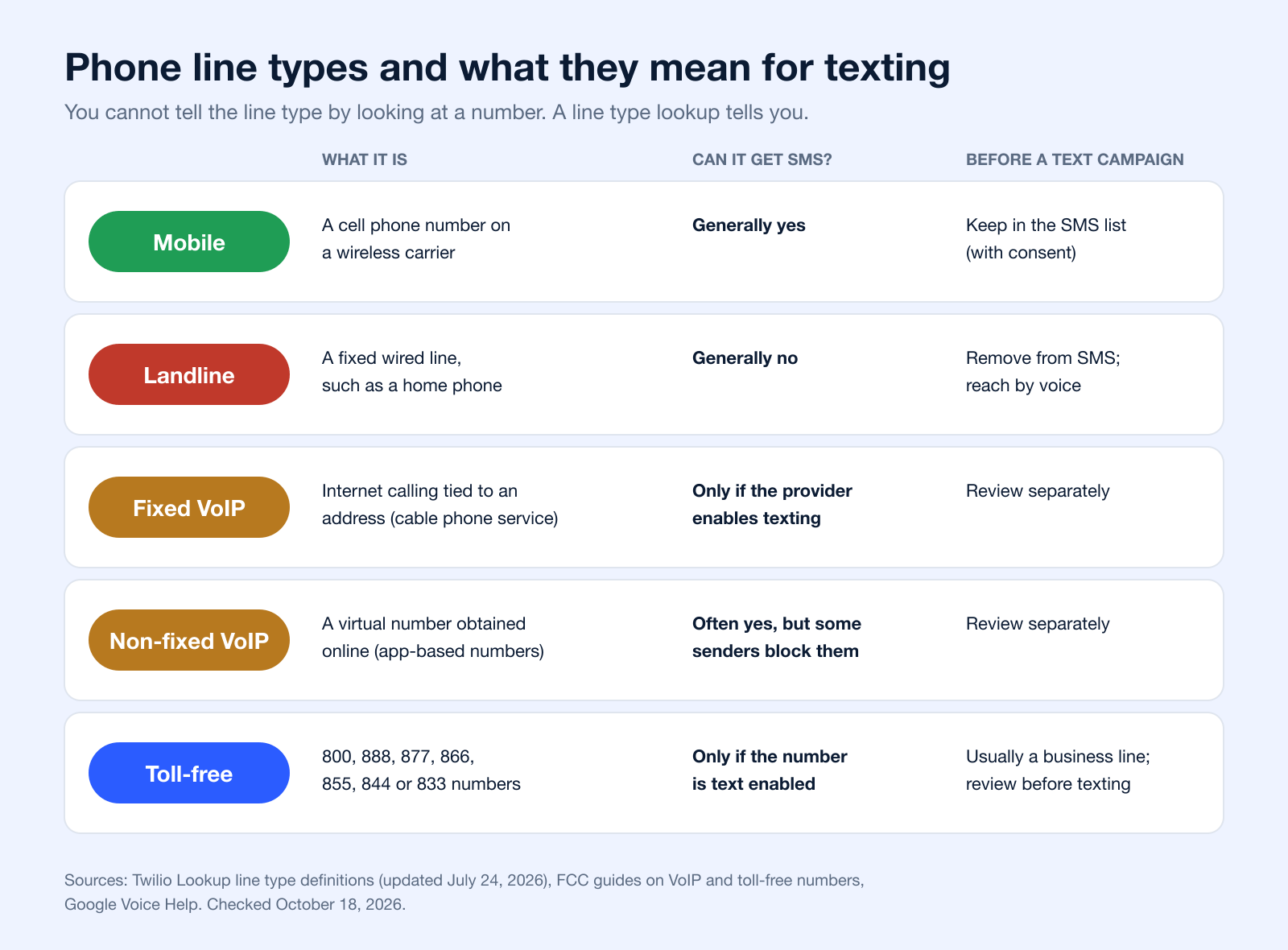
The FCC describes VoIP as "a technology that allows you to make voice calls using a broadband Internet connection instead of a regular (or analog) phone line" (FCC: Voice over Internet Protocol). The fixed versus non-fixed split matters for lists: a fixed VoIP line usually belongs to a home or business with a registered address, while a non-fixed number can be created online in minutes.
How to Tell if a Number Is VoIP
What Does a VoIP Number Look Like?
Exactly like any other number. In the US and Canada, a VoIP number has a three-digit area code and seven more digits, the same as a mobile or landline number, and in international E.164 format it starts with + and the country code (up to 15 digits in total, per Twilio's E.164 guide based on ITU-T E.164). The area code does not reveal the line type either: the FCC says numbers can be ported "between wireline, IP and wireless providers" (FCC: porting). The one exception is toll-free codes (800, 888, 877, 866, 855, 844, 833), which tell you it is toll-free, not which technology carries it.
Four Ways to Check if a Number Is VoIP
| Method | How it works | Best for | Limits |
|---|---|---|---|
| Online lookup tool | Type one number or upload a CSV; the tool returns line type, carrier and validity | One-off checks and list cleaning without code | Free tiers usually cover format checks or a few lookups; full carrier data is usually paid |
| Lookup API | Your app or CRM sends each number to a line type API and stores the result | Sign-up forms and recurring imports | Needs a developer; line type is often a paid add-on to free format validation (Twilio Lookup) |
| Carrier lookup | Find the current carrier, then infer the line type from it (for example, a cable company usually means fixed VoIP) | Rough checks | Ported numbers make prefix-based guesses unreliable (FCC) |
| Manual clues | Search the number, call it, or send one test text and watch for a failure | A handful of numbers | Slow, inconclusive and, for business texts, still subject to consent rules |
For campaign lists, a lookup tool or API is the only method that scales. Whatever you use, run it close to the send date: a number checked last year may have been ported or reassigned since.
How to Tell if Your Own Phone Service Is VoIP
- Your phone plugs into a router or adapter instead of a wall jack, or you call through an app or computer. The FCC lists these setups as VoIP (FCC).
- Your phone stops working when the internet or power goes out. The FCC warns that VoIP "may not work during a power outage or when the internet connection fails" (FCC: VoIP and 911).
- Your provider is a cable or internet company, or an app such as Google Voice.
- When in doubt, the FCC suggests asking your provider whether the service is interconnected VoIP.
Can a VoIP Number Be Texted?
Often, yes, but not always. Whether a VoIP number can receive a text depends on the provider behind it and on who is sending:
- Many app-based numbers handle texts. Google Voice, for example, sends texts at no charge to US, Canadian and Puerto Rican numbers, but it cannot send texts to five- or six-digit short codes (Google Voice Help).
- Some senders choose not to text VoIP numbers. Google notes that "some websites, such as banks or subscription services, won't send text messages to Google Voice numbers."
- Fixed VoIP numbers from cable or internet phone providers may be voice only unless the provider has enabled texting on them.
- Toll-free numbers can receive texts only if they are "text enabled" (FCC).
That is why a lookup report shows VoIP separately instead of grouping it with mobile. For more on what happens when a text goes to a fixed line, see can you text a landline phone, and if messages fail for other reasons, our guide to why text messages are not delivered.
How We Evaluated PhoneCheckr for VOIP, Mobile, and Landline Lookup
PhoneCheckr is designed to be used by an SMS team by looking at whether it helps clean a list before sending, whether the output is easy to act on, and whether the classifications are useful enough to split traffic between text and voice. Core questions include: Does it identify line type clearly? Does it flag junk formatting before you pay to message bad records? And does the report make it obvious what to suppress, what to text, and what to move to a voice workflow?
It also helps to look at any checker through a list-hygiene lens rather than a pure data-enrichment lens. The primary benefit is not “learning everything” about a number; it is avoiding obvious mistakes at scale. A useful checker should normalize formatting, surface carrier and country details, and return results in a format that a marketer or ops person can export and use immediately.
What would count as a failure here? Ambiguous classifications, no warning on malformed numbers, or a report that tells you a number is non-mobile without helping you segment it out of an SMS send. That matters more now because cloud calling keeps expanding; the VoIP market alone is projected to grow sharply over the next few years according to Zoom's VoIP statistics roundup, which means more mixed-quality contact data and more virtual numbers showing up in customer lists.
How Can I Use Phonecheckr ?
The most useful reason to run a lookup is before bulk messaging. If you upload an older CRM export, a purchased event list, or a CSV that has been touched by multiple people, line-type checking helps you remove SMS-ineligible landlines, separate likely mobile contacts from VoIP entries, and cut down on wasted sends. We use this kind of report as a first pass before any larger text campaign because it is faster to clean the list once than to pay for failed attempts over and over.
It is also useful when your database is mixed-quality. A lot of teams have one file that includes opt-ins from forms, call-ins from sales, support callbacks, and manually entered records. In that situation, PhoneCheckr gives you a fast way to review a CSV, identify numbers that are probably better suited for voice, and segment out lines that should not be treated like standard mobile recipients. If you run both calling and texting, the tool becomes operational rather than informational.
In practice, a VoIP number lookup is checking a few things at once: whether the number is formatted as a real phone number, what carrier data is attached to it, what line type it currently maps to, and what country code it belongs to. That combination is what makes the result useful. A raw number by itself does not tell you whether it belongs in an SMS campaign; a line-type report usually does.
From a messaging perspective, mobile numbers are usually the best candidates for SMS, landlines are generally a poor fit for texting, and VoIP sits in the middle because the number may be valid but not ideal for the same workflows as a standard mobile line. The complication is that line type is not frozen forever. Numbers can be ported between wireline, IP and wireless providers under FCC number portability rules, so a checker gives you a useful current snapshot, not an eternal truth.
If your use case extends into voice operations, emergency routing, or business telephony compliance, the surrounding VoIP setup matters too; the FCC's guide to VoIP and 911 service explains why VoIP numbers need an accurate registered address and may not work during power or internet outages. It is a helpful companion read when a number is clearly better handled in a calling workflow than in SMS.
How It Works
Start with an Excel or CSV file of phone numbers and import it on the homepage.
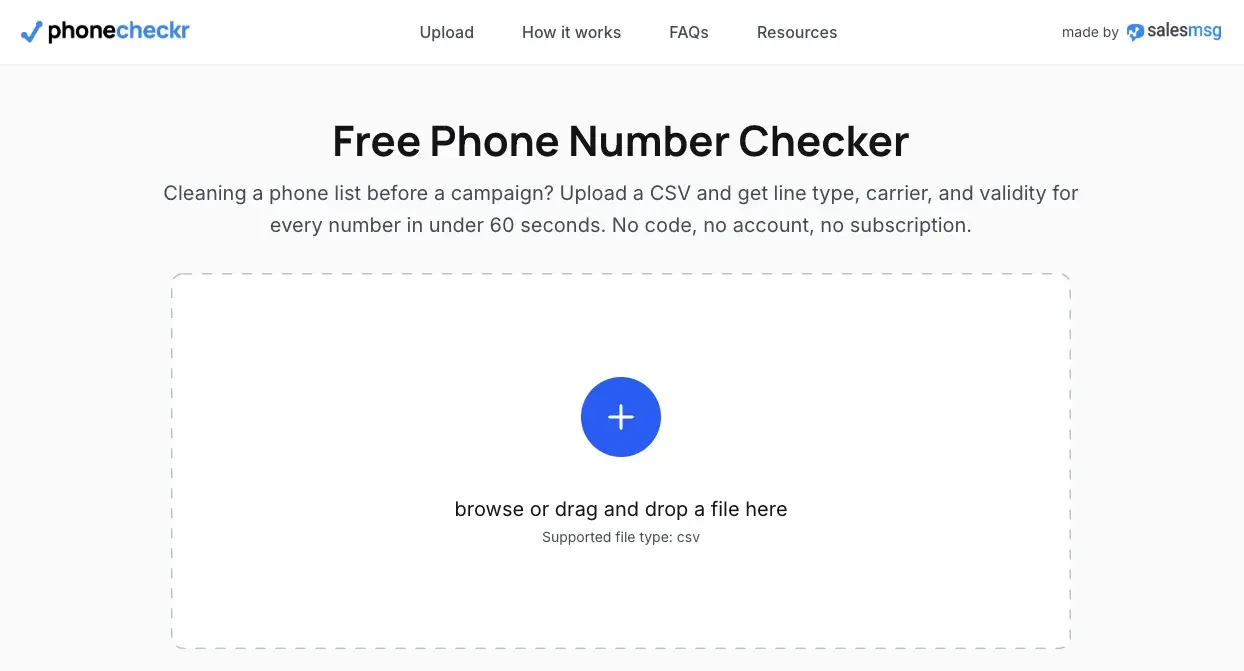
Once the file is uploaded, the first job is normalization. That means cleaning obvious formatting issues, standardizing local and international number presentation, and identifying records that are malformed before they create downstream problems. This step matters early because bad formatting is one of the easiest reasons for a list to look bigger than it really is.
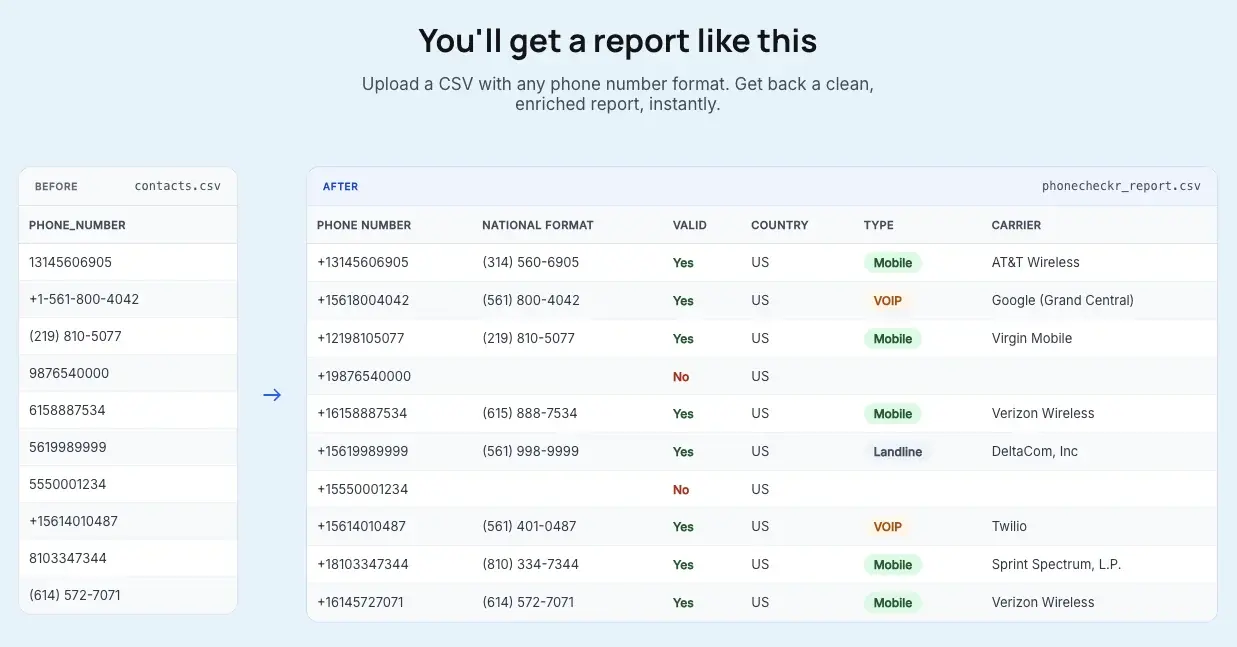
After that, PhoneCheckr runs the lookup against carrier and line-type data. The output classifies numbers as mobile, landline, or VoIP, and also returns supporting details such as carrier and country information. That is the point where a generic list becomes something you can segment: mobile for texting, landline for suppression or voice, and VoIP for closer review depending on your campaign rules.
Next, the platform totals the records it can check and shows the lookup cost. For 2¢ per lookup, you can pay by credit card and get the results back in minutes. The useful part is not just the classification itself, but the ability to export or review the report and act on it immediately.
This feature will be rolling out in the NEW Broadcast platform so if you choose to, it will automatically determine if it’s landline, mobile, or VOIP for you.
You’ll get a report like this!
What can you verify for free before paying? A few basics. You can catch obvious formatting errors, spot country-code mismatches, and sometimes infer line type from context such as the listed carrier or from a failed text attempt to a clear landline. Some teams also manually test a small sample first when they only have a handful of numbers and do not want to run a full file.
Where free methods stop being reliable is scale and confidence. Manual checks do not hold up well on big CSVs, carrier clues can be incomplete, and a failed text does not always tell you why it failed. A dedicated checker is better when you need one report across hundreds or thousands of records instead of one-off guesses.
There is one important limit: line type alone does not guarantee deliverability. A number can be correctly identified and still not perform the way you expect because of porting, carrier behavior, messaging permissions, or account-level restrictions. Treat line-type data as a strong pre-send filter, not a promise that every remaining number will accept messages.
Line type is also only one part of list hygiene. Consent, opt-outs and removing old records matter just as much; see our tips on managing contact lists.
Click here to learn more about PhoneCheckr.
How to Verify a Phone Number Online: Choosing the Right Method
Picking the right way to verify phone number online isn't a one-size-fits-all decision. The method that’s perfect for a high-security login is total overkill for cleaning up a contact list. It’s all about matching the tool to the task at hand.
The whole decision really boils down to a single, critical question: do you need to confirm the user is holding their phone right now, or do you just need to know the number is real without them ever knowing you checked? This splits the options into two distinct camps: passive and active verification.
Passive Verification Real-Time Lookups
Think of passive verification as your behind-the-scenes data cleanup crew. These methods work silently, giving you valuable intel on a phone number without ever bothering the user. The go-to tool for this is a simple API-based lookup.
When you ping a verification API with a phone number, it runs a few checks in the blink of an eye:
- Carrier and Line Type: It instantly tells you the mobile carrier (like Verizon or AT&T) and, more importantly, if it’s a mobile, landline, or VoIP number. This is non-negotiable if you want to send the right kind of message. Line type lookups are available for numbers worldwide at the larger providers (Twilio).
- Live Status: Using a real-time ping or a Home Location Register (HLR) lookup, the API checks if the phone is actually switched on and connected to the network. Coverage varies by country and network: Twilio, for example, labels its Line Status check a public beta that "might not return data for some networks" (Twilio Line Status).
This is the perfect approach for scrubbing large contact lists or for low-friction signups where you just need to make sure the number is valid before it hits your CRM. The goal here is to gather intelligence without interrupting the user experience.
Active Verification Confirming Ownership
Active methods are a different beast entirely. Here, you’re asking the user to do something to prove they have access to the phone. This is your best bet for security-focused actions like creating a new account, resetting a password, or enabling two-factor authentication.
The two most common ways to do this are:
- SMS OTP (One-Time Password): You text a temporary code to the number, and the user has to enter it on your website or app. This confirms they can receive texts on that line.
- "Press-1" Voice Prompts: An automated call is placed that asks the user to press a key to confirm. It's a fantastic fallback for verifying landline numbers.
Verification services typically offer several channels for this step; Twilio Verify, for example, lists SMS, voice, WhatsApp, email and authenticator apps (Twilio Verify).
Be warned, though: active methods add friction. Every second a user waits for a code or a call is a chance for them to get distracted and abandon the process, so save them for moments where proving ownership really matters.
This chart makes it easy to see how you'd message someone after you've validated their number.
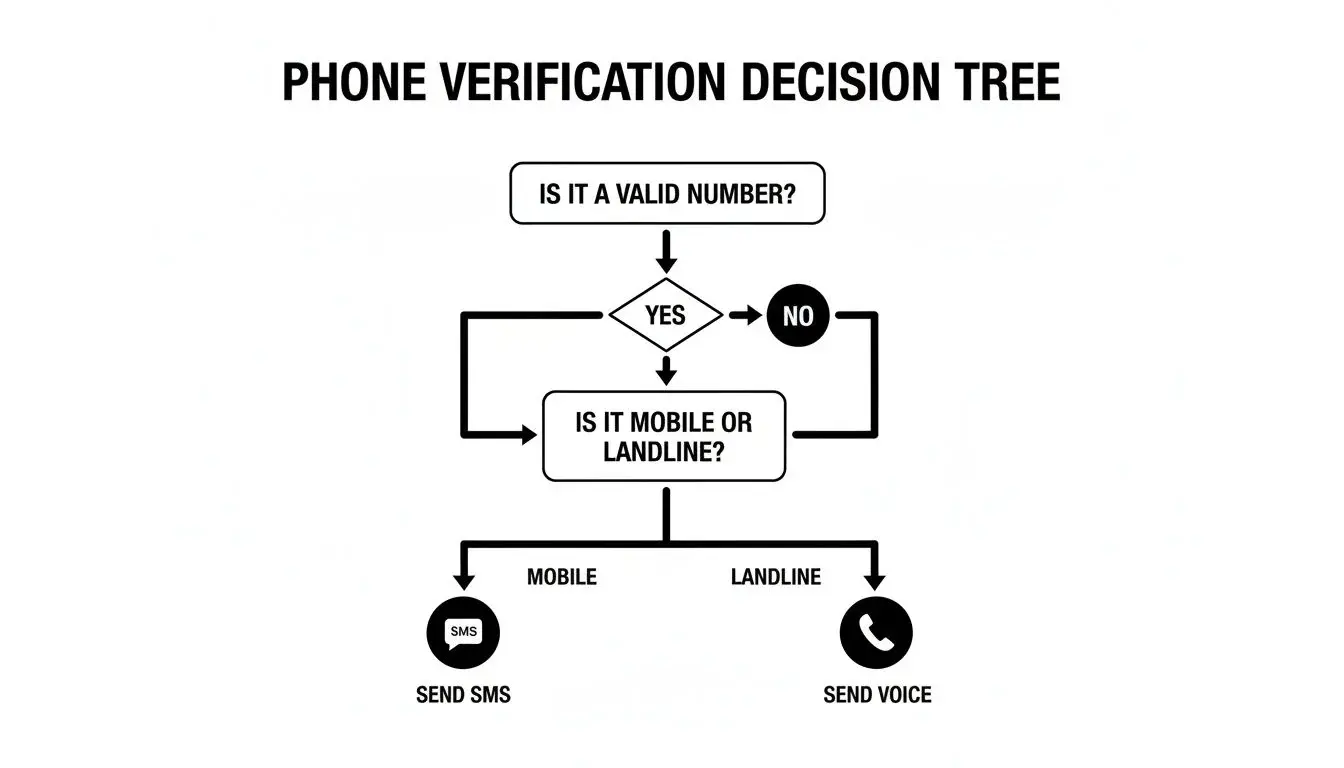
Once you know a number is valid, the line type tells you exactly what to do next. Mobile numbers are perfect for SMS, while landlines are best reached with a voice call.
Connecting Verification to Your Campaigns
Knowing the line type isn't just a "nice-to-have"; it's absolutely essential for running smart, multi-channel campaigns.
Take ringless voicemail, for example. It's an incredibly powerful tool, but it only works if you're sending to the right numbers. A ringless voicemail is delivered to the voicemail box behind a number, so line type tells you which numbers your provider can reach and which ones will fail. Failed deliveries cost money and add noise to your reports. Consent matters too: the FCC ruled in 2022 that ringless voicemail to wireless phones is a "call" under the TCPA and requires consumer consent (FCC 22-85). This is general information, not legal advice. Learn more in our ringless voicemail guide.
By first using a verification API to sort numbers by line type, you can match each number to the channel that suits it: SMS for mobile, voice or ringless voicemail where your provider supports it, and review for VoIP. This is how verification goes from a simple data check to a core part of your messaging strategy, and it supports better deliverability.
Phone Number Verification Layers at a Glance
To put it all together, here’s a quick summary of how these layers build on each other to give you a complete picture of a phone number's validity.
| Verification Layer | Primary Purpose | Key Question Answered | Learn more |
|---|---|---|---|
| Syntax & Formatting | Standardize the number into the global E.164 format. | Is this number formatted correctly for any network? | Twilio: E.164 |
| Carrier & Line Type | Identify the network provider and phone type. | Is this a mobile, landline, or VoIP number? | Twilio: line types |
| Live Status Check | Confirm if the number is currently active and reachable. | Is this phone turned on and connected to the network right now? | Twilio: Line Status (beta) |
| Ownership | Confirm the person holds the phone (one-time code or voice prompt). | Does this number belong to the person in front of me? | Twilio Verify |
Each of these checks answers a fundamental question, moving you from a raw piece of data to an actionable contact number you can rely on for your campaigns.
Frequently Asked Questions
How do you find out if a phone number is a VoIP?
The most reliable method is to run the number through a lookup tool that checks carrier and line-type data, then returns whether the line is classified as mobile, landline, or VoIP. Free clues can help with one-off checks, but they usually do not give consistent results across larger lists. For campaign work, do not rely on guesswork when a report can segment the file properly. PhoneCheckr will check whether its a landline, mobile, voip, or a bad number.
Can you tell if a number is mobile or landline for free?
Sometimes, but only at a basic level. You can catch formatting errors, try a manual text on a small sample, or look for carrier clues, but those methods become unreliable fast. Free checks are fine for one or two numbers; they are not a dependable process for cleaning a serious contact list.
Is This a VoIP Number? How Do I Know?
Run it through a line type lookup. The result will say mobile, landline, fixed VoIP or non-fixed VoIP (some tools just say "VoIP"). The digits alone cannot tell you, because VoIP numbers use the same format as every other number and can be ported in from other providers (FCC).
Is a Google Voice Number VoIP?
Yes. Line type lookups usually classify Google Voice as non-fixed VoIP: a virtual number obtained online without a physical device (Twilio).
Can VoIP Numbers Receive Short Code Texts?
It depends on the sender. Google Voice cannot send texts to short codes, and some companies, such as banks, will not send their texts to Google Voice numbers (Google Voice Help). If a code never arrives on a VoIP number, ask the sender whether they block VoIP.
Is There a Free VoIP Number Lookup?
Free options exist for small checks: some tools offer a few free lookups, and APIs often validate format for free. Line type data for a large list is usually paid, priced per number. Compare what the free tier actually returns (format only, or line type) before you rely on it.
Can you find out who a VoIP number belongs to?
Not usually from a simple line-type checker. A checker can tell you what kind of line it is and which carrier data is attached, but ownership details are a different problem and are often limited by privacy, registration quality, and how the number was provisioned. Anonymous or app-based VoIP services often reveal far less than traditional phone records.
Can a VoIP number be traced?
Sometimes, but tracing is not the same as identifying line type. Tracing a call's origin usually requires the provider's records. For calls carried over IP networks, the FCC requires providers to use STIR/SHAKEN caller ID authentication, which helps carriers and law enforcement "more readily identify the source of illegal robocalls" (FCC: call authentication). For normal marketing or CRM use, though, the practical need is usually classification and segmentation, not forensic tracing.
Does a VoIP or landline result mean the number can never receive texts?
Not necessarily in every edge case (Verizon, for example, can read a text aloud to a White Pages listed landline as a voice message, for a fee), but it is a strong signal for campaign planning. Landlines are generally the numbers you should remove from standard SMS sends, while VoIP numbers deserve separate treatment because the messaging behavior can vary. The safe workflow is to treat the report as list-hygiene guidance and then use channel-specific rules for sending. Source: Verizon Text to Landline FAQs.
Can I use PhoneCheckr as a bulk phone validator?
Yes, PhoneCheckr is a bulk phone number validator that will look up your numbers. Just upload a CSV file and it will process them easily.
Can I Verify International Phone Numbers?
Yes. Most lookup providers cover numbers worldwide (Twilio, for example, documents worldwide line type coverage, with extra approval needed for Canadian carrier data). The key is to standardize all your numbers into the E.164 format (like +44 for the UK or +61 for Australia), which is a plus sign, the country code and the national number, up to 15 digits (Twilio: E.164). A good tool will do this for you automatically.
Once the number is in the right format, it can be checked against the carrier network in its specific country. If you have customers around the world, this isn't just a nice-to-have feature; it's essential for making sure your messages actually connect.
The core difference often comes down to this: Validation checks if a number looks right, while verification confirms if it's real and reachable. You need both for truly clean data.
What Is the Difference Between Phone Validation and Verification?
People often use these terms interchangeably, but they're two different, crucial steps in cleaning your data.
- Phone Validation is all about the format and syntax. It’s a quick check to see if a number even looks plausible. Does it have the right number of digits for its country? Is it structured correctly?
- Phone Verification takes it a big step further. This is where you confirm the number's status in the real world. Is it an active line on a carrier network that can actually get a call, an SMS, or even a ringless voicemail?
A truly solid data hygiene process uses both. You validate the format first to weed out the obvious junk. Then, you verify the remaining numbers to confirm they're live and worth contacting. This two-part approach is how you make sure you're not just collecting data, but collecting data you can actually use.
In practice, many tools split the two steps the same way: format validation is often free (Twilio's Basic Lookup validates and formats numbers at no charge), while line type data and ownership checks are paid add-ons (Twilio Lookup, Twilio Verify).
Practical takeaway
Use a line-type check before any bulk SMS campaign. It is one of the simplest ways to stop paying for avoidable failures, clean up imported lists, and split numbers into text versus voice paths before launch.
The main takeaway is that PhoneCheckr fits best for teams importing existing lists, not people doing the occasional one-number curiosity check. If you regularly work from CSVs, inherited CRM data, or mixed lead sources, the report gives you something actionable fast: suppress the landlines, review the VoIP lines, and send SMS to the numbers most likely to belong in that channel.


