
A customer update needs to go out now. Maybe bad weather just forced you to cancel classes. Maybe a speaker dropped out before your event starts. Maybe your sales team wants to push a same-day offer while people are still paying attention.
This is the moment where email feels too slow and manual calling falls apart. Spreadsheets don't route anything. Group texts get messy. Someone forgets to follow up, someone else calls the wrong list, and the whole thing turns into a scramble.
A solid phone tree template fixes that, but most templates online still solve the wrong problem. They focus on inbound IVR menus or old-school manual call-down lists. That leaves a real gap for teams that need outbound campaigns, not just inbound call routing. This guide gives you both classic templates ready to copy (a calling tree and an IVR menu), plus an outbound version for teams that run campaigns. If you are choosing the software that runs a tree, see our companion guide to phone tree systems.
For modern outreach, the useful version of a phone tree isn't just "press 1 for sales." It's a planned sequence across voice, SMS, and ringless voicemail, built for reminders, promotions, alerts, and follow-up. That's where a template stops being an admin file and starts becoming an operating system for communication.
Your Communication Lifeline in a Digital World
The fastest outreach systems are the ones you can launch without rethinking your process every time. That's why a phone tree template matters. It gives you a repeatable structure for urgent notices, routine reminders, lead follow-up, and after-hours campaigns.
For small and mid-sized businesses, the core problem usually isn't sending one message. It's sending the right message to the right segment in the right order. A team may need one message for active customers, another for missed appointments, and another for warm leads who asked for a callback. If all of that still lives in one spreadsheet and a few saved scripts, you're relying on memory when you should be relying on workflow.
Most phone tree content still assumes the caller is coming to you. That's useful for reception desks and support lines. It doesn't help much when you're the one initiating the outreach.
Outbound phone trees work differently. They need:
- Audience logic so different groups get different messages
- Response paths such as press-1 callbacks or transfer requests
- Channel coordination between voice, SMS, and ringless voicemail
- Compliance rules so opt-ins, DNC handling, and consent aren't afterthoughts
Practical rule: If your outreach requires more than one person to remember who gets called next, you need a template.
That doesn't mean every campaign needs a complicated build. In practice, the best outbound phone tree template is usually the simplest one that still handles segmentation, escalation, and message handoff cleanly.
A good template also reduces rewriting. Once you have a structure for reminders, promos, and urgent alerts, you stop building every campaign from scratch. You edit the message, update the list, test the flow, and send.
What Is a Phone Tree and When Should You Use One
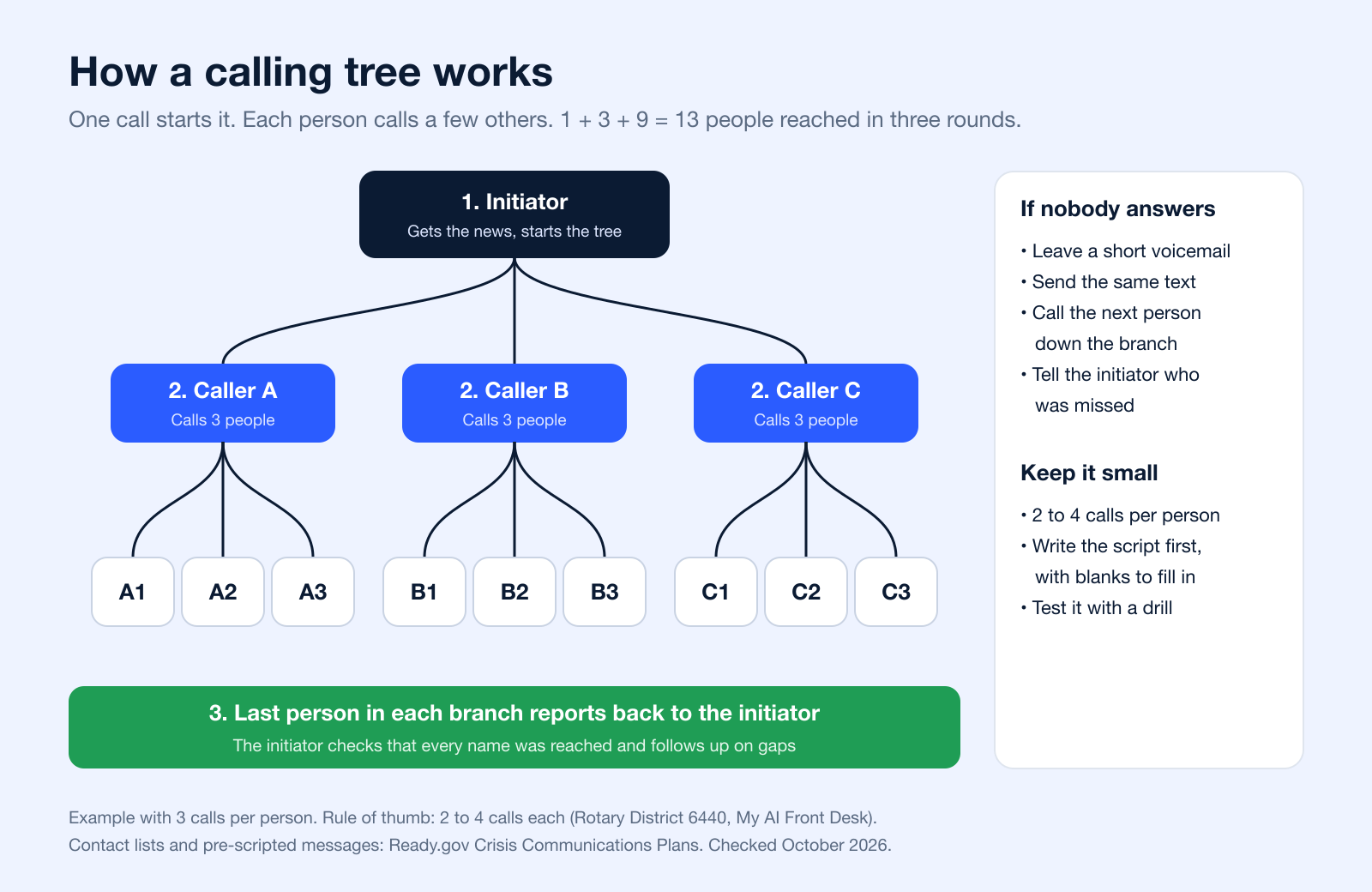
A phone tree started as a manual calling network. One person called a few people, who each called a few more, until everyone had the message. Clubs and schools still run them this way: Rotary District 6440, for example, shares a phone tree template in which each member calls three or four others. The same name now also describes the automated menu (IVR) a caller hears when a business says "press 1 for sales."
Today, you can think about phone trees in two versions. The first is manual. The second is automated. Both still matter.
| Type | How it works | Typical use | Template in this guide |
|---|---|---|---|
| Calling tree (call tree, telephone tree) | One person calls a few people, who each call a few more, until everyone is reached | Schools, teams, clubs, churches, emergency staff alerts | Calling tree table, CSV header and call script |
| IVR phone tree | A recorded menu answers incoming calls and routes callers by keypress or voice | Reception, support lines, after-hours routing | IVR menu script |
| Automated outbound tree | Software sends one recorded call, ringless voicemail or text to the whole list, with a response path such as "press 1" | Closures, reminders, urgent updates at scale | Outbound announcement script |
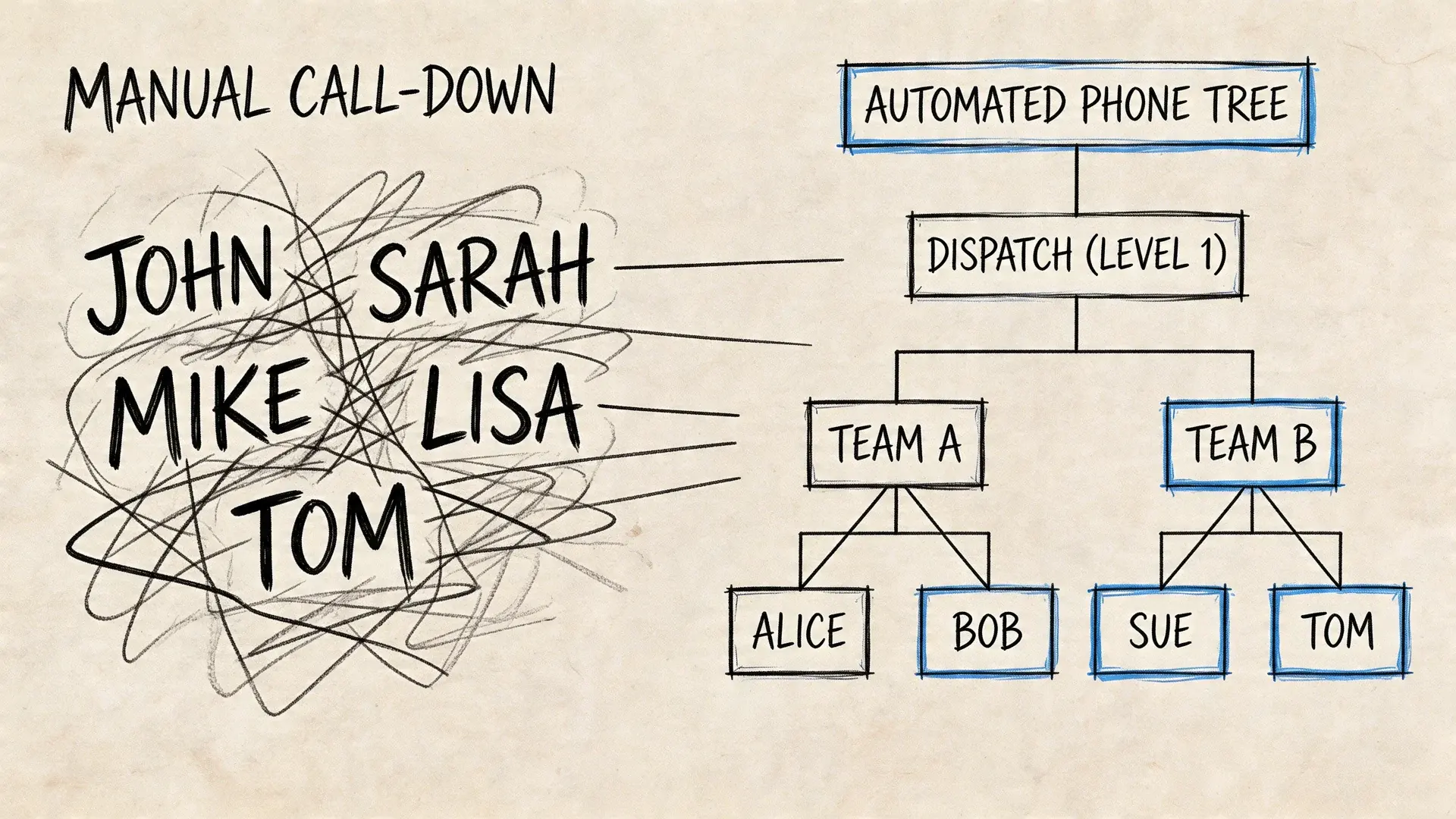
The old version and the modern version
A manual phone tree is still useful when a team wants human confirmation. A school, nonprofit, church, or neighborhood group may prefer person-to-person calls for sensitive updates.
An automated phone tree handles scale better. It can deliver a pre-recorded message, trigger a transfer, send a follow-up text, or drop a voicemail without forcing staff to spend the next hour dialing.
The difference shows up fast in real use:
| Situation | Manual tree makes sense | Automated tree makes sense |
|---|---|---|
| Staff emergency alert | Yes, especially if confirmation matters | Yes, for immediate broad reach |
| Event reminder | Usually not ideal | Yes |
| Promotional campaign | Rarely | Yes |
| Appointment reminder | Sometimes for high-touch cases | Yes |
| After-hours update | Limited | Yes |
Where businesses actually use them
A karate studio may need to cancel evening classes because weather turns bad mid-afternoon. A recorded voice message gets attention faster than an email, and a follow-up text gives parents a written record.
A healthcare clinic might prefer ringless voicemail for appointment reminders because it feels less disruptive than a live call. That's especially useful when patients don't answer unknown numbers but still check voicemail.
An ecommerce brand may run a time-sensitive promotion with a voice announcement first, then an SMS reminder later that day. That kind of sequence works well when the offer expires quickly and the team wants a channel mix, not just a single send.
The best use case is usually time-sensitive, action-oriented, and too important to leave to inbox luck.
When not to use one
Don't use a phone tree when the message is vague, non-urgent, or better handled by a simple email. If the update doesn't require attention soon, voice can feel heavier than it needs to be.
Also don't force long menus into outbound campaigns. Outbound works best when the listener has one clear path. Listen, press a key, request a callback, confirm, or opt out. Anything more starts to feel like inbound support trapped inside a sales campaign.
Free Phone Tree Templates to Copy
Instead of a blank page, a starting structure that can be adapted quickly is often sought. A useful phone tree template should match the message type, the size of the audience, and whether the campaign is manual, automated, or hybrid.
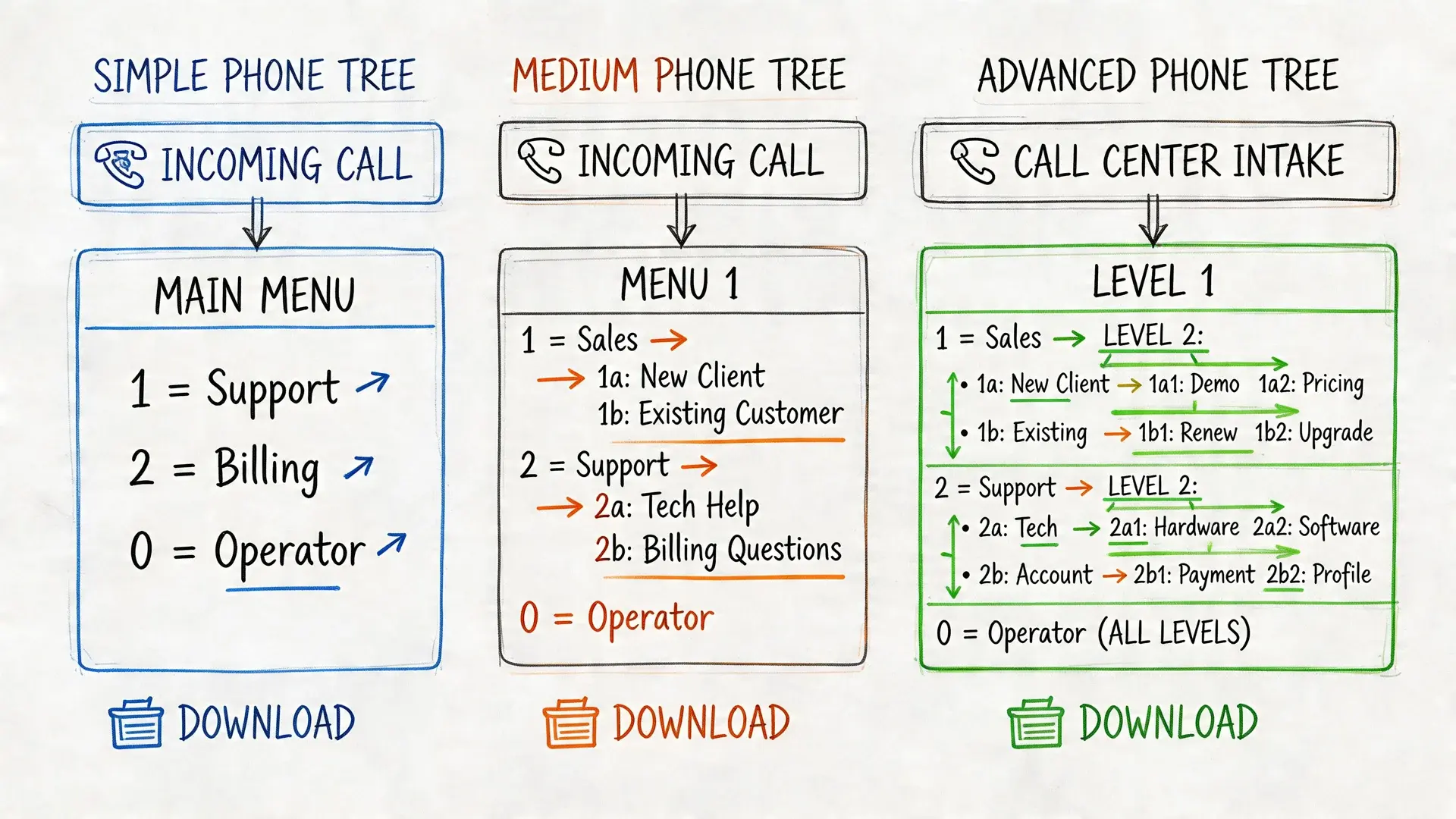
Three templates worth keeping on hand
Simple emergency contact list
Use this for a small team that needs fast clarity more than automation. Keep names, roles, primary number, backup number, and who owns each follow-up call. This is the template for weather alerts, office closures, and last-minute staffing changes.
Tiered communication tree
This works when messages need to flow through supervisors, department heads, or location leads. It's a better fit for distributed teams, field staff, agencies, and organizations with multiple groups that shouldn't all receive the same script.
Outbound campaign script template
This is the one most guides skip. Build it for voice broadcasting, ringless voicemail, and SMS follow-up. Include placeholders for:
- Audience segment
- Message goal
- Recording script
- Press-1 action
- Follow-up text
- Opt-out language
- Send window
- Owner and approval status
Recommended file formats
Use formats your team will maintain:
- Excel for structured list management
- Google Sheets for shared editing
- CSV for fast imports into outreach tools
Keep one master version and one campaign version. The master stores clean contact data. The campaign version stores the message logic.
That split prevents a common problem. Teams often edit the contact file and the live script in the same document, then nobody knows which version is current.
Calling tree template (copy and paste)
Copy this table into a document, or the CSV block into the first cell of a spreadsheet, and replace the bracketed fields. The example uses three callers who each call three people; keep every caller at 2 to 4 calls, the rule of thumb in My AI Front Desk's telephone tree guide. Ready.gov recommends compiling contact details in advance (business phone, cell number and email) and updating and securing the list regularly (Crisis Communications Plans).
| Level | Caller | Role | Primary phone | Backup phone | Calls these people | Reported back (time) |
|---|---|---|---|---|---|---|
| 1 | [Initiator name] | [Role] | [Phone] | [Backup phone] | [Caller A], [Caller B], [Caller C] | [Time] |
| 2 | [Caller A] | [Role] | [Phone] | [Backup phone] | [A1], [A2], [A3] | [Time] |
| 2 | [Caller B] | [Role] | [Phone] | [Backup phone] | [B1], [B2], [B3] | [Time] |
| 2 | [Caller C] | [Role] | [Phone] | [Backup phone] | [C1], [C2], [C3] | [Time] |
| 3 | [A1] to [C3] | [Role] | [Phone] | [Backup phone] | Last person in each branch reports back to the initiator | [Time] |
The same template as CSV, ready to paste into Excel or Google Sheets (or save as a .csv file and import it):
level,caller_name,role,primary_phone,backup_phone,calls_these_people,reported_back_at
1,[Initiator name],[Role],[Phone],[Backup phone],"[Caller A], [Caller B], [Caller C]",
2,[Caller A],[Role],[Phone],[Backup phone],"[A1], [A2], [A3]",
2,[Caller B],[Role],[Phone],[Backup phone],"[B1], [B2], [B3]",
2,[Caller C],[Role],[Phone],[Backup phone],"[C1], [C2], [C3]",
Calling tree script (what each caller says)
Ready.gov suggests pre-scripting messages "as templates with blanks to be filled in" so every caller says the same thing (Ready.gov). Paste this next to the contact list:
Hi [Name], this is [Your name] calling for the [Organization] phone tree.
Message: [What happened]. [What to do], by [time/date].
More details: [link, phone number or place].
Please call [Next names on your list] now.
If you cannot reach someone: leave this message, send it by text, call the next person,
and tell [Initiator name] who you could not reach.
Report back to [Initiator name] at [phone] when your calls are done.
IVR phone tree template (menu script)
For the inbound kind of phone tree, script the menu before you record it. Smith.ai's phone tree guide recommends no more than five choices per menu level and a way to reach a person, so this template has three topics, an operator option and a repeat option:
GREETING (keep it to a few seconds)
"Thank you for calling [Business name]."

MAIN MENU (five options or fewer)
"For [most common reason, e.g. appointments], press 1.
 For [second reason, e.g. billing], press 2.
 For [third reason, e.g. hours and location], press 3.
 To speak with a person, press 0.
 To hear these options again, press 9."

ROUTING
1 -> [Team or person] (no answer -> voicemail [box])
2 -> [Team or person] (no answer -> voicemail [box])
3 -> Recorded message: "We are open [days and hours] at [address]."
0 -> [Front desk or on-call person]
No input after [seconds] -> repeat menu once, then send to 0

AFTER HOURS
"You have reached [Business name] after hours. We are open [days and hours].
 If this is urgent, press 1 to reach [on-call contact]. To leave a message, press 2."
Outbound announcement template (automated call or ringless voicemail)
When software makes the calls for you, the recording replaces the human callers. Federal rules require every prerecorded message to name the business at the start and give a phone number during or after the message; marketing messages also need an automated opt-out (47 CFR 64.1200(b)). A short version:
"Hi, this is [Business name] with an update for [audience].
 [What changed, in one sentence]. [What to do, by when].
 For details, check the text we will send next or call us at [phone number].
 [Marketing calls only: To stop receiving these calls, press 9.]"
More scripts for reminders, alerts and follow-ups are in these voice message templates.
How to Create a Phone Tree, Step by Step
These steps build a calling tree. For an IVR menu, steps 1, 4 and 7 apply the same way; replace steps 3, 5 and 6 with the menu options and routing in the IVR template above.
- Pick the purpose and the initiator
Decide what the tree is for (closures, emergencies, schedule changes) and who starts it, plus a backup initiator if that person cannot be reached.
- Collect contacts in advance
Gather names, roles, mobile and backup numbers and email for everyone on the list, and update the list on a schedule. Ready.gov recommends compiling contact information before an incident and keeping it secured.
- Draw the branches
Give each caller 2 to 4 people. Put reliable people at the top levels and spread new or hard-to-reach contacts across branches.
- Write the script with blanks
Use the calling tree script above: what happened, what to do, by when, where to get details, and who to call next.
- Set the no-answer rule
Decide what a caller does when nobody picks up: leave a voicemail, send the message by text, call the next person in the branch, and report the gap.
- Close the loop
The last person in each branch reports back to the initiator, who checks every name off. Without this step nobody knows who was missed.
- Share, test and update
Give everyone a copy of their part, run a test with a harmless message, and update the tree when people join, leave or change numbers.
Phone Tree Examples: School, Team and Emergency
The examples below show the structure, not real organizations. Adjust the numbers of callers to your group.
School or classroom phone tree
- Initiator: the principal or class coordinator.
- Level 2: room parents or teachers, each calling 3 or 4 families.
- Message: "School is closed today, [date], because of [reason]. Updates at [link]. Please call [names] now."
- Close the loop: each room parent reports back with the families they could not reach.
Schools that need to reach every family at once usually move from calls to texts; see how schools handle school closing texts.
Team or small business phone tree
- Initiator: the owner or operations manager.
- Level 2: shift leads or department heads, each calling the 2 to 4 people on their shift.
- Message: "Tomorrow's [shift/site] is moved to [time/place]. Confirm by replying to your lead."
- Close the loop: leads confirm to the initiator by a set time; anyone missing gets a direct call.
For a group this size, a single text can replace the cascade; see how to send a mass text to employees.
Emergency phone tree
Ready.gov asks businesses to identify how they will communicate with management and employees during and after an emergency (Emergency Response Plan). Where OSHA requires an emergency action plan, it must include procedures to account for all employees after an evacuation and the name or job title of the people employees can contact (29 CFR 1910.38). A calling tree can support that accounting step:
- Initiator: the person named in the emergency plan, with a backup.
- Level 2: floor wardens or team leads, each calling their 2 to 4 people.
- Message: "This is [name] with [organization]. [What happened]. Do [action]. Reply or call [number] to confirm you are safe."
- Close the loop: wardens report who confirmed and who did not, so the initiator can escalate.
For large groups, an automated emergency notification system reaches everyone at once and keeps the calling tree as the backup.
How to Customize Your Phone Tree Plan
A template only becomes useful when it matches how your organization communicates. The build should reflect urgency, audience, fallback rules, and what action you want after the message lands.
When mapping a phone tree, a common rule of thumb is that each caller handles 2 to 4 contacts (My AI Front Desk's telephone tree guide), and automated IVR menus should offer no more than five choices per level to avoid overwhelming people (Smith.ai).
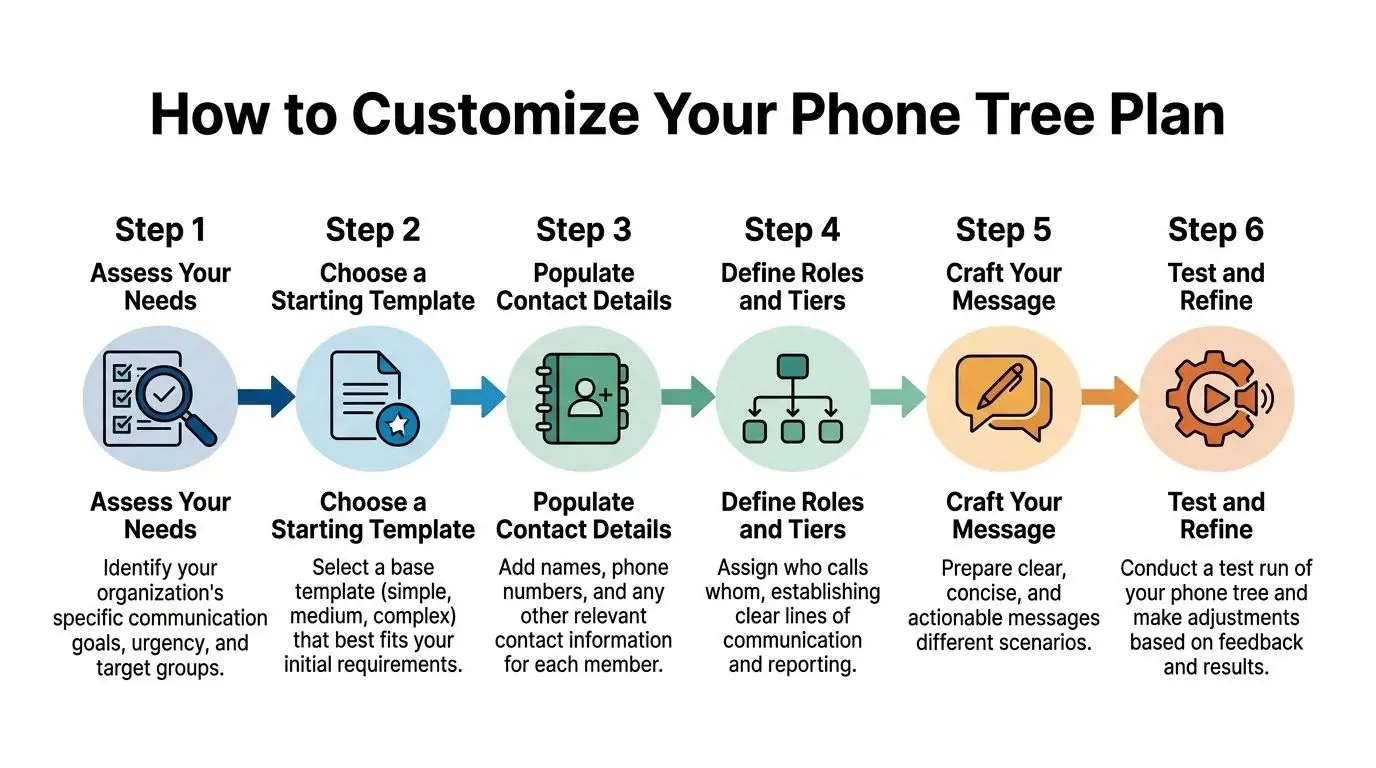
Start with the communication goal
A reminder campaign and an emergency alert should not use the same logic.
If the goal is urgent notification, shorten everything. Keep the message direct. Remove optional branches. Focus on delivery and confirmation.
If the goal is marketing or re-engagement, you have more room to shape the experience. You can lead with a voice message, route interested recipients with a keypress, and follow with SMS or ringless voicemail depending on behavior.
Ask these questions before you build:
- What needs to happen next
- Who should receive this
- How urgent is it
- What should happen if there is no answer
- Does this require a person, a recording, or both
Segment before you script
Most poor phone trees fail before the first call goes out. The audience list is too broad, outdated, or mixed together in ways that create irrelevant messaging.
Segment by something operational, not just demographic labels. That may be:
- Lead status
- Appointment date
- Store location
- Membership type
- Customer lifecycle stage
- Priority level
For outbound campaigns, your contact system should make those segments easy to maintain. A clean contact manager for grouped and editable audience data is what keeps your template usable over time, instead of turning it into another stale spreadsheet.
Map the tree like a workflow, not a chart
Traditional tree diagrams can look neat and still fail in practice. What matters is whether the next action is obvious.
For a manual structure, assign each person a small set of follow-ups. Two to four contacts per caller is manageable. More than that creates delays and missed handoffs.
For automated outbound trees, think in layers:
- Initial message
- Response path
- Follow-up action
- Escalation or fallback
A practical outbound flow might look like this:
| Stage | Action | Why it works |
|---|---|---|
| Initial touch | Voice broadcast | Gets attention fast |
| Response path | Press 1 to connect | Captures intent immediately |
| No answer | Ringless voicemail | Less intrusive than repeated live calls |
| Follow-up | SMS confirmation | Gives written context and next step |
Keep scripts shorter than you think
Lengthy explanations are counterproductive. They hurt response.
A phone script should answer three questions quickly:
- Who is this
- Why are you calling
- What should the listener do now
Try this structure:
Hi [First Name], this is [Business Name]. We're calling about [reason]. To [take action], press 1 now. If you'd rather get details by text, stay on the line for a follow-up message.
That works better than loading the recording with every policy, every date, and every option. Save the details for the text message or the transferred rep.
Build fallback rules before launch
The tree isn't finished until you define failure handling. That means deciding what happens when someone doesn't answer, when a transfer can't connect, or when the wrong segment gets included.
Use plain rules:
- No answer triggers voicemail or SMS
- Interested response triggers transfer or callback queue
- Wrong contact data gets flagged for cleanup
- Sensitive segments require manual review before send
If nobody knows what happens after a missed call, the tree isn't a system yet. It's just a recording.
That one distinction saves a lot of wasted outreach.
Best Practices for Compliant and Effective Outreach
A phone tree can be efficient and still create problems if the outreach is sloppy. The messages may be clear, but if the list is outdated, the opt-in trail is weak, or the routing logic traps people, you'll frustrate the audience and create avoidable risk.
The fixes are practical. Test the flow, document consent, respect opt-outs, and track the right metrics.
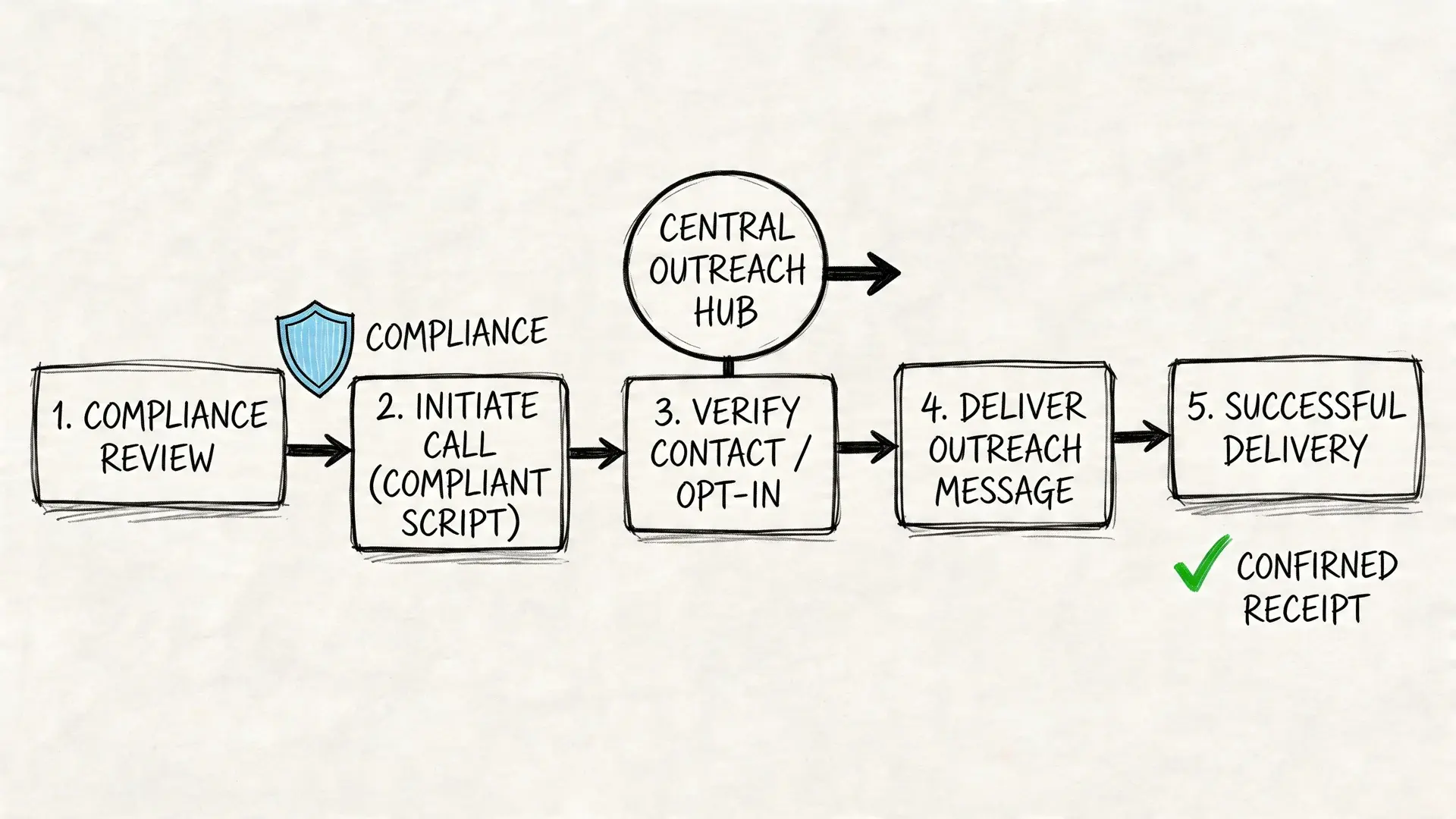
Keep the tree simple enough to complete
The Smith.ai guide to phone tree optimization recommends no more than five choices per menu level, a short greeting, and a way to reach an operator, and suggests tracking abandonment rates, handle times and transfer rates to spot bottlenecks.
The principle is simple. Overbuilt trees underperform. Too many options create hesitation. No clear escape route creates annoyance.
A better standard is simple:
- Lead with the most likely action
- Limit choices
- Give people a human path
- Use a fallback channel if they don't engage
Consent isn't optional
For outbound voice, ringless voicemail, and SMS, consent handling needs to be built into the campaign process, not bolted on later. Every team sending automated outreach should know exactly when and how permission was captured.
If your process around consent still feels fuzzy, review express written consent requirements for automated outreach. It helps clarify what teams need to document before launching automated campaigns.
A few federal basics for automated phone trees (this is general information, not legal advice). Calls made with an autodialer or a prerecorded or artificial voice to a mobile number need the person's prior express consent, and marketing calls need prior express written consent (47 CFR 64.1200(a)). Every prerecorded message must name the business at the start and give a callback number (64.1200(b)), and ringless voicemail to mobile phones counts as a call (FCC 22-85). These rules are about automated and prerecorded calls; a person dialing a teammate by hand in a calling tree is a different situation.
Healthcare teams need to go one step further. They shouldn't only ask whether a patient can be contacted. They should also define what content belongs in a voicemail, what should move to a secure message, and which campaigns require tighter review because of HIPAA obligations.
Test for human reality, not just technical delivery
A message can be technically delivered and still fail.
Run test sends with actual internal users before launch. Confirm whether the caller ID looks trustworthy, the audio sounds clean, the transfer path works, and the text follow-up arrives in the right order. For urgent or sensitive campaigns, it's also smart to align your outreach process with broader crisis communications planning guidance from Ready.gov so your team doesn't improvise under pressure.
Use a simple review checklist:
| Checkpoint | What to verify |
|---|---|
| Audience | Right segment, no stale contacts |
| Script | Clear reason and action |
| Compliance | Opt-in, opt-out, DNC rules covered |
| Routing | Transfers, callbacks, fallback path |
| Follow-up | SMS or voicemail sequence lands correctly |
A compliant campaign isn't the one with the longest legal note. It's the one with a clean permission trail and a clear opt-out.
Review performance and refine
Once the campaign runs, the work isn't done. Look at where people dropped off, where they pressed through, and where they asked for a human.
If abandonment is high, shorten the message or reduce choices. If the wrong people are engaging, tighten segmentation. If staff are fielding confusion calls, the script probably needs to be simpler.
The strongest phone tree templates are living documents. Teams revise them as lists change, offers change, hours change, and audience behavior changes.
Bringing Your Phone Tree to Life with Broadcast
Planning matters, but the value shows up when the template turns into a live campaign. That's where outbound systems need to do more than just call a list. They need to coordinate channels, route responses, and support different audience behaviors without creating extra manual work.
This is especially true for businesses sending reminders, follow-ups, promotions, and operational notices at scale.
Build the campaign around behavior
A strong outbound setup usually starts with a segmented list and one primary message. From there, the system should react based on what the recipient does.
Someone who answers live may hear a short recorded message and choose to press 1. Someone who doesn't answer may get a ringless voicemail. Someone who needs written details may receive an SMS follow-up.
That kind of orchestration is why a modern phone tree template works better when it's designed for campaigns, not just call routing.
If you're comparing setups, this overview of a voice broadcasting service for business outreach is a useful reference point for how recorded voice campaigns fit into broader outbound workflows.
Use the right channel for the right moment
The most effective outreach doesn't force one channel to do everything.
Voice broadcasting works well when immediacy matters. It gets attention, delivers tone, and can push a quick action like a transfer request.
Ringless voicemail works well when you want less interruption. For many reminders, event updates, and reactivation campaigns, that format feels lighter while still delivering a voice message.
SMS works well as reinforcement. It gives recipients a written reminder, a callback number, a confirmation link, or a short summary after the voice touch.
Whichever mix you choose, keep each step tied to the same message and the same list, so a person who already confirmed does not get chased by every channel. For a side-by-side look at manual trees, IVR menus and multi-channel setups, see our guide to phone tree systems.
Practical campaign formats that work
Here are three outbound formats that tend to hold up well in day-to-day use:
- Reminder sequence Voice or ringless voicemail first, SMS second. This works well for appointments, event attendance, and schedule changes.
- Lead follow-up sequence Short voice message with a press-1 option, then a text if there's no response. Good for sales teams that want to capture intent while it's fresh.
- Promotion sequence Ringless voicemail for the initial offer, then SMS for urgency and details. Useful when you want reach without forcing a live answer.
What to avoid
Don't stack every feature into one campaign. Too many touches, too many branches, or too many messages in a short window can make the outreach feel chaotic.
Keep the sequence tied to one outcome. Confirm the appointment. Claim the offer. Call back the rep. Attend the event. If the message asks for too many things, response drops because recipients don't know which action matters most.
The cleanest phone tree campaigns sound simple to the recipient, even when the backend logic is doing a lot of work.
That's the standard worth aiming for.
Phone Tree Template FAQs
What is a phone tree?
A phone tree is a way to pass one message to many people. In a calling tree, one person calls a few people, who each call a few more until everyone is reached. In a business phone system, "phone tree" also means the IVR menu that routes callers ("press 1 for sales").
How do I create a phone tree?
Choose an initiator and a backup, collect everyone's numbers, give each caller 2 to 4 people, write a short script with blanks, set a rule for unanswered calls, have the last caller in each branch report back, and test it. The step-by-step section above covers each step.
Can you give an example of a phone tree or call tree?
A school principal calls three room parents; each calls three or four families with the same script; each room parent reports back to the principal with anyone they could not reach. The examples section above shows school, team and emergency versions.
Is a call tree the same as a phone tree?
Yes, in everyday use "call tree", "calling tree", "telephone tree" and "phone tree" describe the same cascade of calls. "Phone tree" is also used for IVR menus, so check which one a template is for.
Is there a phone tree template for Google Docs, Google Sheets or Excel?
Yes: copy the calling tree table above into Google Docs or Word, or paste the CSV block into the first cell of Google Sheets or Excel and split it into columns. Keep one master contact list and one copy per campaign or event.
How many people should each person call?
Two to four is the usual rule of thumb (My AI Front Desk; Rotary District 6440 uses three or four). More than that slows the tree down and makes it easy to skip someone.
Can I automate a phone tree?
Yes. Voice broadcasting, ringless voicemail and mass texting send the same message to the whole list at once, with a "press 1" or reply option to confirm. Automated calls follow consent rules (see the compliance section above). Our phone tree system guide compares the options.
Start Building Your Automated Outreach Today
A good phone tree template gives your team more than organization. It gives you speed, consistency, and a cleaner path from message to action. The best setups stay simple, segment carefully, respect consent, and use voice, SMS, and ringless voicemail where each channel fits best.
If you work with churches or ministry teams, it's also worth reviewing tools beyond voice. This guide to a church text messaging service is a helpful complement for organizations balancing announcements across multiple channels.
The important part is to stop treating outreach like a one-off task. Build the template once. Refine it. Use it repeatedly.
If you're ready to turn your phone tree template into real outbound campaigns, Broadcast makes it easy to send voice broadcasts, ringless voicemail, and SMS from one platform while keeping your outreach organized, scalable, and compliant.


