
It's usually a normal workday when the problem shows up. A manager needs to reach everyone fast. The office is closed. A shift start changed. A delivery is delayed. Someone tries email first, then realizes half the team won't see it in time.
That's why so many owners search for ways to send a mass text message to employees free. It sounds simple enough. Use what's already on your phone, avoid new software, and get the message out. For a very small team, that can work for a while.
The issue isn't whether free methods exist. They do. The issue is whether those methods still work once the message is important, time-sensitive, or recurring.
Below: the free options and their real limits, the consent rules for texting employees, five copy-ready templates and a FAQ.
Why Instant Employee Communication Matters
At 7 AM, a broken pipe, power outage, or site closure can turn into a payroll and staffing mess if your team doesn't hear from you quickly. Calling people one by one takes too long. Email often sits unread. A phone tree depends on too many people doing their part perfectly.
Texting solves the speed problem because employees already carry the device. They don't need to log into a portal or check a company inbox. They just get the alert.
Texting is also the channel almost everyone already uses: Americans exchanged nearly 2.2 trillion SMS and MMS messages in 2024, according to the CTIA 2025 Annual Survey. Small teams and large ones alike rely on it for messages that cannot wait.
Where texting helps most
Some employee messages need immediate attention. Others just need to be seen reliably.
- Urgent closures: Weather issues, facility problems, security incidents, or sudden schedule changes
- Routine reminders: Shift starts, meeting reminders, training notices, and policy acknowledgments
- Internal coordination: Location updates, staff coverage requests, and simple operational instructions
Practical rule: If the message affects where someone should be, when they should arrive, or whether they should come in at all, text is usually the right first channel.
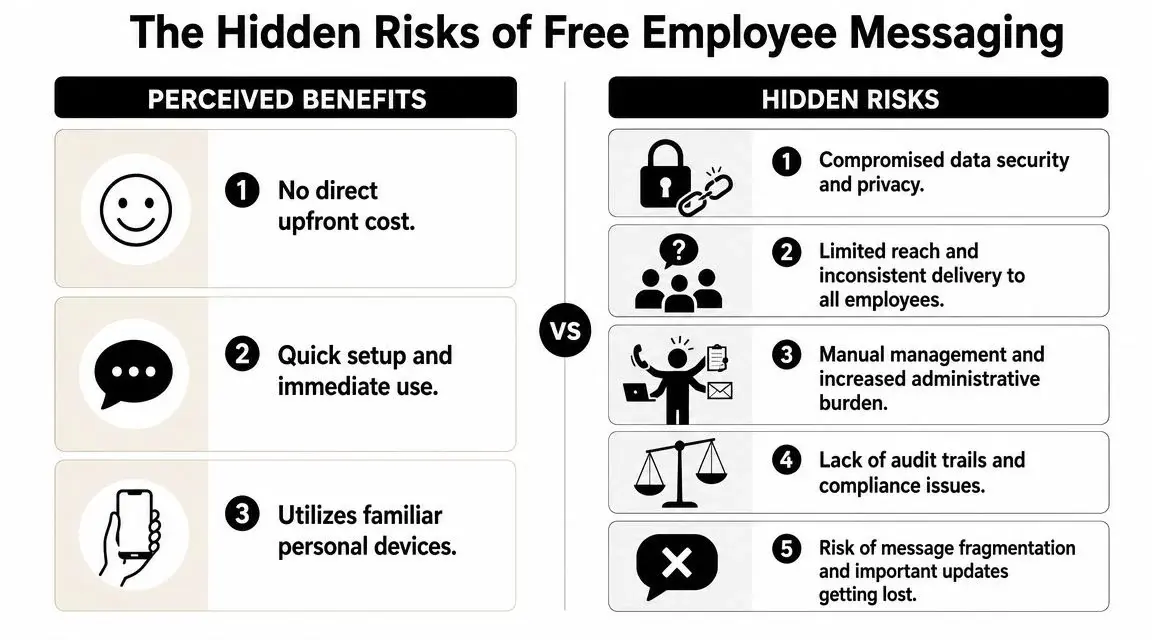
A lot of owners start with free tools because that feels responsible. That instinct makes sense. What matters is knowing where free methods are useful, and where they start costing you more time, more confusion, and more risk than they save.
Exploring Your Free Employee Texting Options
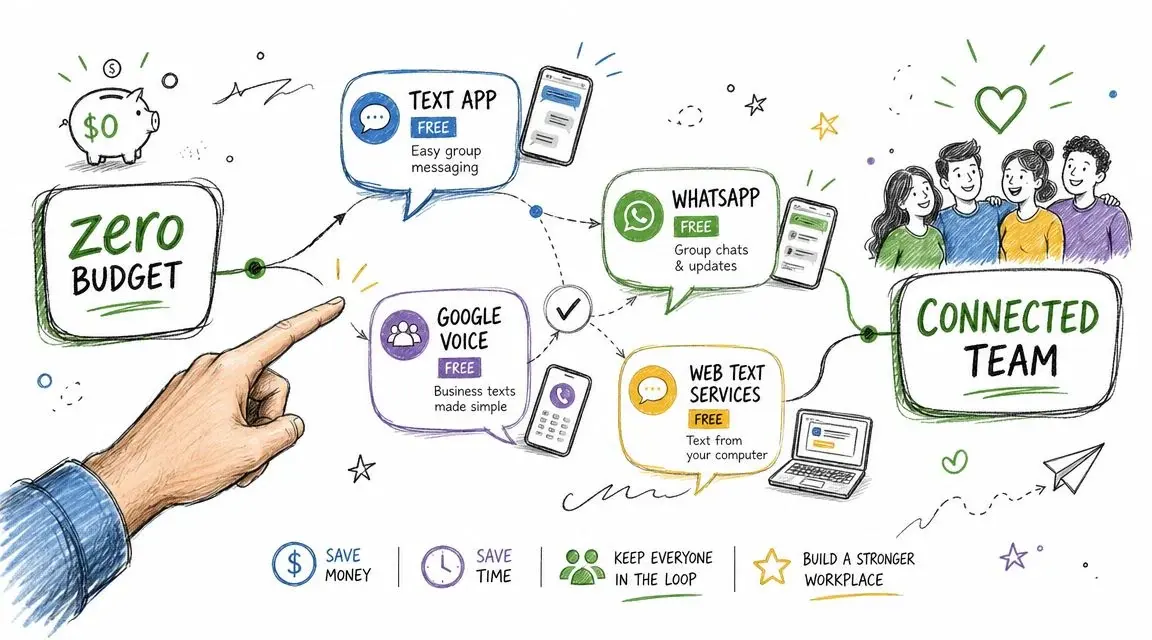
The free path usually starts with whatever you already have. Your phone. Your email account. Maybe a basic voice number. That's fine for testing the habit of faster communication, but each method breaks in a different way.
Native group texts on your phone
This is the most obvious option. Open Messages, add your employees, type the alert, send it.
It works best for a tiny team that already knows one another and doesn't mind seeing replies from everyone else. If you're messaging a few people about a same-day adjustment, it's the fastest no-budget method.
The downside shows up once replies start. One employee says "Got it." Another asks a side question. Someone else replies hours later. In group MMS, iMessage and RCS groups, everyone sees everyone else's reply and the original alert gets buried. In a group SMS on iPhone, replies arrive as separate texts and members cannot see each other's answers (Apple Support), but you still cannot control which type of group the phone creates when people use different phones and settings.
Best use: One-off updates for a very small team Main drawback: Reply-all clutter and no real list management
Email-to-SMS gateways
Some carriers used to support email-to-text delivery through a special address tied to a mobile number. That option is disappearing: AT&T shut its gateway down on June 17, 2025, and Verizon is phasing out vtext.com and vzwpix.com, with completion expected by March 31, 2027.
This can be useful if you're at a desk and need a quick workaround. But it's clunky. You need the right carrier format for each person, and the setup gets messy if your team uses different carriers or changes numbers often.
Best use: Last-resort desktop workaround Main drawback: Carrier dependency and tedious upkeep
Google Voice or similar basic texting tools
A basic texting number can help if you want to avoid using your personal mobile number. For very small teams, that can be a step up from texting from your own phone.
The problem is scale and workflow. These tools aren't built for structured employee broadcasts, organized segmentation, or repeat operational messaging. Once you're texting by shift, location, or role, you'll feel the friction fast.
Google states the limits directly: Voice group messages can have up to 8 participants including the sender, and Google Voice messaging "is not intended for bulk messaging" (Google Voice Help, checked October 19, 2026). Carriers draw a similar line: CTIA's guidelines describe typical personal use as about 100 unique recipients per message and 1,000 messages a day, and treat a business sender as application-to-person traffic even below those numbers (CTIA Messaging Principles).
What a low-cost workflow actually looks like
The practical version is less about "free" and more about "low-cost and manageable." The usual workflow is to collect consented mobile numbers, upload them into a bulk SMS platform, segment by location, shift, or role, write a short alert, and schedule or send it. Keep alerts brief and use a short link for details: one SMS holds 160 standard characters, or 70 if it contains an emoji, and longer messages split into segments (Twilio). For the step-by-step version, see how to send a mass text.
That workflow matters because it fixes the biggest amateur mistake. Owners often treat employee texting like a personal group chat when they really need one-to-many delivery with private replies.
Here's a practical comparison:
| Method | Good for | Where it breaks |
|---|---|---|
| Phone group text | Tiny teams, rare messages | Reply-all chaos, no privacy |
| Email-to-SMS | Desk-based emergency workaround | Carrier issues, manual setup |
| Basic texting number | Very small teams | Weak segmentation, limited management |
| Bulk SMS platform | Repeated employee alerts | Usually not fully free |
| Method | Documented limit | Source |
|---|---|---|
| iPhone group text | Group SMS replies go to the sender only; group MMS, iMessage and RCS show every reply to everyone | Apple Support |
| Google Voice | Up to 8 participants per group; "not intended for bulk messaging" | Google Voice Help |
| Email-to-SMS | AT&T shut down June 17, 2025; Verizon shutting down by March 31, 2027 | AT&T, Verizon |
| Personal phone, any app | Typical consumer use: about 100 recipients per message, 1,000 messages a day; business senders count as A2P | CTIA |
| Platform on a local (10DLC) number | Brand and campaign registration required; unregistered traffic blocked since February 1, 2025 | Bandwidth, TCR |
If you want a broader look at no-cost starting points, this guide to free group text messaging service options is useful as a comparison point, and so is sending bulk texts from a computer for free. The key is to treat free tools as a short runway, not as a permanent system.
Keep the text short. Put the action first. If employees need detail, send them to a short link rather than cramming the whole explanation into the message.
Texting Employees: Consent, Emergencies and the Law
Texting staff is not marketing, but the same federal rules on automated messages still apply. A short summary of what the rules say, as of October 2026:
- A text is a call. The Supreme Court noted that a text message to a cell phone "qualifies as a 'call'" under the Telephone Consumer Protection Act (Campbell-Ewald v. Gomez, 2016).
- Consent for automated texts. Texts sent with an autodialer to a mobile number need the recipient's prior express consent, unless they are made for emergency purposes (47 CFR 64.1200(a)(1)). Promotional texts need prior express written consent (a)(2).
- "Emergency purposes" is narrow. The rule defines it as calls "made necessary in any situation affecting the health and safety of consumers" (64.1200(f)(4)). A shift reminder or a benefits notice is not an emergency.
- Personal phones. Many employees use their own phones, so ask for the mobile number and permission to text it during onboarding, say what kinds of messages you will send, and include an opt-out such as STOP (CTIA, sections 5.1 and 5.1.3). See express consent for texting.
- Ringless voicemail counts too. The FCC ruled that ringless voicemail to wireless phones is a call that needs consent (FCC 22-85).
- Texts do not replace your alarm. Where OSHA requires an emergency action plan, the employer must also maintain an employee alarm system that meets 29 CFR 1910.165 (29 CFR 1910.38(d)). Texts help with the plan's step to account for all employees after an evacuation (1910.38(c)(4)); they are an extra layer, not the alarm itself.
For more on planning urgent alerts, see the emergency notification system guide.
Employee Alert Message Templates You Can Use Today
Most employee texts fail because they're too long, too vague, or missing a clear action. A useful alert tells people what happened, what they need to do, and where to get more detail.
Urgent closure alert
Use this when employees need immediate direction.
[Business Name]: Location closed today due to a facility issue. Do not report to the site until further notice. Check updates here: [short link]. Reply STOP to opt out.
Why it works: the action comes early, and nobody has to guess whether they should still come in.
Shift reminder with confirmation
Use this for attendance and simple accountability.
[Business Name]: Reminder that your shift starts at [time] today at [location]. Reply YES to confirm you received this. Reply STOP to opt out.
This format is simple enough for fast reading and easy enough for employees to answer without friction.
Weather or safety alert
Use this alongside your emergency plan, not instead of it.
[Business Name]: Severe weather at [location]. Do not travel to the site today. Reply SAFE when you see this so we can account for everyone. Updates: [short link]. Reply STOP to opt out.
Open shift coverage request
Use this to fill a gap without a reply-all thread.
[Business Name]: We need coverage for [shift] on [date] at [location]. Reply YES if you can take it. First confirmed reply gets the shift. Reply STOP to opt out.
General company announcement
Use this for policy changes, meetings, or benefits updates when the full explanation doesn't fit in a text.
[Business Name]: New employee update available. Please review here before [deadline]: [short link]. Questions? Reply to this message. Reply STOP to opt out.
For more complex internal cascades, it helps to map your backup path in advance. A simple phone tree template for urgent communication can support your text workflow when a critical notice needs another layer of follow-up.
Short texts get read. Long texts get skimmed. Put the instruction in the first sentence.
Knowing When to Upgrade to a Professional Platform
Free tools don't fail all at once. They fail in pieces. One missed shift reminder here. One former employee still on the list there. One morning where you spend too long sorting replies instead of running the business.
That's the tipping point.
The upgrade checklist
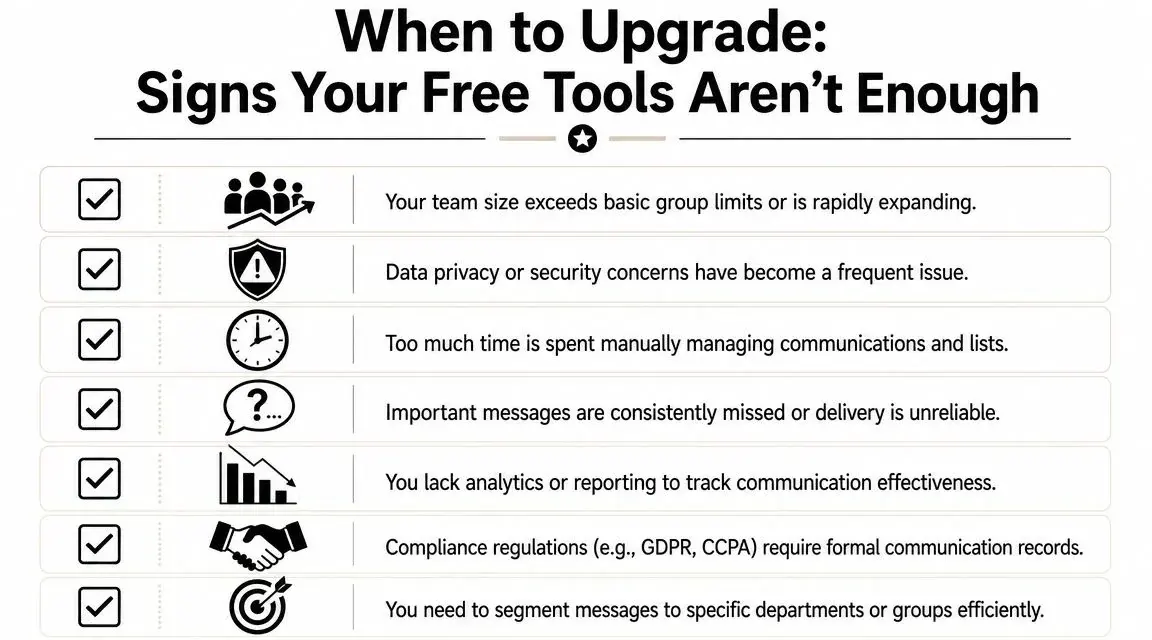
If several of these are true, free methods are already costing you more than they save.
- Your team is growing: Group threads are getting harder to manage and basic texting limits are becoming obvious
- Your messages are targeted: Different shifts, sites, or job roles need different alerts
- You need delivery confidence: It's no longer acceptable to guess whether the message went through
- You're managing by hand: Contact cleanup and repeat sends are eating time every week
- You need a record: HR, operations, or compliance teams need cleaner communication history
What a professional platform changes
The core benefit is simple. You upload a contact list and send one message to the right audience at once, with replies coming back privately instead of into a group thread. A mass texting platform replaces the copy-paste routine with lists, groups and scheduling.
That speed matters, but the bigger upgrade is control. A real platform lets you segment, schedule, track replies, and operate from a registered sender instead of improvising from personal devices.
One option in this category is Broadcast, which supports bulk SMS along with voice broadcasting and ringless voicemail. That matters when text isn't the only channel you need. A short SMS is often right for urgent instructions. A ringless voicemail can work better for a more personal message, such as a leadership update, schedule change explanation, or non-urgent policy note where tone matters.
Ringless voicemail has a place
Owners usually think only in terms of texting. That's too narrow.
Ringless voicemail helps when you want employees to hear a human voice without creating an inbound call spike. It won't replace SMS for immediate action alerts, but it can support broader internal communication, especially when the message benefits from warmth, clarity, or leadership presence.
Like texts, ringless voicemail needs the recipient's consent: the FCC ruled it is a call made with a prerecorded voice (FCC 22-85). See ringless voicemail compliance.
Building a Full Communication Strategy
Strong employee communication doesn't rely on one channel. It assigns a job to each one.
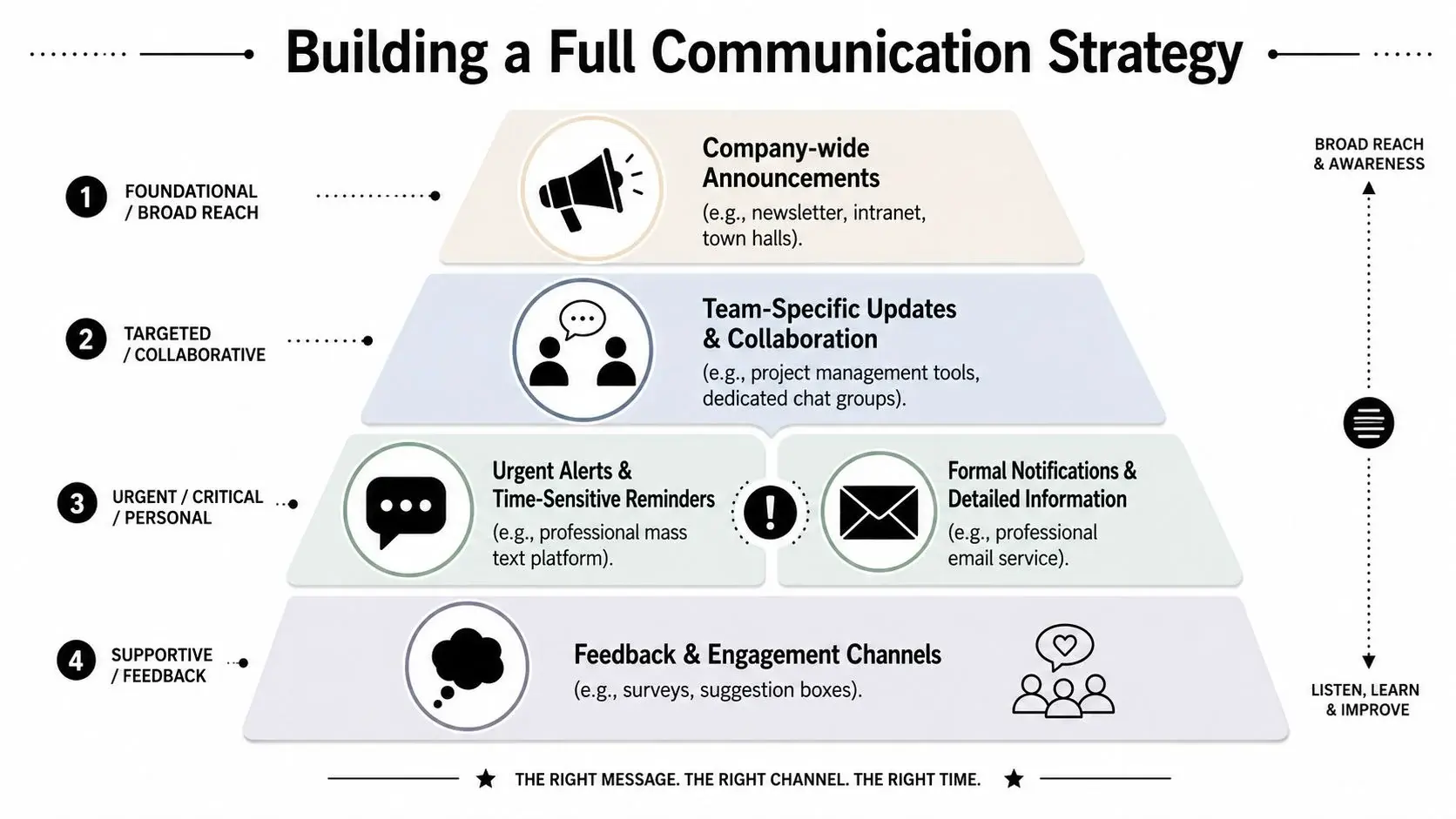
Texting handles urgent alerts and short reminders. Email holds the detailed version. Voice broadcasts can support critical notifications when confirmation matters. Ringless voicemail fits updates that need a more human tone without requiring everyone to answer a live call.
A simple channel mix
| Channel | Best use |
|---|---|
| SMS | Closures, shift reminders, immediate instructions |
| Policies, benefits details, long-form updates | |
| Voice broadcast | Critical notifications that need broader reinforcement |
| Ringless voicemail | Personal leadership messages, explanatory updates |
There's also a practical budgeting truth here. The main limit on "free" mass employee texting usually isn't the app itself. It's consent, sender registration, and deliverability: Google Voice is not built for bulk messaging (Google), and unregistered business traffic on local numbers has been blocked since February 1, 2025 (Bandwidth).
For non-urgent internal updates, benefits enrollment, or policy communication, the message itself matters just as much as the channel: say what changed, what employees need to do, and by when.
A good system is simple. Use SMS for urgency. Use voice and ringless voicemail when tone matters. Use email for detail. Keep all three coordinated so employees know where to look, what to do, and how to respond.
If your team has outgrown group texts and improvised workarounds, Broadcast gives you a structured way to handle SMS, voice broadcasts, and ringless voicemail from one platform so your employee communication stays fast, organized, and easier to manage.
Frequently Asked Questions
Is there a free way to mass text employees?
Yes, for small groups: a group text from your phone or Google Voice (up to 8 participants, Google). For a whole workforce, platforms charge per message and need a registered number, so expect low-cost rather than free.
How can I send mass text messages to my employees?
Collect each employee's mobile number and permission to text it, load the list into a texting platform, group people by site, shift or role, and send a short message with an opt-out. Replies come back to you privately.
How do I text employees who don't have a company email or phone?
Text their personal mobile numbers, with their permission. Ask for the number and consent at onboarding, explain what you will send, and honor STOP replies (CTIA). No app is needed on the employee's side; the alert arrives as a normal text.
Is bulk SMS illegal?
No. Bulk SMS is legal in the US when recipients have given the right consent, the sender is registered, and opt-outs are honored (47 CFR 64.1200, Bandwidth). This is general information, not legal advice.
How do I send a text to 100 people at once?
A phone is at the edge at that size: CTIA describes about 100 unique recipients per message as typical personal use, and a business sender counts as application-to-person traffic (CTIA). A texting platform sends each person a separate copy from a registered number.
Do I need 10DLC registration for employee texts?
If you send from an application over a local 10-digit number in the US, yes: the brand and campaign must be registered (Twilio). Unregistered traffic has been blocked since February 1, 2025 (Bandwidth). See the 10DLC compliance guide.


