
Let's be honest. In a sea of digital noise, how do you make sure your message actually gets read? It’s a constant battle. But the answer might be simpler and more powerful than you think: SMS and MMS messaging.
While other channels are screaming for attention, a simple text message cuts right through the chaos. It’s a direct, personal line to your audience that’s almost impossible to ignore.
Why SMS and MMS Are Still King
Think of it this way. An email is like a flyer left on a doorstep: it might get seen, but it’s just as likely to end up in the trash with all the other junk mail. It's fighting for attention and is easy to dismiss.
An SMS or MMS message, on the other hand, is like a personal note handed directly to your customer. It comes with its own notification, feels urgent, and demands to be seen. And people still use it at enormous scale: Americans exchanged nearly 2.2 trillion SMS and MMS messages in 2024, more than in any year except 2020, according to the CTIA 2025 Annual Survey.
The Unbeatable Power of the Text Inbox
The real magic of SMS and MMS messaging is in its incredible engagement. We all know email is a useful tool, but its power is often watered down by spam filters, promotion tabs, and overflowing inboxes.
Here is what that direct line gives you:
- Visibility: A text lands in the phone's native messaging app with its own notification, not in a promotions tab or a spam folder. You will see claims of "98% open rates" everywhere, but they come from vendor surveys, not independent research, and SMS has no standard open tracking, so treat them as marketing numbers.
- Speed: Texts arrive within seconds and are usually seen when the phone is next picked up. That makes them the right channel for anything time-sensitive.
- Response: Texting is two-way. People can reply "YES" to confirm or ask a question, which makes it a real conversation. It's perfect for sales follow-ups, appointment reminders, and event promos.
This direct line to the customer makes SMS and MMS messaging a secret weapon for modern businesses. Mastering this 'old' technology is not just an option; it’s essential for building real relationships and achieving your goals.
Going Beyond SMS with Ringless Voicemail
This direct and personal touch isn't limited to just text. What if you could drop a personal audio message right into someone's voicemail without their phone even ringing? That's the power of ringless voicemail, a perfect partner to your texting strategy that adds a human voice to your outreach.
One rule to know first: the FCC ruled in 2022 that ringless voicemail counts as a "call" under the TCPA, so it needs the same prior consent as other automated calls (FCC 22-85).
It avoids being disruptive while still delivering a warm, personal message. When you combine SMS, MMS, and ringless voicemail drops, you create a powerful communication strategy that grabs attention from multiple angles.
Choosing Between SMS and MMS for Your Campaigns
So, you're ready to text your customers, but you've hit a fork in the road: SMS or MMS? It's a bigger question than you might think. This isn't just about sending a message; it's about picking the right tool for a specific job.
Think of it this way: you wouldn't use a sledgehammer to hang a picture frame. One is for brute force, the other for finesse. SMS is your hammer: direct, fast, and gets the job done with no fuss. MMS is your paintbrush, perfect for adding color, detail, and emotion. Knowing when to grab which tool is what separates a good campaign from a great one.
And let's be clear why this choice matters so much. In a world of overflowing inboxes, text messages cut through the noise.
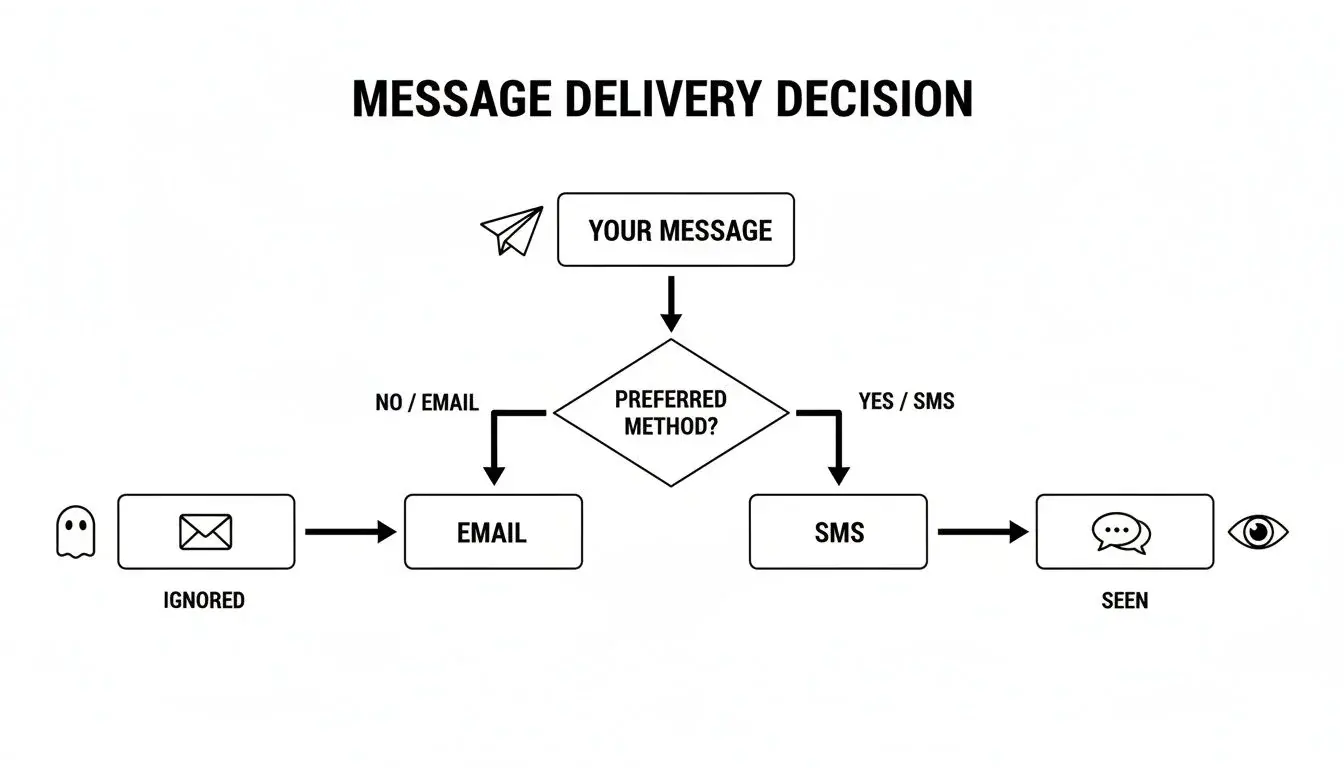
As you can see, emails often sit unread. But a text message? That gets seen. Every time. This puts a lot of power in your hands, so let's make sure you're using it correctly.
The Power of Simplicity with SMS
The classic SMS message is all about its 160-character limit: 160 standard (GSM-7) characters per segment, or 70 if the text contains an emoji or another special character. Longer texts are split into segments of 153 (or 67) characters and billed per segment (Twilio). Some people see that limit as a restriction, but it is really a feature. It forces you to be brutally efficient with your words. There’s no room for fluff, just the core message.
This makes SMS the undisputed champion for a few key jobs:
- Time-Sensitive Alerts: Flash sales, last-minute appointment reminders, or "your order has shipped" notifications. SMS delivers the news now.
- Clear Calls to Action: Need someone to click a link, use a promo code, or reply "YES" to confirm? A short, punchy text is the quickest way to get a response.
- Maximum Reach: SMS is the universal standard. It works on every single mobile phone, from the latest iPhone to the most basic flip phone, ensuring your message always gets through.
Use SMS when your message is urgent, your call to action is simple, and your primary goal is immediate attention. That character limit isn't a bug; it's a feature that demands clarity.
Creating Rich Experiences with MMS
But what happens when 160 characters and plain text just won’t cut it? That’s where MMS shines. Standing for Multimedia Messaging Service, MMS lets you break free and send images, GIFs, short videos, and even longer blocks of text.
Suddenly, a simple notification becomes an experience. MMS is what you use when you want to tell a story, grab attention with stunning visuals, or make an emotional connection. It’s about showing, not just telling. To really get a feel for the nuts and bolts, you can see how brands use MMS in marketing and how to apply them.
When to Go Visual with MMS
A picture is worth a thousand words, right? Sometimes, it's also worth a thousand clicks. Here’s when you should absolutely go visual with MMS:
- Product Showcases: Why describe your new product line when you can show it? A crisp, vibrant photo of a new dress or gadget is way more persuasive than text alone.
- Promotional Events: A slick graphic for a holiday sale or an exciting GIF hyping up an event creates a sense of buzz that plain text can't match.
- Personalized Greetings: Sending a branded image for a customer’s birthday or an animated GIF for a holiday makes your brand feel more human and memorable.
Yes, MMS messages cost more to send, and the phone needs MMS turned on in its plan and its mobile data setting. Carriers also cap the size: AT&T delivers picture messages up to 1 MB and compresses larger files, and Verizon lists 1.2 MB for images and 3.5 MB for video. Keep images small and light. The impact can still be huge: the visual often does the selling that text alone can't.
To make the decision even clearer, here’s a quick-glance table to help you decide which format best aligns with your goals.
SMS vs. MMS Strategic Use Case Comparison
Use this table to decide which messaging format best aligns with your campaign goals, budget, and desired customer experience. See the strategic trade-offs at a glance.
| Feature | SMS (Short Message Service) | MMS (Multimedia Messaging Service) |
|---|---|---|
| Best For | Urgent alerts, reminders, simple CTAs, confirmations | Brand storytelling, product showcases, promotions, visual impact |
| Content | Text only: 160 characters per segment (70 with an emoji); longer texts are split; links allowed | Images, GIFs, short videos, audio and longer text; carriers cap size (about 1 MB at AT&T, 1.2 MB images at Verizon) |
| Primary Goal | Immediacy, high deliverability, clear action | Engagement, emotional connection, brand building |
| Cost | Lower cost per message | Higher cost per message |
| Reach | Universal; works on any phone with a cellular plan | Phone and plan must support MMS, with mobile data on; carriers compress large files |
| Example Use | "Your table is ready." or "24-hr flash sale! Code: SAVE50" | Sending a vibrant photo of a new product or a GIF for a holiday |
Ultimately, choosing between SMS and MMS isn't about picking a "better" option; it's about picking the right option for the message you want to send and the action you want to drive. Get this first step right, and you're well on your way to building a powerful SMS and MMS messaging strategy.
SMS vs MMS vs RCS: What Changed for Business Texting
There is now a third format in the picture. Since iOS 18 (September 2024), iPhones and Android phones can talk to each other over RCS (Rich Communication Services) on supported carriers, so a photo between an iPhone and an Android phone often travels as RCS instead of MMS. SMS and MMS remain the fallback that works everywhere. Here is how the three compare, with the source for each row (checked October 19, 2026).
| SMS | MMS | RCS | Source | |
|---|---|---|---|---|
| What it carries | Text and links | Text plus photos, GIFs, audio, short video | Text, high-resolution photos and video, files, read receipts, typing indicators | Apple, Twilio |
| Size or length | 160 characters per segment (70 with emoji) | About 1 MB at AT&T; 1.2 MB images, 3.5 MB video at Verizon; 5 MB on Twilio | No consumer limit published by Apple or Google | Twilio, AT&T, Verizon, Twilio MMS |
| How it travels | Carrier network | Carrier network (MMS center); needs mobile data on | Mobile data or Wi-Fi, through a carrier that supports RCS | Apple, Google |
| iPhone | Yes (green bubble) | Yes (green bubble) | iOS 18 or later with a supporting carrier (green bubble) | Apple |
| End-to-end encrypted | No | No | Yes between iOS 26.5 and current Google Messages, on supported carriers (beta on iPhone) | Apple, GSMA |
| Group texts | Replies come back one by one; no photos | Everyone sees replies; photos allowed | Everyone sees replies; high-res media | Apple |
What changed recently:
- September 2024: iOS 18 adds RCS on iPhone with supporting carriers (Apple).
- May 2026: iOS 26.5 brings end-to-end encrypted RCS (beta) between iPhone and Android (GSMA). SMS and MMS are still not encrypted (Apple).
- Still true: carriers cap MMS size and compress big files, so a 5 MB photo will not arrive at full quality over MMS (AT&T).
For a person-to-person walkthrough, see our guides on how to send a picture by text message and how to send a video through text.
Building Compliant and Deliverable Messaging Programs
Sending a text feels instant, right? But behind that simple tap of a button, a whole lot has to go right to make sure your message actually lands in your customer's inbox, legally and reliably.
Just hitting "send" on a marketing text isn't the full picture. You've got to build your entire program on two solid pillars: compliance and deliverability. Getting this right is non-negotiable. It protects your business and makes sure all your hard work doesn’t just vanish into thin air.
Think of it like this: compliance is the solid foundation of your house, and your deliverability strategy is the blueprint. Without both, the whole thing is at risk of falling apart before you even get started.
Navigating TCPA and Express Written Consent
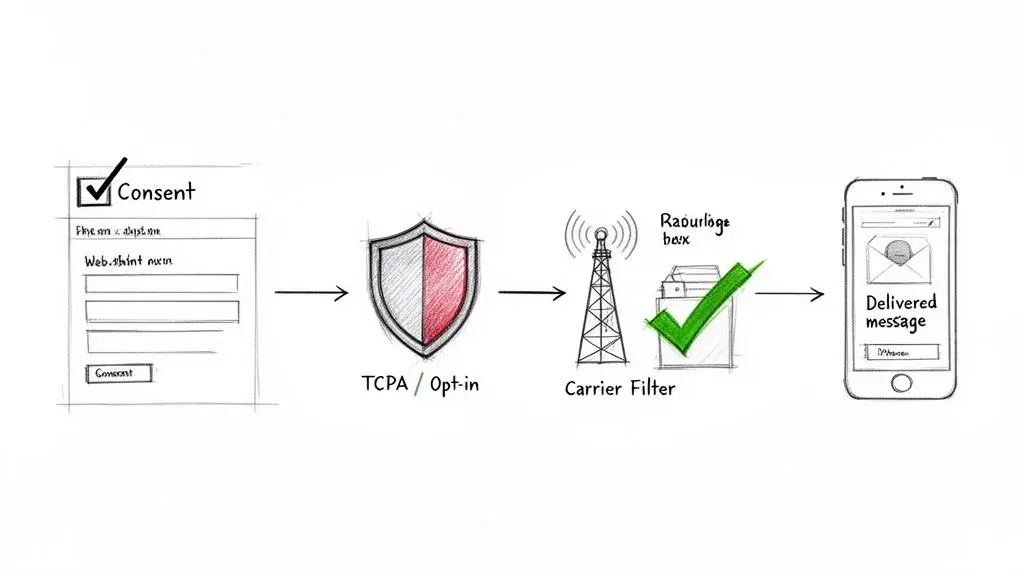
The number one rule in the world of business texting is the Telephone Consumer Protection Act (TCPA). Under the FCC's rules, marketing texts sent with automated systems need the person's prior express written consent (47 CFR 64.1200), and carriers expect a documented opt-in for business texts. It's there to protect people from spam, and the damages for ignoring it are no joke. Our guide to express written consent covers the details. This is general information, not legal advice.
So, what does "express written consent" actually mean? It doesn't mean you need a pen-and-paper signature. It just means you need a clear, documented record of someone giving you the thumbs-up to text them.
Here are a few proven ways to get that consent:
- Text-to-Join Keywords: This is the classic. Someone texts a keyword like "DEALS" to your number after seeing a clear disclosure of what they'll receive. That action, plus the disclosure, is your record of consent.
- Web Form Opt-Ins: A simple checkbox on your signup form that says something like, "Yes, send me marketing texts from [Your Brand]!" is perfect.
- At the Point-of-Sale: Asking customers at the register if they want to join your text list and having them type in their number is a great way to capture them when they're already engaged.
The key is to be completely transparent. Your request can't be buried in the fine print. It needs to be crystal clear about what kinds of messages they're signing up for. Never, ever assume you have permission.
The Secrets to High Deliverability
Getting consent is step one. Step two is making sure your messages actually arrive. Mobile carriers have smart filters that are constantly on the lookout for spam. If your messages raise any red flags, they get blocked.
This is where things like carrier filtering and A2P 10DLC registration become critical.
A2P 10DLC (Application-to-Person 10-Digit Long Code) is the required path for business texting from local numbers. When you register your brand and your campaigns, you're telling the carriers, "Hey, I'm a legitimate business sending messages people asked for." Since September 1, 2023, texts from unregistered 10DLC numbers are blocked (Twilio), and toll-free numbers need toll-free verification (blocked if unverified since January 31, 2024). If you really want to get into the weeds, understanding the essentials of 10DLC compliance is a must.
Specialized Compliance for Healthcare
If you're in the healthcare space, the rules get even tighter. The Health Insurance Portability and Accountability Act (HIPAA) has strict guidelines for handling patient information.
While sending something like an appointment reminder is usually okay, you have to use a platform that offers HIPAA-compliant security. This protects sensitive patient data from being exposed.
HIPAA does not ask for a specific technology. HHS allows providers to communicate electronically with patients when they apply reasonable safeguards (HHS FAQ 570), and a vendor that handles Protected Health Information (PHI) for you needs a signed business associate agreement. Note that regular SMS and MMS are not end-to-end encrypted, so keep PHI out of the text itself and link to a secure portal. See our guide to HIPAA-compliant patient communication.
Automating Compliance and Enhancing Outreach
Trying to manage opt-ins, opt-outs, and all the compliance rules by hand is a recipe for a headache (or worse, a lawsuit). A modern messaging platform like Broadcast automates all of this for you.
- Double Opt-In: When someone subscribes, they get an immediate text asking them to reply "YES" to confirm. This creates a rock-solid record of their consent.
- Automatic Opt-Outs: If a subscriber replies with "STOP," "CANCEL," or "UNSUBSCRIBE," the system automatically takes them off your list and makes sure they don't get another message.
Under FCC rules, replies like "stop", "quit", "end", "revoke", "opt out", "cancel" or "unsubscribe" revoke consent and must be honored within a reasonable time, no more than 10 business days (47 CFR 64.1200(a)(10)). The FCC revised parts of these revocation rules on September 30, 2026, so check the current text.
While SMS and MMS are your workhorses, it’s smart to see how other channels can fit into your strategy. For example, you might add a WhatsApp click-to-chat link for customers who prefer that app. You could even layer in ringless voicemail to drop a personal audio message without making their phone ring. It’s all about building a well-rounded outreach plan that respects both customer preferences and the rules of the road.
Alright, knowing the difference between SMS and MMS is a great start. But the real magic happens when you put that knowledge to work. The best sms and mms messaging campaigns aren’t generic; they’re built for a specific industry with a clear goal in mind.
Let's move from theory to action. This is where we break down proven campaign ideas you can steal and adapt for your own business, whether you're in retail, services, or healthcare. I’ll show you exactly when to use SMS and when an MMS will get you better results.
Retail and Ecommerce Campaigns
For anyone selling products online or in a store, text messaging is your direct line to driving sales and keeping customers coming back. It completely bypasses the chaos of email inboxes and noisy social media feeds, putting your message right where your most loyal customers will see it.
Here are two campaigns that just flat-out work:
- The Abandoned Cart Nudge (SMS): This one is a classic for a reason. A customer loads up their cart and then…poof. They’re gone. A simple, automated text a few hours later can be the gentle nudge they need. The key is to be helpful, not pushy.
- The Strategy: Use the instant, impossible-to-ignore nature of SMS to remind them what they left behind. A small discount is often all it takes to close the deal.
- The Template: "Hey [FirstName], you left some great items in your cart at [YourBrand]! Complete your order before they're gone: [ShortLink]. Use code COMEBACK10 for 10% off."
- The VIP Product Drop (MMS): Got a hot new product line coming? Give your best customers the first shot at it. A plain text is good, but an MMS turns a simple announcement into an exclusive event.
- The Strategy: This is where you use the visual punch of MMS to build hype. A stunning product photo makes it feel real and desirable, leading to way more clicks than text alone.
- The Template: (Include a vibrant photo of the new product) "VIP Exclusive! The new [ProductName] collection is here. As a loyal customer, you get early access before anyone else. Shop now: [ShortLink]"
Campaigns for Service Businesses
If you run a service-based business (think gyms, salons, or consulting), sms and mms messaging is your secret weapon for cutting down on admin work and keeping your clients happy. This is less about flash sales and more about creating smooth, personal communication.
Here are a few essential campaigns to set up:
- Appointment Reminders (SMS): No-shows are a killer for service businesses. An automated SMS reminder sent 24-48 hours before an appointment is one of the single best ways to make sure your clients show up.
- "We Miss You" Campaigns (MMS): Haven't seen a client in a few months? A friendly MMS can be the perfect way to win them back. Send a picture of your smiling team or that shiny new piece of equipment you just got. Show them what they're missing!
- The Personal Follow-Up (Ringless Voicemail): After a new client's first visit or a big consultation, dropping a ringless voicemail makes a huge impact. It’s personal, but it doesn't interrupt their day. A simple, "Hey [FirstName], it's [YourName] from [YourBusiness]. It was great meeting you today! Just wanted to follow up and see if you had any questions," builds incredible rapport.
Pro Tip: Don't just pick one. Combine them! Send an SMS reminder two days before the appointment. A week after they visit, drop a ringless voicemail asking how things went. This kind of thoughtful follow-up keeps you top of mind.
HIPAA Compliant Healthcare Messaging
In healthcare, communication has to walk a fine line: it needs to be effective, but it absolutely must be secure. Using a HIPAA-compliant messaging platform is non-negotiable for sending things like appointment reminders or follow-up care without risking patient privacy.
Here are two safe and powerful ways to use it:
- Post-Visit Instructions (SMS): It's easy for patients to get overwhelmed and forget important instructions after an appointment. A secure, simple SMS that links them to their patient portal for the details is a lifesaver.
- Template: "You have a new message from [ClinicName] regarding your recent visit. Please log in to your secure portal to view care instructions: [SecurePortalLink]"
- Proactive Wellness Tips (MMS): Help your patients stay healthy with periodic wellness tips. An MMS with a clean, simple graphic about the benefits of hydration or daily stretching is far more engaging than a wall of text.
- Template: (Include a simple infographic about the benefits of walking) "A friendly reminder from [ClinicName]! Just 30 minutes of walking a day can boost your mood and heart health. Stay active!"
Adding Ringless Voicemail to Your Outreach Strategy
What if you could leave a personal, heartfelt message for someone without ever making their phone ring? It sounds a little like magic, but it's a real and powerful tool.
While sms and mms messaging are fantastic for quick, text-based updates, there’s another channel that brings a distinctly human touch to the table: ringless voicemail. It’s the perfect partner to your texting strategy, letting you speak directly to your audience in a way that’s personal but never pushy.
The tech is simple. It delivers a pre-recorded audio message straight into a contact's voicemail inbox. Their phone never buzzes or rings, so you aren't interrupting a meeting, family dinner, or deep-focus work session. They find your message when they check their voicemail, on their own time.
Why Ringless Voicemail Feels More Personal
A cold call puts someone on the spot and demands an immediate answer. A ringless voicemail drop, on the other hand, feels more like a friendly heads-up.
It’s far less confrontational, which is why many people are more willing to listen. You get the personal warmth of your own voice combined with the convenience of a text message. It's the best of both worlds. This is the go-to method for any message that needs a dose of genuine excitement, empathy, or simple gratitude. Sometimes, just hearing a real voice makes a connection that plain text can't.
Ringless voicemail allows you to be heard without being disruptive. It’s the perfect middle ground between an impersonal text and a potentially inconvenient phone call, making it a valuable part of any outreach sequence.
Strategic Use Cases for Voicemail Drops
Once you start layering ringless voicemail into your campaigns, you’ll find all sorts of new ways to connect with people. It works especially well when you mix it with your SMS and MMS efforts to create a complete communication experience. You can dive deeper in our complete guide on what ringless voicemail is and how to use it.
Here are a few powerful ways to put it to work:
- Warm Lead Follow-Up: A new lead signs up. You send an automated welcome text, and then a day later, you follow up with a ringless voicemail. A quick, "Hey [FirstName], it's [YourName] from [YourBrand]. Thanks for your interest. Let me know if you have any questions," feels incredibly personal and makes you stand out.
- Special Announcements for VIPs: Got a big update or an exclusive offer for your best customers? A personal voicemail from the founder or their account manager makes them feel genuinely important and valued.
- Event Reminders and Post-Event Thank Yous: Sure, send your SMS reminders. But dropping a voicemail the day before an event really builds excitement. Afterward, a heartfelt thank-you voicemail is the kind of touch that leaves a lasting positive impression.
Integrating Voicemail into Automated Workflows
This is where the real power comes alive. When you automate it.
Using a platform like Broadcast, you can drag and drop ringless voicemail drops right into your automated sequences. Imagine a new contact gets a welcome SMS, then an MMS with a cool graphic two days later, and finally, a personal voicemail from you the day after that.
This multi-channel approach makes sure your message gets through by hitting people on different platforms with different formats. By adding the human element of your voice to your sms and mms messaging strategy, you’ll build much stronger relationships and drive way more action.
How to Automate and Scale Your Messaging
Sending messages one by one is a surefire way to burn out. It just doesn't scale. The real magic happens when you build an automated system that engages customers around the clock, so you’re not chained to your phone.
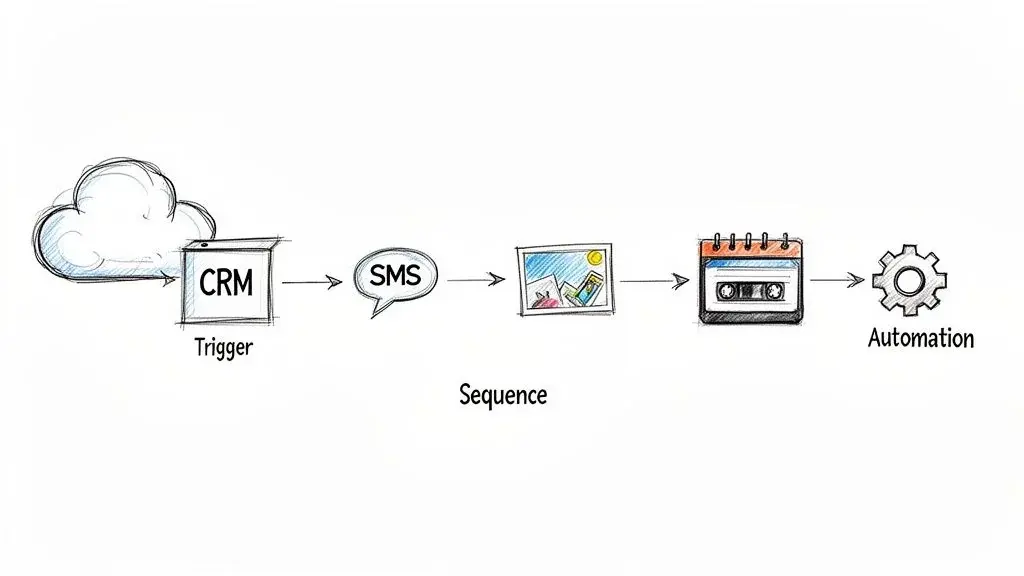
This is about moving beyond manual sends and creating smart workflows. By connecting your messaging platform to the other tools you already use, you can build a powerful outreach machine that responds to customer actions instantly.
Building Intelligent Drip Campaigns
A drip campaign is simply a series of pre-written messages sent out automatically. But the best ones don't just stick to SMS. They layer in different channels to create a much richer experience that really grabs attention.
Think about what this could look like for a brand-new lead:
- Day 1 (Instant): They fill out a form on your site and instantly get an SMS welcome message. Simple and immediate.
- Day 3: You follow up with an MMS, showing off a product with a great picture or a helpful infographic.
- Day 5: A ringless voicemail drop from your company’s founder lands in their inbox, adding a surprisingly personal, human touch.
This multi-channel approach keeps your brand top-of-mind without becoming annoying. Each message uses a different format, making your follow-up feel dynamic, not robotic. And the engagement numbers back this up.
Text messages arrive with a notification on the lock screen and invite a reply, which is why they suit time-sensitive steps in a sequence. Measure your own clicks, replies and opt-outs rather than relying on industry "open rate" figures.
Connecting Your CRM for Trigger-Based Messaging
The real key to automation is hooking your messaging platform directly into your Customer Relationship Management (CRM) system. Platforms like Broadcast are built to integrate with tools like HubSpot, Keap, and ActiveCampaign, letting you fire off messages based on what your customers are actually doing.
Once your systems are talking to each other, you can automate outreach based on all sorts of triggers:
- New Lead Signup: A contact is added to your CRM, which instantly kicks off your welcome sequence.
- Customer Purchase: A "thank you" text with shipping info goes out the moment an order is completed.
- Specific Tag Applied: A sales rep tags a contact as a "Hot Lead," and a follow-up SMS and a ringless voicemail from them are sent automatically.
This creates a responsive system that sends exactly the right message at the perfect time. Going beyond just text, connecting your messaging to your broader sales automation can streamline your entire process, from that first touchpoint all the way through to the final follow-up.
Automating Personalization at Scale
Just because it’s automated doesn’t mean it has to sound like a robot wrote it. By using merge tags or custom fields, you can pull data straight from your CRM and pop it right into your messages.
Think about including a customer's first name, the product they were looking at, or their last appointment date. You can insert these details directly into your SMS, MMS, or even your ringless voicemail scripts.
This is how you send thousands of messages that each feel like a one-on-one conversation. It's the perfect blend of efficiency and personal connection, letting you build real relationships with your audience as your business grows.
Frequently Asked Questions About SMS and MMS
As you get started with SMS and MMS, you’re bound to have a few questions. It happens to everyone. Here are the answers to the most common ones we hear, giving you the clarity to build your next campaign with confidence.
What Is Ringless Voicemail and How Does It Fit In?
Imagine sending a voicemail directly to someone's inbox, but their phone never actually rings. That's ringless voicemail in a nutshell. It’s a way to deliver a pre-recorded audio message without interrupting someone's day.
Think of it as a powerful companion to your texting strategy. You might send an SMS for a quick alert, but a ringless voicemail drop adds a human touch that text can't always match. It's perfect for a personal thank you, a special announcement, or any message where the warmth of your voice makes a real difference.
Can I Send SMS Messages to a Landline Phone?
You can, but it's not what you think. Some carriers, such as Verizon, offer a "Text to Landline" service that converts your text into a voice message and reads it out loud; Verizon's works with most White Pages listed US numbers (Verizon). More in our guide on whether you can text a landline.
Frankly, the experience is clunky and often confusing for the person on the other end. Your best bet is to use a number validation service before sending. This ensures you're only texting actual mobile numbers that can receive your message the way you intended.
Key Takeaway: While you can technically send a text to a landline, it won't land as a text. Stick to verified mobile numbers for your SMS and MMS campaigns to get the best results and not waste your sends.
How Much Do SMS and MMS Messages Typically Cost?
The cost for SMS and MMS messaging will always depend on your platform and the type of message you're sending. As a general rule, SMS messages are the cheaper option. They carry only text, and a long text is billed as several segments, so short messages cost less.
MMS messages, on the other hand, cost a bit more because they carry media like images, videos, or GIFs. These files are larger and require more network muscle to get delivered. Most platforms will charge you on a per-message basis, so it's a good idea to account for this difference when you're planning your campaign budget.
Which Is Better to Use, SMS or MMS?
Neither is better in general. SMS is cheaper, works on any phone and is best for short, urgent messages such as reminders, alerts and codes. MMS costs more and is limited by carrier size caps, but it is better when an image or GIF carries the message, such as a product launch or an event flyer. Many programs use SMS for most sends and MMS for a few high-impact campaigns.
Is SMS Still Used Today?
Yes. Americans exchanged nearly 2.2 trillion SMS and MMS messages in 2024, more than in any year except 2020 (CTIA). RCS is growing, but SMS and MMS remain the fallback every phone supports.
How Do I Know If My Texts Are SMS or MMS?
On an iPhone, SMS, MMS and RCS all show as green bubbles; blue bubbles are iMessage (Apple). A text with a photo, video or audio file, or a group text with MMS turned on, is MMS. In Google Messages, the Send icon shows whether a message is going as RCS, SMS or MMS (Google).
Why Are Messages Sending as MMS Instead of SMS?
Usually because of the content or the conversation: a photo, video or audio attachment always goes as MMS, and group texts go as group MMS when MMS is the group setting. In Google Messages you can choose "mass text" or "group MMS" as the default under Messages settings, Advanced, Group messaging, and adding a contact without RCS to a group creates an MMS chat (Google). On iPhone, group texts with photos need MMS Messaging turned on (Apple).
Ready to automate and scale your outreach with SMS, MMS, and ringless voicemail? Broadcast gives you all the tools you need to build powerful, compliant, and personalized campaigns that drive results. Get started with Broadcast today!
See how SMS marketing with Broadcast works.


