
You send a flash sale by SMS at lunch. You queue appointment reminders for the afternoon. You schedule a ringless voicemail drop for customers who never replied to text. Then the waiting starts.
Some people click. Some call back. Some stay silent. What you really want to know is simpler than engagement reporting. Did the message get there?
That question sits underneath every outbound campaign. If you don't know which messages were delivered, delayed, rejected, or failed, you can't tell whether the problem is your offer, your list, your timing, or your channel. A weak campaign and a delivery problem can look identical from the outside.
Business users feel this most when the message is time-sensitive. A restaurant sending a same-day special can't wait until tomorrow to learn half the texts never made it. A clinic sending reminders by voice or ringless voicemail needs to know whether the issue is an invalid number, carrier filtering, or a customer who ignored the message.
Delivery status notifications are the operational answer to that uncertainty. They turn outbound messaging from guesswork into a tracked process. For email, they show what happened between mail servers. For SMS and MMS, they show what happened after submission to carriers. For voice and ringless voicemail, they show call outcomes and drop results that tell you what happened in the real world.
Used well, these statuses do more than confirm delivery. They help you clean bad data, catch routing issues early, decide when to retry, and choose when to switch from text to voice or voicemail.
Did They Get Your Message
A lot of delivery problems don't look like delivery problems at first.
A gym owner sends a membership renewal reminder by SMS. Responses are lower than usual, so the first instinct is to rewrite the copy. A dental office runs ringless voicemail reminders before a busy Monday and sees more no-shows than expected. A retailer launches an MMS promotion with an image and assumes the offer missed the mark. In all three cases, the underlying issue might be message delivery, not message quality.
That's where operators separate themselves from casual senders. Casual senders blast a list and hope. Practitioners check the delivery trail.
Practical rule: If a campaign underperforms, don't start by rewriting the message. Start by verifying whether the message reached the customer at all.
In practice, this means looking beyond a single “sent” label. “Sent” usually means your system handed the message off. It doesn't always mean the recipient's carrier accepted it, the phone received it, the call was answered, or the ringless voicemail drop succeeded.
For business outreach, that distinction matters across every channel:
- SMS and MMS: A message can be accepted for processing and still fail later.
- Voice broadcasts: A campaign can complete from your side while many recipients never answer.
- Ringless voicemail: A drop can succeed for one segment of your list and fail for another because the numbers weren't mobile, weren't reachable, or couldn't accept the drop.
When teams start treating delivery reporting as part of campaign management, their decisions improve fast. They stop chasing the wrong problem. They remove bad numbers sooner. They know when to retry and when to stop.
What Are Delivery Status Notifications
The cleanest way to understand delivery status notifications is to start with email, because email has a long-established model for it.
A Delivery Status Notification (DSN) is a standardized email report that tells the sender whether a message was delivered, delayed, or failed. It is defined by the IETF: RFC 3461 adds DSN requests to SMTP, and RFC 3464 sets the report format. In practical terms, a DSN can confirm that the message was delivered to the recipient address, report a delay while the mail server keeps trying, or return a permanent failure when the server has given up. In Gmail, a failure DSN usually arrives from "Mail Delivery Subsystem" with the subject "Delivery Status Notification (Failure)" (Gmail Help).
Email DSN codes: 2, 4 and 5
Every email DSN carries a status code of three numbers, such as 5.1.1. The first number is the one to read (RFC 3463):
| First digit | Meaning | What to do | Example |
|---|---|---|---|
| 2.x.x | Success: the DSN reports a positive delivery action | Nothing | 2.0.0 |
| 4.x.x | Persistent transient failure: the message is valid, but a temporary condition delayed or stopped delivery | Wait; the sending server usually keeps retrying | 4.2.2 (mailbox full) |
| 5.x.x | Permanent failure: resending the same message will not fix it | Correct or remove the address | 5.1.1 (mailbox does not exist) |
Same idea, different channel behavior
That same reporting idea shows up in messaging and calling, but each channel exposes it differently.
For SMS and MMS, the parallel is usually a delivery receipt or delivery report. You'll often see statuses such as queued, sent, delivered, undelivered, expired, or carrier-rejected; the exact names depend on the provider. Twilio, for example, uses queued, sending, sent, delivered, undelivered and failed, and defines "delivered" as confirmation from the carrier "and, where available, the destination handset" (Twilio). These don't behave exactly like email DSNs because the path includes telecom carriers and mobile devices, not just mail servers. Still, the business purpose is the same. You're trying to see what happened after the platform submitted your message.
Delivered is not the same as read
A delivery receipt confirms the message reached the network or the phone, not that a person opened it. Plain SMS and MMS have no read receipts. iMessage and RCS chats can show delivery and read receipts (Apple, Google Messages), and business platforms can report a "read" status only on channels that support it: Twilio lists RCS and WhatsApp, and only when the recipient has read receipts turned on (Twilio). For SMS, replies, clicks and conversions are the engagement signals.
For voice broadcasts, the platform usually reports a call outcome instead of a delivery receipt. Typical dispositions include answered, busy, no answer, failed, or voicemail. If you're running appointment reminders or payment notices, these statuses matter more than a generic “completed” label because they tell you whether the call reached a person, hit voicemail, or never connected.
For ringless voicemail, the outcome is more specific. You want to know whether the voicemail was successfully dropped, whether the mobile number was valid for the drop, and whether the network accepted the attempt. This is one reason ringless voicemail deserves its own reporting review. It isn't a text and it isn't a live call, so its success and failure patterns are different.
What business users should care about
Teams often don't need protocol theory. They need operational clarity.
Think of delivery status notifications as shipping scans for outbound communication. “Label created” is not “delivered.” “Out for delivery” is not “package received.” The same logic applies here.
What works is treating every channel as a pipeline with checkpoints:
- Submission means your system handed off the message or call attempt.
- Accepted or processed means the next network stage took it.
- Delivered, answered, or dropped means the final intended event happened.
- Delayed or failed means you need a next action.
A “sent” event is useful for auditing. A final delivery status is what you use to make decisions.
Decoding Common Delivery Statuses and Error Codes
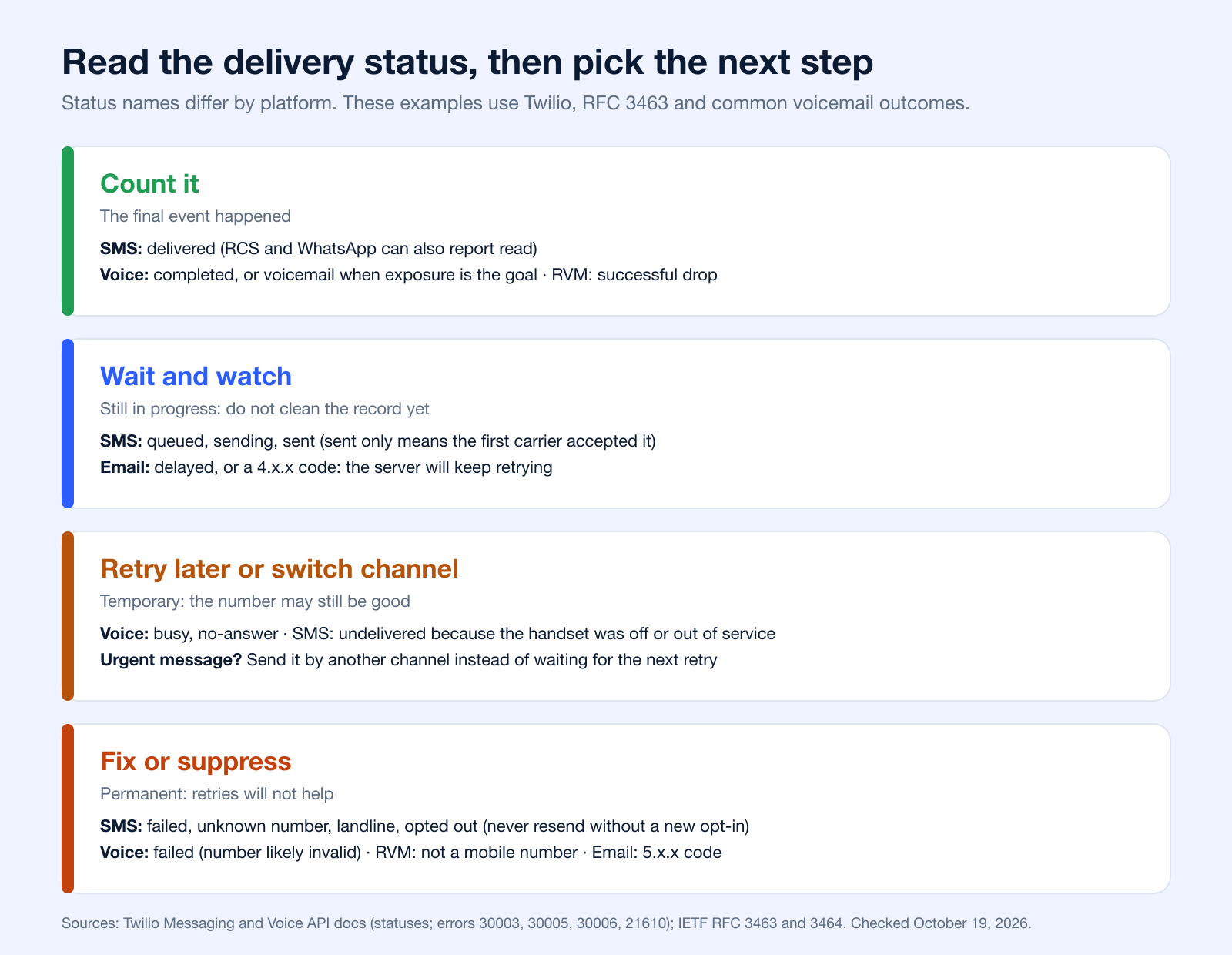
Raw status labels are only useful if you know what action they should trigger. The most important distinction is whether the issue is temporary or permanent. A Delivery Status Notification can represent a transient failure, where delivery is temporarily impossible and retrying makes sense, or a permanent failure, where retries won't fix it and the address or number needs correction or removal, as described in RFC 3463, the standard for email status codes.
That logic applies well beyond email.
SMS and MMS statuses that matter
For text messaging, teams usually see a handful of recurring outcomes:
- Delivered: The carrier reported successful delivery to the handset or downstream network. This is the cleanest success signal.
- Sent or submitted: Your platform handed the message to the next stage. Treat this as progress, not proof.
- Queued: The message is waiting to be processed. This can be normal during volume spikes or throughput limits.
- Undelivered: The message didn't reach the recipient. The cause could be carrier filtering, handset issues, or an unreachable number.
- Expired: The platform or carrier stopped trying after a delivery window passed.
- Rejected by carrier: The carrier didn't accept the message. Content, sender setup, or number quality are common places to investigate.
What tends to work operationally is grouping these into decision buckets instead of memorizing every label. Delivered is success. Queued and some undelivered states may need monitoring or retry logic. Invalid-number style failures should trigger list cleanup.
| Status | What it means | Next step |
|---|---|---|
| queued | The send request succeeded and the message waits for its sender number | Wait |
| sending | The provider is handing the message to the nearest carrier | Wait |
| sent | The nearest upstream carrier accepted the message | Wait for the delivery receipt; sent is not proof of delivery |
| delivered | The carrier confirmed delivery, and the handset too where available | Count it; measure engagement separately |
| undelivered | A delivery receipt says it was not delivered, for example because of carrier filtering or an unreachable phone | Read the error code that comes with it |
| failed | The message never left the provider, for example a queue overflow, an account suspension or a media error | Check the account, the sending number and the message format |
| read | The recipient opened it (RCS and WhatsApp only, with read receipts on) | Count it as opened |
Source: Twilio Message resource, checked October 19, 2026. The error code decides between retry and cleanup: Twilio reports an unreachable phone (30003), a number that may no longer exist (30005), a landline (30006) and a contact who opted out (21610). Our guide to why text messages are not delivered covers the full list of causes and fixes.
Voice call dispositions
Voice campaigns generate a different kind of status trail because the system is placing calls, not sending messages.
Common outcomes include:
- Answered: A person or system picked up.
- No answer: The call rang but wasn't answered.
- Busy: The line was engaged.
- Voicemail: The call reached voicemail.
- Failed: The call could not be completed.
- Canceled or stopped: The campaign or attempt ended before completion.
Platforms derive these from the call record. Twilio's call statuses, for example, are queued, ringing, in-progress, completed, busy, no-answer, failed and canceled, where failed means the call could not be completed as dialed, "most likely because the provided number was invalid" (Twilio). "Voicemail" comes from answering machine detection, which Twilio says "will not always return the right answer", for example when a very short greeting sounds like a person (Twilio AMD). Treat answered and voicemail counts as close estimates.
These statuses are easy to misread if you focus only on contact rate. For example, voicemail isn't necessarily failure if your campaign goal is only message exposure. For a press-1 transfer campaign, voicemail is a missed opportunity. The same status can be good or bad depending on the workflow.
For voice, a useful status isn't the one that sounds positive. It's the one that matches the job the call was supposed to do.
Ringless voicemail outcomes
Ringless voicemail creates the most confusion because people expect call-style reporting and get something else.
What you usually care about is:
- Successful drop: The voicemail was placed into the recipient's mailbox.
- Failed drop: The attempt did not complete.
- Mobile not found or not eligible: The number may not support the drop path or may not be a valid mobile target.
- Rejected or unreachable: The network or endpoint didn't allow the attempt.
For ringless voicemail, list quality matters a lot. A number that can receive texts isn't automatically a valid ringless voicemail target. That's why ringless voicemail reporting often exposes data quality issues that SMS alone won't reveal.
Ringless voicemail result names are set by each platform; there is no industry standard list. Consent rules do apply: in 2022 the FCC ruled that ringless voicemail to a wireless phone is a "call" made with a prerecorded voice, so it requires the consumer's consent (FCC 22-85). See our ringless voicemail compliance guide.
Common Delivery Statuses Across Channels
| Channel | Status | What It Means | Your Next Step |
|---|---|---|---|
| SMS/MMS | Delivered | Message reached the recipient side successfully | Count as successful delivery and monitor engagement separately |
| SMS/MMS | Queued | Message is waiting for processing | Watch for backlog patterns before changing content |
| SMS/MMS | Undelivered | Message did not reach the recipient | Review number quality, content, and carrier acceptance |
| SMS/MMS | Expired | Delivery window passed before success | Retry only if the message is still time-relevant |
| SMS/MMS | Rejected by Carrier | Carrier did not accept the message | Inspect content, sender setup, and compliance posture |
| Voice | Answered | Call connected to a live person or system | Evaluate outcome against campaign goal |
| Voice | No Answer | Call rang but no one picked up | Retry later or move to SMS or voicemail |
| Voice | Busy | Recipient line was occupied | Retry on a later schedule |
| Voice | Voicemail | Call reached voicemail | Keep if voicemail exposure fits the campaign plan |
| Voice | Failed | Call could not be completed | Check number validity and call setup |
| Ringless Voicemail | Successful Drop | Voicemail landed in mailbox | Mark as successful exposure |
| Ringless Voicemail | Failed Drop | Drop attempt did not complete | Review eligibility and retry rules |
| Ringless Voicemail | Mobile Not Found | Number may not be a valid mobile target | Validate the record before trying again |
| Ringless Voicemail | Rejected | Network or endpoint didn't accept the attempt | Remove from the ringless path or use another channel |
The status isn't the diagnosis
A status tells you what happened. It doesn't always tell you why.
That's why experienced teams don't stop at one report. They compare status by list source, message type, campaign segment, and channel. If one imported list produces more failed ringless voicemail drops than another, that points to data quality. If MMS underperforms while plain SMS delivers cleanly, the media payload or carrier acceptance path may be the issue.
The biggest mistake is treating all failures the same. Some deserve retries. Some deserve suppression. Some deserve a different channel.
Troubleshooting Common Delivery Failures
Most delivery problems become manageable once you stop treating them as random. They usually fall into a few buckets: bad recipient data, content or compliance problems, temporary network conditions, and account security confusion.
When the problem is the number
Permanent failures often start with the contact record, not the campaign.
If a number is invalid, no amount of retrying will fix it. The right move is to validate, correct, or suppress it. This matters even more for ringless voicemail, where the target has to be a reachable and eligible phone line for the drop path you're using. A textable number isn't always a valid ringless voicemail target.
A simple maintenance step saves a lot of wasted spend and noise in reporting. Run regular number checks, especially on old lists and manually entered records. If you need a process reference, Broadcast has a straightforward guide on validating phone numbers before campaigns.
Old lists often hide landlines, which generally cannot receive SMS. See can you text a landline phone for the exceptions.
When carriers or networks don't like the message
If messages are getting rejected or marked undelivered in clusters, review the content before you blame the list.
Check for:
- Aggressive promotional wording: Hard-sell phrasing can raise filtering risk.
- Unclear sender context: Recipients and networks both respond better when the message clearly identifies the business.
- Poor list sourcing: Consent and list quality influence complaint behavior and downstream deliverability.
- Overuse of links or unusual formatting: Keep the message readable and expected.
Sender setup matters as much as wording. In the US, texts from an unregistered 10DLC number are blocked, so check registration first (see our 10DLC compliance guide), then how carriers score your traffic over time (spam risk).
For email-related troubleshooting, especially when you need a plain-language walkthrough of bounce causes and fixes, Google's guide to fixing bounced or rejected emails is a useful companion resource.
If failures spike suddenly, compare the message body against the last version that delivered normally. Small content changes can alter acceptance behavior.
When a failure notice appears for something you didn't send
This catches people off guard, especially in email.
Google notes that if you get bounce messages for emails that look like they were sent from your account, your address may have been spoofed: someone else used it as the sender. Gmail can't stop spammers from spoofing an address, and recommends reporting those bounces as spam. If friends say they got spam from you, follow the Gmail security checklist and report the problem to Gmail (Gmail Help).
That distinction matters. If your Sent folder shows no messages you didn't write, you are more likely looking at impersonation than a direct breach.
When to stop retrying
Not every failure deserves persistence.
Use this simple decision model:
- Retry temporary issues such as short-term delays or busy signals.
- Pause and inspect when failures cluster by campaign, content, or route.
- Remove or correct records that show clear permanent failure patterns.
- Switch channels when the message is urgent and one path is unreliable.
That last point is where multi-channel operations have an advantage. If SMS stalls and the reminder is time-sensitive, voice or ringless voicemail may be the better recovery path.
Best Practices for Maximizing Deliverability
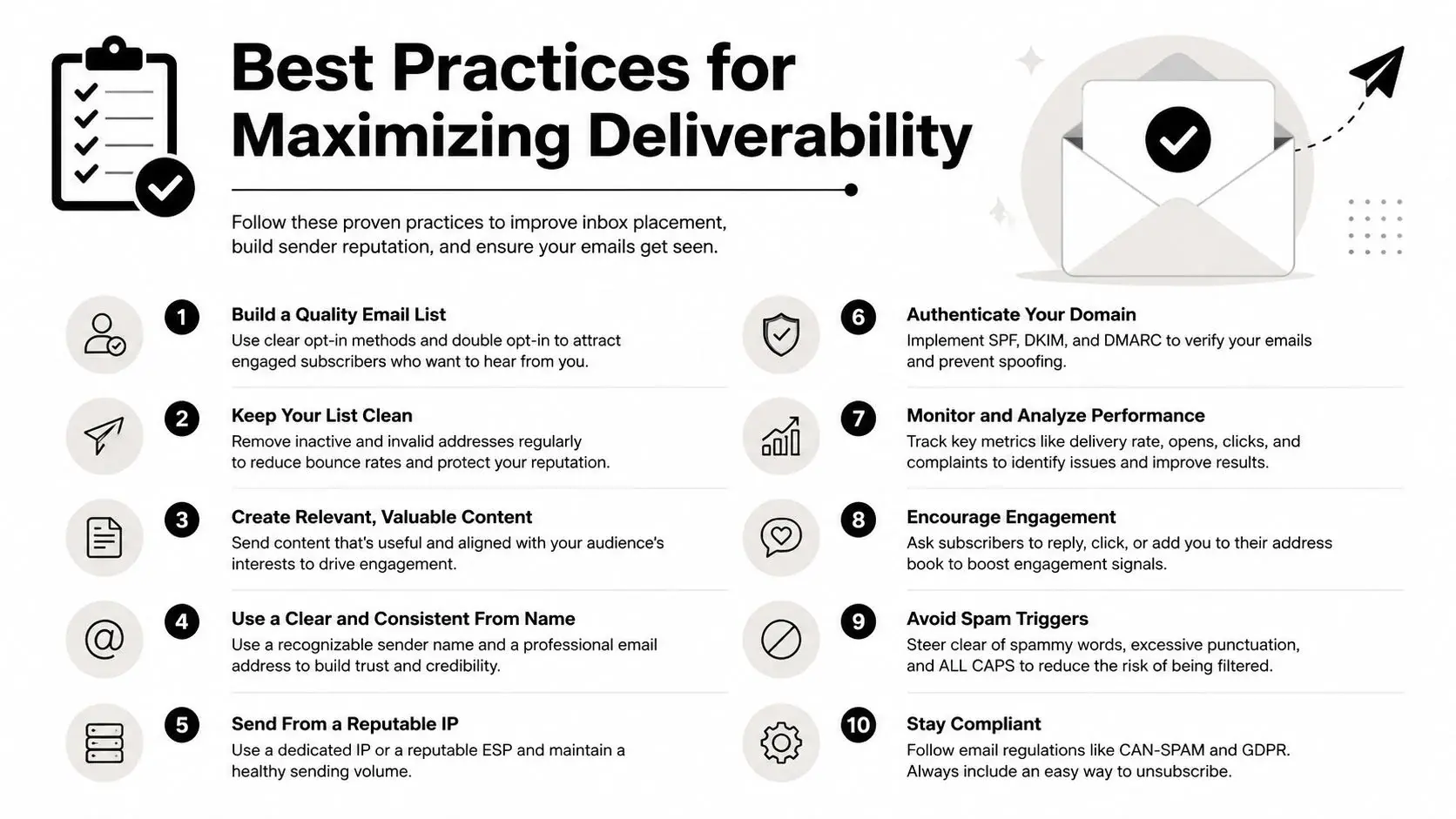
Deliverability is mostly the result of process discipline. Teams that maintain good data, respect consent, and monitor status signals consistently tend to avoid the ugly surprises.
Keep the list clean
Permanent failures should leave your active list quickly. If you keep sending to bad records, you waste budget, muddy your analytics, and create a false picture of campaign performance.
For phone outreach, list hygiene means more than deleting obvious errors. It also means separating mobile from landline use cases, removing stale records, honoring opt-outs immediately, and watching for import sources that repeatedly produce poor outcomes.
Treat consent like infrastructure
A lot of deliverability problems start upstream, where the contact entered your system.
For SMS, MMS, voice, and ringless voicemail, documented consent and clear expectations improve everything. People are less likely to ignore, block, or complain about messages they expected to receive. If your signup process is vague, your delivery reporting will eventually show the consequences.
Watch complaint signals and sender setup
Gmail's email sender guidelines ask senders to keep the spam rate reported in Postmaster Tools below 0.10% and to avoid ever reaching 0.30% or higher. Bulk senders (more than 5,000 messages a day to Gmail accounts) also need SPF, DKIM and DMARC authentication and one-click unsubscribe for marketing messages, according to Google's email sender guidelines (requirements in force since February 2024).
Those are email-specific numbers, but the lesson travels well across channels. Small negative signals matter. Complaint behavior, poor targeting, and weak sender identity can hurt performance long before a campaign completely fails. For texting, the equivalents are opt-out and complaint rates, which carriers watch (see spam risk).
Build habits that prevent failures
The teams that stay out of trouble usually do a few things consistently:
- Validate before launch: Clean data beats aggressive retry logic.
- Segment responsibly: Don't send the same message to every contact record.
- Match the channel to the use case: Urgent reminders and promotions don't always belong on the same path.
- Use recognizable messaging: Make the sender obvious and the purpose clear.
- Audit outcomes regularly: Don't wait for a campaign disaster to look at reporting.
If you're evaluating tooling around this, look for platforms with reporting, validation, and channel-level monitoring built into the workflow. Broadcast documents those controls in its deliverability features overview.
Using Delivery Status Notifications in Broadcast
Delivery data only becomes useful when it's easy to act on. Inside a messaging platform, that usually means filtering reports by outcome, comparing channels, and pushing status changes into the rest of your workflow.
Broadcast (formerly Call Loop) sends SMS, voice broadcasts and ringless voicemail from one account.
Start with campaign-level filtering
The first useful move is simple. Filter campaign results by status instead of looking only at top-line sends.
For SMS and MMS, split outcomes into successful deliveries, pending states, and failures. For voice, look at answered, voicemail, no answer, and failed. For ringless voicemail, isolate successful drops from failed attempts. Once you do that, patterns become easier to spot. One segment may have clean text delivery but weak voicemail drop success. Another may show the opposite.
If you're reviewing reports in Broadcast, the key is to treat the reporting screen as an action queue, not just a summary. The platform's reporting tools are most useful when you use filters to decide who should be retried, who should be corrected, and who should move to another channel.
Separate delay from failure
A delayed message often gets misread as a failed message.
The email standard defines a delayed DSN as one where the server "has so far been unable to deliver or relay the message, but it will continue to attempt to do so" (RFC 3464). Causes can include spam filtering, overloaded servers, wrong addresses, or temporary connectivity problems, as discussed in this explanation of DSN delay behavior (video).
That's operationally important because a delayed event should trigger observation first, not panic. If the message is still relevant and the retry window is active, waiting can be the right move. If the message is urgent, delay reporting tells you when to switch to another channel such as voice or ringless voicemail instead of waiting for a final failure.
A delay status is a timing problem until the retry window closes. Don't clean the record too early.
Push statuses into the systems your team already uses
It is webhooks and automation that make delivery status notifications far more valuable.
A practical setup looks like this:
- Send the campaign with tags, segments, or custom fields that identify the audience and purpose.
- Capture status callbacks as messages deliver, fail, delay, or complete.
- Route the status into your CRM or help desk so sales, support, or operations can act without checking a dashboard manually.
- Trigger follow-up rules based on the outcome.
Examples of useful automation:
- Failed SMS to a high-value lead: Create a task to verify the number.
- No-answer voice attempt: Queue a text follow-up later in the day.
- Successful ringless voicemail drop: Hold additional reminders to avoid over-messaging.
- Repeated delivery delays on urgent reminders: Escalate to another contact method.
Under the hood, these are webhooks: the messaging platform posts each status change to a URL you choose. Twilio calls them status callbacks and sends one as a message moves from queued to sent or failed, and then to delivered or undelivered (Twilio).
A multi-channel platform proves its worth. Delivery statuses stop being passive logs and start driving next actions. That's the difference between a report you glance at and an operational system your team uses.
Voice and SMS Notifications for Failed Delivery Attempts
Delivery status also has a second meaning: telling customers what happened to a physical delivery. Couriers, retailers, pharmacies and service businesses send a call or text when a package could not be delivered so the customer can reschedule. These alerts run on the same building blocks as the rest of this guide: an event, a message, and a status that tells you whether the alert itself got through.
How to automate delivery status calls
- Trigger from the delivery system. Your shipping or dispatch software marks the attempt as failed and sends the event (by webhook or an integration) to your messaging platform.
- Send one short notice. Name the company, say the delivery was missed, and give one next step: a reschedule link, a reply option, or a number to call.
- Watch the status of the alert. Text delivered: done. Call no-answer or busy: one text instead. SMS undelivered to a landline: a voice call.
- Stop when the customer acts. A reschedule, a reply or an opt-out ends the sequence on every channel.
What to look for in a provider
- Status webhooks for every message and call, so failed alerts reach your team without checking a dashboard.
- Voice and SMS in one place, so a missed call can fall back to a text, and a text to a landline can fall back to a call.
- Answering machine detection if you leave different messages for people and voicemail (it is not always right; see above).
- Opt-out handling by key press on live calls, a toll-free callback number on voicemail, and STOP on texts.
- Retry rules and quiet hours you can set per campaign.
Voice broadcasting platforms are built for this kind of one-to-many alert; see voice broadcasting for how Broadcast handles it.
Consent rules for delivery notifications
Automated and prerecorded calls and texts to cell phones generally need the person's prior express consent (47 CFR 64.1200(a)(1)(iii)). The FCC carved out a narrow exemption for package delivery companies in 2014 (FCC 14-32); the current rule is 47 CFR 64.1200(a)(9)(i). It applies only when the notice is free to the recipient and meets every condition below.
| Condition | What the rule says | Source |
|---|---|---|
| Who receives it | Only the telephone number for the package recipient | 47 CFR 64.1200(a)(9)(i)(A) |
| Identify the sender | Name of the package delivery company and its contact information | (a)(9)(i)(B) |
| No marketing | No telemarketing, solicitation or advertising content | (a)(9)(i)(C) |
| Length | Generally one minute or less for a call; 160 characters or less for a text | (a)(9)(i)(D) |
| How many | One notification per package, plus one per extra delivery attempt (up to two) when a signature is required and the recipient was not there to sign | (a)(9)(i)(E) |
| Opt-out | Offer an opt-out and honor it within six business days (the 2014 order allowed up to thirty days) | (a)(9)(i)(F), FCC 14-32 |
| Opt-out in the message | Key press or voice opt-out on live calls, a toll-free number on voicemail, reply STOP on texts | (a)(9)(i)(G) |
Businesses that are not package delivery companies (a store, a clinic, a utility) rely on consent instead: collect it when the customer gives you the number for delivery updates, and honor a revocation made in any reasonable way within ten business days (47 CFR 64.1200(a)(10)).
Delivery Status Notifications FAQ
What is a delivery status notification?
It is an automatic report that tells the sender whether a message was delivered, delayed or failed. For email it is a standard format (RFC 3464); for SMS it is the delivery receipt your provider passes back; for calls it is the call outcome.
What does "Delivery Status Notification (Failure)" mean in Gmail?
Your email did not reach the recipient. Read the error in the bounce, check the address for typos, and resend later if the error was temporary (Gmail Help). If you get these bounces for emails you never sent, your address was probably spoofed (Gmail Help).
Does "delivered" mean the text was read?
No. Delivered means the carrier, and sometimes the phone, confirmed receipt. Read status exists only on channels with read receipts, such as iMessage, RCS and WhatsApp, and only when the recipient allows it (Twilio).
Our SMS deliverability suddenly dropped. What's wrong?
Look at the error codes, not just the status. A sudden drop across one sending number usually points to registration (10DLC or toll-free verification) or carrier filtering of new content or links; a drop in one list points to bad numbers or opt-outs. Our guide to why text messages are not delivered maps each error code to its first fix.
How do I automate delivery status calls?
Connect your delivery or order system to a voice platform by webhook, send one short prerecorded call or text when an attempt fails, and follow up based on the call status (no-answer, busy, failed). Consent rules apply; see consent rules for delivery notifications.
What is delivery status communication?
It is how a business keeps customers informed about an order or a delivery: shipped, out for delivery, delivered, or a failed attempt with a way to reschedule. Text and voice alerts are common because they reach people away from their inbox.
Turn Delivery Data Into Your Competitive Advantage
Most businesses already send messages. Fewer businesses manage delivery with discipline.
That gap matters. When you read delivery status notifications correctly, you stop confusing list problems with campaign problems. You catch bad records faster. You know when a delay is harmless, when a failure is permanent, and when voice, SMS, MMS, or ringless voicemail is the smarter next move.
The practical advantage isn't just better reporting. It's better decisions. Cleaner contact data. Fewer wasted sends. More reliable reminders, promotions, and follow-up sequences.
Teams that treat delivery reporting as part of operations usually respond faster when something breaks and waste less time guessing why a campaign underperformed.
If you want a simpler way to monitor message outcomes across SMS, voice, and ringless voicemail, Broadcast gives you one place to track delivery statuses, review reporting, and turn those outcomes into follow-up actions.


