Get more from the list you have
Older lists and lists with landlines lose people on every send. Fallback gives each of them a second way in, without new contacts or a bigger plan.
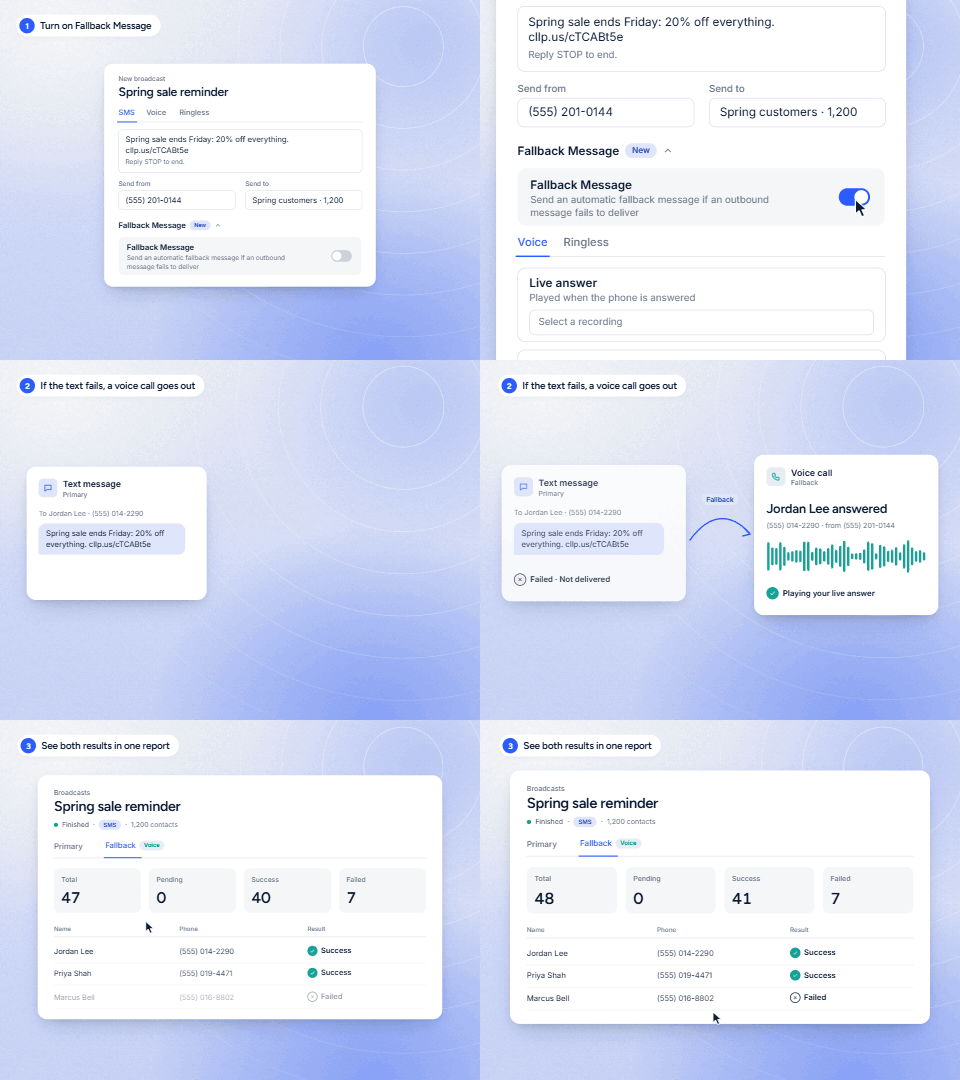
If a text, call, or voicemail drop in your broadcast fails, Broadcast automatically resends it on another channel. You set it once, and only the contacts who missed it get the backup.
14-day free trial · 30-day money-back guarantee on unused credits
Formerly Call Loop. Trusted by over 45,000 people, organizations, and businesses.
A fallback message is a second send on a different channel for the contacts a broadcast could not reach. In Broadcast, formerly Call Loop, a failed text can be followed by a voice call or a ringless voicemail drop, a failed call by a text or a drop, and a failed drop by a text or a call, with both results in one report.
Why it matters
Older lists and lists with landlines lose people on every send. Fallback gives each of them a second way in, without new contacts or a bigger plan.
No pulling the failed numbers out of a report and no second campaign. Broadcast spots each failure and sends the backup on its own.
A fallback is charged like any message on its channel, and only for the contacts whose first message failed. Everyone your message reached is left alone.
How it works
Start a text, voice, or ringless voicemail broadcast as you always do. Fallback sits at the bottom of the same screen.
Switch on Fallback Message and pick the second channel, then add the text or the recording. Auto-recharge needs to be on so the backups always have credits.
Contacts whose message fails get the backup once, even if the failure is reported after the broadcast ends. The report shows the main send and the fallback in separate tabs.
Integrations
Common uses
When a voicemail drop cannot be delivered, follow up with a text or a call so the message still lands.
Numbers that cannot take a text, like landlines, get a call or a voicemail drop with the same offer.
When a call rings out, hits a busy line, or is rejected, send a text or a voicemail drop instead.
Use it on the broadcasts where every contact counts, such as a sale that ends Friday or a change to an appointment.
Only when the main message fails. For texts and voicemail drops, that means the carrier reported it could not be delivered. For calls, it means no answer, a busy line, or a rejected call. Late failure reports from carriers still trigger the backup.
No, it works on broadcasts, whether they go out now or on a schedule. It also works on A/B test broadcasts, for both versions and for the winner.
The same as a normal message on its channel, 1 credit per 160 characters for a text, 1 credit per minute for a voice call, and 2 credits for a ringless voicemail drop that reaches the voicemail box. You pay only for fallbacks that are sent, and the broadcast estimate covers only your main message.
No. Each contact gets one fallback at most, and if that fails too, it is marked failed in the report with no third try.
Yes. Replies land in your inbox and in the broadcast stats, like any other text.
Yes. Marketing texts and prerecorded calls need prior express written consent, and a fallback is held to the same rules as the main message. Broadcast includes opt-out keywords, quiet hours in each contact’s time zone, and do-not-call scrubbing. This is not legal advice.
Keep exploring
These tend to be set up alongside it.
Texts, picture messages, voicemail drops, and voice calls, all paid with the same credits. Cancel before day 14.